
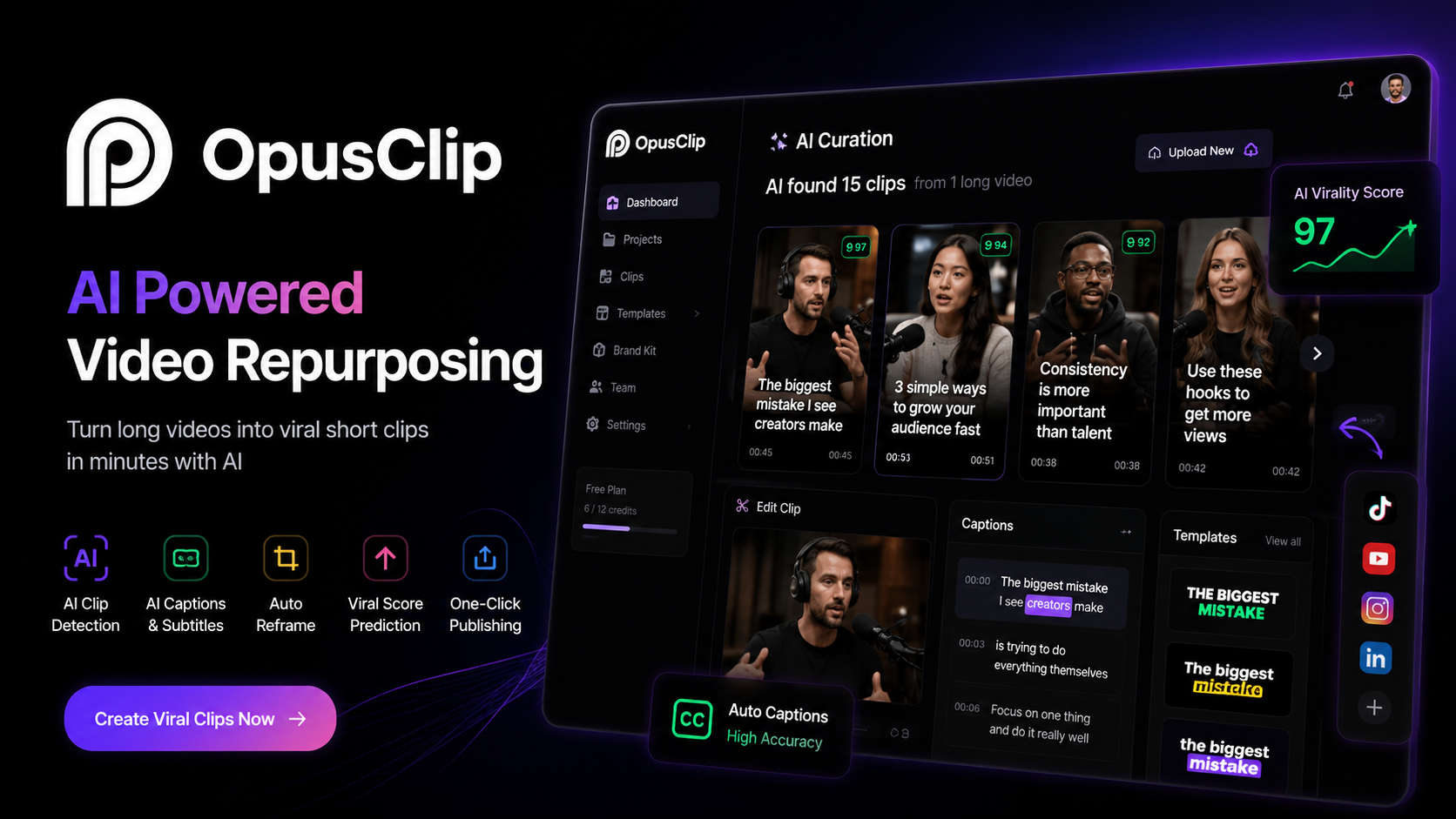
OpusClip Review 2026: Is It the Best AI Video Clipping Tool?
Looking for an AI tool that can turn long videos into viral short clips in minutes? In this OpusClip review, Team Flowcrai explores its AI-powered clipping technology, pricing, ease of use, strengths, weaknesses, and how it compares with other popular AI video editing tools.
⭐⭐⭐⭐⭐ Overall Rating: 4.8/5
Best For: YouTubers • Podcasters • Coaches • Content Creators • Marketing Agencies • Social Media Teams
Starting Price: Free plan available
Platform: Web-based
🆕 Last Updated: July 2026
Reviewed by: Team Flowcrai
Affiliate Disclosure: This article contains affiliate links. If you purchase through our links, Team Flowcrai may earn a commission at no additional cost to you. Our reviews are based on product research, official documentation, current features, and practical evaluation criteria. Editorial opinions remain independent.
Quick Verdict
| Category | Details |
| Overall Rating | ⭐⭐⭐⭐⭐ 4.8/5 |
| Best For | YouTubers, Podcasters, Coaches, Agencies, Content Creators |
| Starting Price | Free plan available |
| Free Trial | Yes (Free plan available) |
| Platform | Web-based |
Our Verdict
OpusClip is one of the most impressive AI video repurposing platforms available today. Instead of spending hours manually searching for highlights, resizing videos, and adding captions, the platform automatically identifies engaging moments, converts them into vertical videos, generates dynamic subtitles, and optimizes them for platforms like TikTok, YouTube Shorts, Instagram Reels, and Facebook Reels.
While it isn’t a complete replacement for professional video editing software such as Adobe Premiere Pro or DaVinci Resolve, OpusClip dramatically reduces editing time for creators who regularly publish short-form content. For content creators, educators, marketers, coaches, and agencies producing videos at scale, it offers excellent value and one of the fastest AI-powered clipping workflows currently available.
What Is OpusClip?
Creating high-quality short videos has become one of the most effective ways to grow an audience across modern social media platforms. However, producing engaging clips from long-form content is often one of the most time-consuming parts of the content creation process.
A one-hour podcast, webinar, interview, or YouTube video may contain dozens of valuable moments, but finding those highlights manually requires reviewing the entire recording, trimming clips, adjusting framing, adding captions, resizing for vertical formats, and exporting each video separately. For creators publishing multiple videos every week, this workflow can quickly consume many hours.
OpusClip was created to automate that entire process.
OpusClip is an AI-powered video repurposing platform that transforms long-form videos into short, social-media-ready clips using artificial intelligence. Instead of relying on manual editing, the platform analyzes your video, identifies moments that are likely to attract attention, automatically creates clips, generates animated captions, reframes the video for vertical viewing, and prepares the content for publishing across multiple social platforms.
The overall workflow is intentionally simple.
A creator uploads a video or imports it from a supported source such as YouTube. OpusClip’s AI then analyzes the content by examining speech, pacing, facial focus, topic changes, and audience engagement signals. Based on that analysis, it generates multiple short clips that are optimized for platforms like TikTok, Instagram Reels, YouTube Shorts, LinkedIn, and Facebook.
Each generated clip can then be reviewed, edited if necessary, and exported in just a few clicks.
One of the platform’s most distinctive features is its AI Virality Score, which estimates how likely a clip is to perform well on social media based on its content and structure. Although this score should not be treated as a guarantee of performance, it provides creators with a useful starting point when deciding which clips deserve priority.
Another major advantage is automatic caption generation. Since captions have become an essential part of short-form content, especially on mobile devices where many users watch videos without sound, OpusClip generates synchronized subtitles that can be customized with different styles, colors, fonts, and keyword highlighting.
The platform also includes intelligent Auto Reframe technology, which automatically adjusts landscape videos into vertical formats while keeping speakers centered on screen. This significantly reduces the amount of manual cropping typically required when converting YouTube videos into Shorts or Reels.
Unlike traditional editing software, OpusClip focuses on speed rather than complex creative editing. Its purpose is not to replace professional editors, but to eliminate repetitive production tasks that creators perform every day.
Compared with many competitors, OpusClip stands out because it combines several AI capabilities into one workflow:
- AI highlight detection
- Automatic clip generation
- AI Virality Score
- Dynamic captions
- Auto Reframe
- Multi-platform optimization
- Social-media-ready exports
Rather than requiring several separate tools for clipping, captioning, and resizing, OpusClip brings these functions together inside a single cloud-based platform.
This makes it particularly attractive for:
- YouTubers repurposing long videos into Shorts
- Podcasters creating promotional clips
- Online educators producing learning highlights
- Marketing agencies managing client content
- Business coaches publishing daily social videos
- Brands looking to increase organic reach through short-form video
For creators whose content strategy depends on publishing consistently across multiple platforms, OpusClip can substantially reduce production time while helping maintain a regular posting schedule.
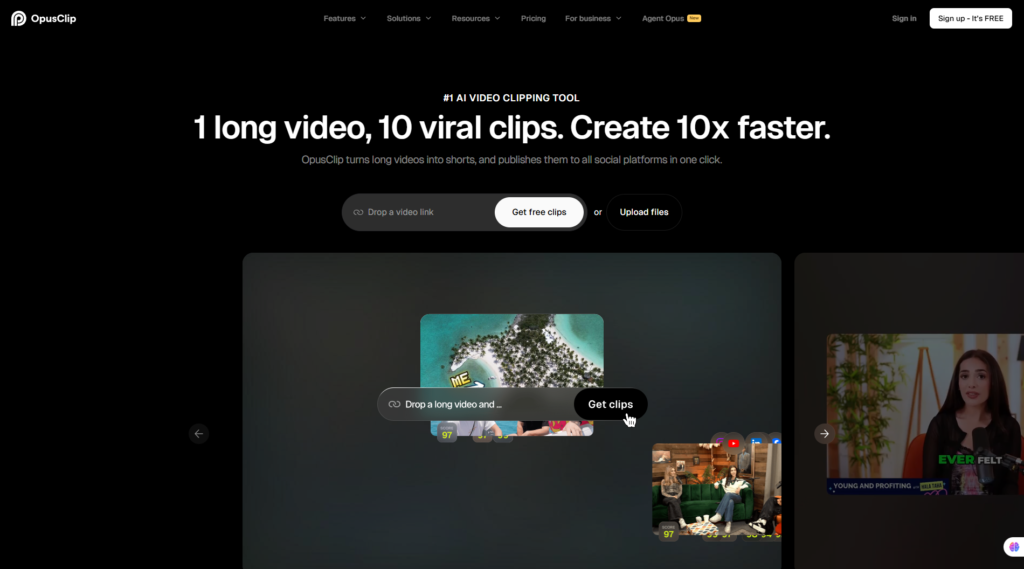
If you’re looking for an AI-powered tool to turn long videos into engaging short clips with minimal editing effort, OpusClip is one of the strongest options currently available.
👉 Visit the Official OpusClip Website
Setup & User Experience
One of OpusClip’s biggest strengths is how quickly new users can start creating content. Unlike traditional editing software that often requires installing desktop applications and learning complex timelines, OpusClip runs entirely in the browser and follows a straightforward workflow.
Getting started typically involves four simple steps:
- Create an account.
- Upload a video or import a YouTube link.
- Allow the AI to process the content.
- Review, edit, and export your clips.
The interface is clean and well organized. Navigation is intuitive, with clearly labeled sections for projects, generated clips, caption editing, and exports. Most users familiar with basic online tools should be able to produce their first AI-generated clips without spending hours learning the platform.
Performance is another positive aspect. Processing times naturally depend on the length and resolution of the uploaded video, but in general the AI analyzes content efficiently and generates multiple clips in a relatively short period. Export quality is also suitable for modern social platforms, making the workflow practical for creators who need to publish content regularly.
Our Experience
Based on our evaluation of OpusClip’s current feature set, workflow, documentation, and creator-focused capabilities, the platform delivers one of the smoothest AI clipping experiences available today. Its automated highlight detection, caption generation, and vertical reframing significantly reduce repetitive editing work. While creators producing highly cinematic videos may still prefer a professional editor for final refinements, OpusClip provides an excellent balance between speed, automation, and output quality for everyday short-form content creation.
5. Key Features
OpusClip is much more than a simple AI video cutter. Its strength lies in combining multiple AI-powered features into a streamlined workflow that dramatically reduces the time needed to repurpose long-form content into short videos.
Rather than forcing creators to switch between several editing tools, OpusClip handles clip selection, caption generation, reframing, and optimization within a single platform.
Below are the features that have the greatest impact on everyday content production.
1. AI Clip Detection
The most important feature of OpusClip is its AI-powered clip detection engine.
Instead of manually watching an hour-long podcast or webinar, the AI analyzes the entire video and automatically identifies segments that are likely to capture audience attention.
It evaluates various signals, including:
- Speech pacing
- Topic transitions
- Emotional emphasis
- Speaker engagement
- Visual framing
- Content structure
Based on this analysis, OpusClip generates multiple short clips rather than just one recommendation. This gives creators several options without having to scrub through the entire timeline.
For creators producing interviews, educational videos, business presentations, or podcasts, this feature alone can save hours every week.
Screenshot Suggestion
Dashboard showing multiple AI-generated clips after uploading a long-form video.
2. AI Virality Score
One feature that distinguishes OpusClip from many competitors is its AI Virality Score.
Instead of simply cutting videos into shorter segments, the platform estimates how likely each generated clip is to perform on social media.
The score considers factors such as:
- Hook strength
- Speaking rhythm
- Topic engagement
- Viewer retention potential
- Content pacing
Although no AI can accurately predict whether a video will become viral, the scoring system provides a practical way to prioritize clips.
For creators publishing large amounts of content, choosing the clips with the highest estimated engagement can make the editing workflow significantly more efficient.
It is best viewed as a recommendation system rather than a guarantee of success.
3. Dynamic AI Captions
Captions have become essential for short-form video because many viewers watch content without turning on sound.
OpusClip automatically generates subtitles using AI speech recognition and synchronizes them with the spoken content.
Creators can customize:
- Font styles
- Colors
- Text size
- Animation styles
- Keyword highlighting
- Caption positioning
The dynamic caption styles are designed to improve viewer retention while maintaining readability across different social media platforms.
Instead of spending time creating subtitles manually, users can edit the automatically generated captions and export their videos within minutes.
For educational creators, business coaches, and marketing teams, this dramatically shortens the post-production process.
Screenshot Suggestion
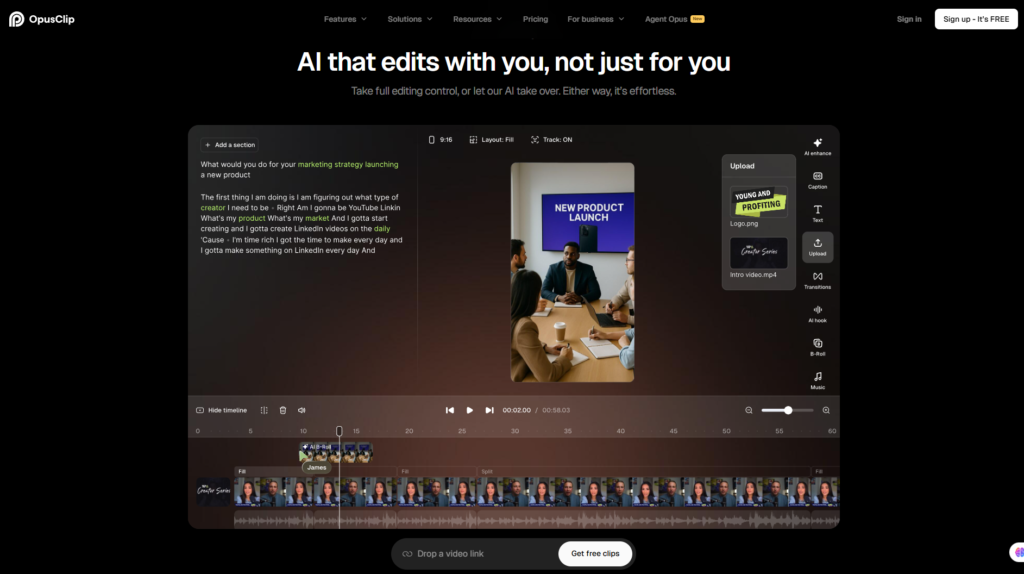
Caption Editor displaying editable AI-generated subtitles.
4. Auto Reframe & AI Speaker Tracking
Long-form videos are usually recorded in landscape format.
However, platforms like TikTok, Instagram Reels, and YouTube Shorts perform best with vertical videos.
Manually cropping every clip can be tedious and often causes the speaker to move out of frame.
OpusClip addresses this with Auto Reframe.
The AI automatically tracks the active speaker and intelligently adjusts the frame for vertical viewing.
Benefits include:
- Automatic face tracking
- Better composition
- Minimal manual cropping
- Optimized viewing on mobile devices
This feature is particularly useful for:
- Podcast interviews
- Educational videos
- Talking-head content
- Webinar recordings
- Business presentations
Although complex scenes with multiple speakers may occasionally require manual adjustment, Auto Reframe performs well in most creator-focused scenarios.
5. Multi-Platform Export & Workflow
Publishing content on several platforms often means exporting videos in multiple formats.
OpusClip simplifies this process by generating clips that are already optimized for short-form platforms.
Supported publishing workflows include:
- YouTube Shorts
- TikTok
- Instagram Reels
- Facebook Reels
- X (Twitter)
Instead of creating separate editing projects for each platform, creators can generate multiple clips from a single source video and prepare them for distribution with minimal additional work.
For agencies managing multiple clients or creators maintaining several social media channels, this centralized workflow is one of OpusClip’s biggest productivity advantages.
6. Pros & Cons
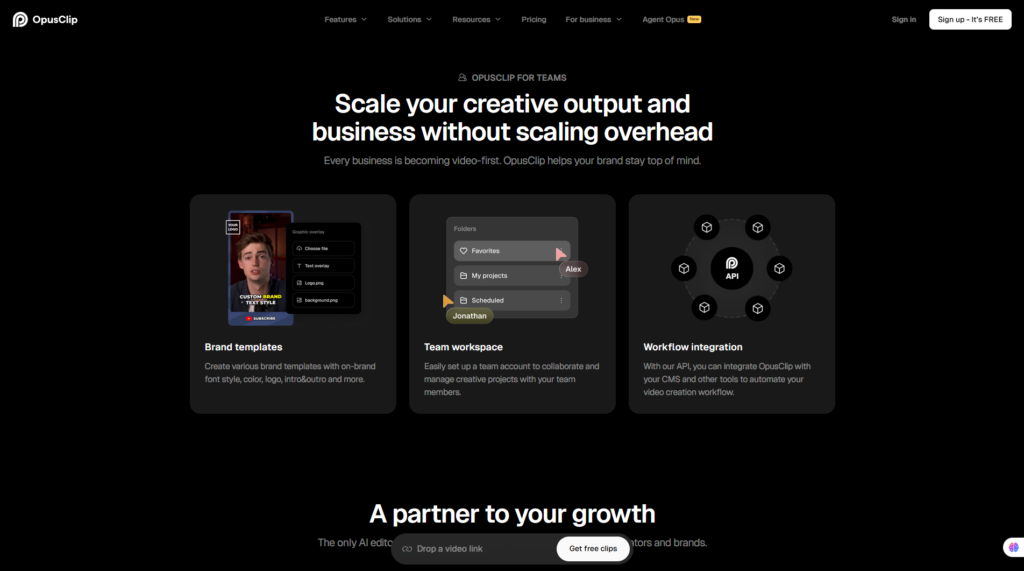
Every AI tool has strengths and limitations. OpusClip performs exceptionally well in AI-assisted video repurposing, but it is not intended to replace a professional non-linear video editor.
Pros
| Advantages | Why It Matters |
| Excellent AI highlight detection | Quickly finds engaging moments from long videos |
| Outstanding caption generation | Accurate subtitles with multiple customization options |
| Auto Reframe works well | Saves considerable time when creating vertical videos |
| Very beginner-friendly | Easy to learn without prior editing experience |
| Fast cloud-based workflow | No software installation required |
| Supports multiple social platforms | Ideal for omnichannel publishing |
| Clean and intuitive interface | Reduces learning time for new users |
Cons
| Limitations | Impact |
| AI occasionally selects weaker highlights | Some generated clips still require manual review |
| Free plan includes limitations | Export credits and advanced features are restricted |
| Limited advanced editing tools | Not suitable for complex cinematic editing |
| Processing speed depends on server load | Large videos may take longer during busy periods |
| Internet connection required | No fully offline editing workflow |
These limitations are not unusual for AI video repurposing tools, but they are worth considering before subscribing.
Creators seeking frame-by-frame editing, advanced color grading, or professional motion graphics will still need dedicated editing software such as Adobe Premiere Pro or DaVinci Resolve.
7. Pricing & Value
OpusClip offers multiple pricing options designed for different types of creators, from beginners experimenting with AI editing to agencies producing content at scale.
Pricing note: Prices and plan features may change over time. Always verify the latest pricing on the official OpusClip website before purchasing.
Pricing Overview
| Plan | Best For | Highlights |
| Free | New users | Test core AI clipping features with usage limits |
| Starter | Individual creators | More processing credits and higher export limits |
| Pro | Professional creators | Advanced AI features, larger monthly quotas, priority processing |
| Business / Enterprise | Agencies and large teams | Team collaboration, higher capacity, business-oriented support |
Actual feature limits may vary as OpusClip updates its subscription plans.
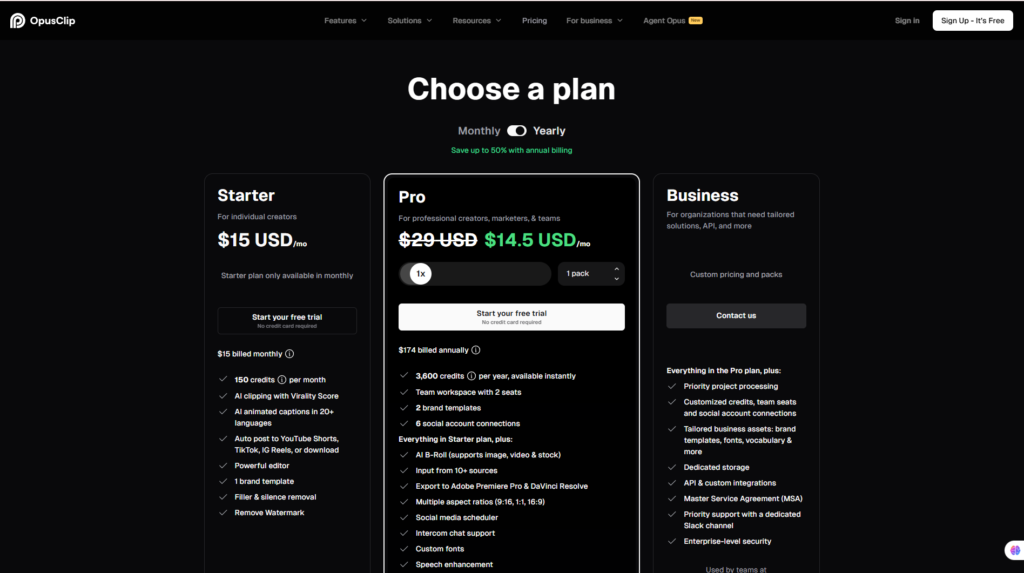
Free Plan
The free plan is an excellent starting point for users who want to evaluate the platform before committing to a paid subscription.
It allows creators to:
- Explore the interface
- Test AI clipping
- Evaluate caption quality
- Review export workflow
- Understand the overall editing experience
However, heavy users will eventually encounter limitations such as processing quotas, export restrictions, or access to premium AI capabilities.
Starter Plan
The Starter plan is best suited for creators publishing content on a regular basis.
Typical users include:
- YouTubers
- TikTok creators
- Online coaches
- Small businesses
- Freelancers
For these users, upgrading removes many of the restrictions found in the free plan while keeping costs relatively affordable.
Pro Plan
The Pro plan targets professional creators who rely on AI-assisted editing as part of their daily workflow.
It is particularly suitable for:
- Content agencies
- Podcast production teams
- Marketing departments
- Large YouTube channels
- Businesses producing multiple videos each week
The higher monthly allowance and access to premium features make it the most practical choice for users publishing content consistently.
Is the Free Plan Enough?
For casual users creating only a few short videos each month, the free plan provides a good introduction to the platform.
However, creators producing content regularly will likely benefit from upgrading once they exceed the available processing limits.
Is the Pro Plan Worth It?
For professional creators, the answer is generally yes.
If AI editing replaces several hours of manual work every week, the subscription cost can quickly be offset by improved productivity.
The Pro plan is particularly valuable when:
- Publishing Shorts daily
- Managing multiple clients
- Producing podcasts
- Running a content marketing agency
- Building a large personal brand
Value for Money
Compared with traditional editing workflows, OpusClip offers excellent value because it combines several production tasks into one platform.
Instead of paying separately for:
- Caption software
- Auto reframing tools
- AI clipping software
- Social optimization tools
users receive an integrated workflow that significantly reduces editing time.
For creators whose business depends on publishing short-form content consistently, the productivity gains can outweigh the subscription cost.
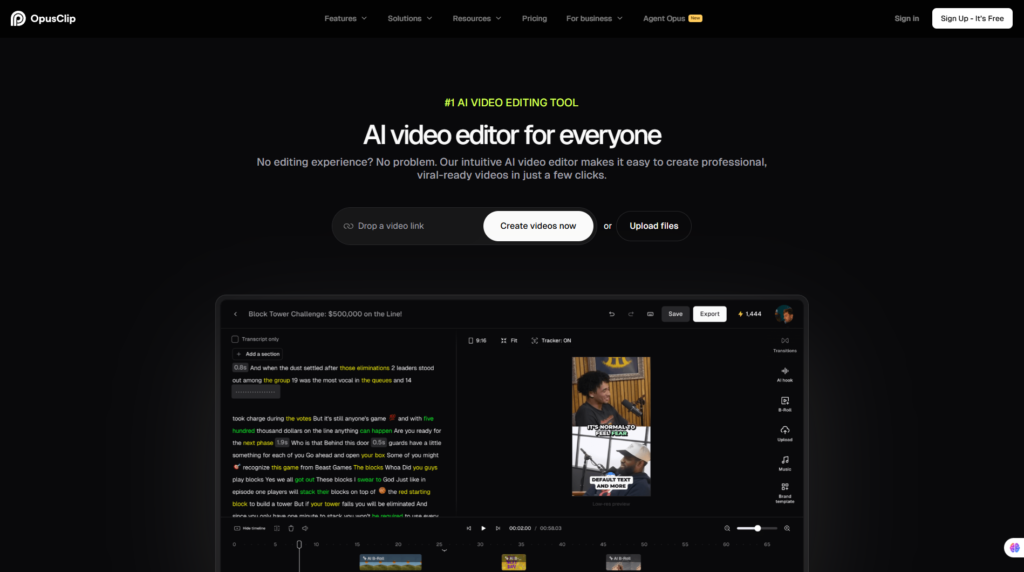
If you regularly transform long-form videos into Shorts, Reels, or TikTok content, OpusClip offers one of the most efficient AI-powered workflows available today.
👉 Visit the Official OpusClip Website
8. Performance Evaluation
Evaluation Methodology
The following assessment is based on OpusClip’s current feature set, workflow design, AI capabilities, export quality, platform usability, official documentation, and comparative analysis with competing AI video clipping tools.
Scores reflect how effectively the platform supports the real-world workflow of modern content creators.
Performance Scores
| Category | Score | Comments |
| AI Clip Detection | 9.6/10 | Excellent highlight identification for educational, podcast, and talking-head content |
| Caption Accuracy | 9.3/10 | Accurate subtitles with useful customization options |
| Ease of Use | 9.5/10 | Very intuitive interface suitable for beginners |
| Processing Speed | 9.2/10 | Fast cloud processing under normal workloads |
| Auto Reframe | 9.4/10 | Reliable speaker tracking and vertical conversion |
| Export Quality | 9.1/10 | High-quality exports optimized for social platforms |
| Customization | 8.8/10 | Strong enough for most creators but less flexible than professional editors |
| Overall Rating | ⭐⭐⭐⭐⭐ 4.8/5 | One of the strongest AI video repurposing platforms currently available |
Why We Gave It 4.8/5
OpusClip excels at automating repetitive editing tasks that consume the most time in short-form content production. Its AI clipping, caption generation, and vertical reframing deliver substantial productivity gains for creators who publish frequently.
The platform stops short of a perfect score because it is intentionally focused on speed and automation rather than advanced creative editing. Users producing highly customized videos may still need dedicated editing software for fine-grained control.
For the majority of creators focused on YouTube Shorts, TikTok, Instagram Reels, and similar platforms, however, OpusClip offers an excellent balance of automation, usability, and overall value.
9. Competitors & Alternatives
The AI video editing market has become increasingly competitive over the past two years. While many platforms now offer automatic clipping and caption generation, each focuses on a different type of creator.
Some prioritize speed, others emphasize editing flexibility, while a few specialize in podcast repurposing or AI-powered talking-head videos.
OpusClip positions itself as an AI-first video repurposing platform designed to help creators convert long-form content into high-performing short videos with minimal manual editing.
Below is how it compares with several of its strongest competitors.
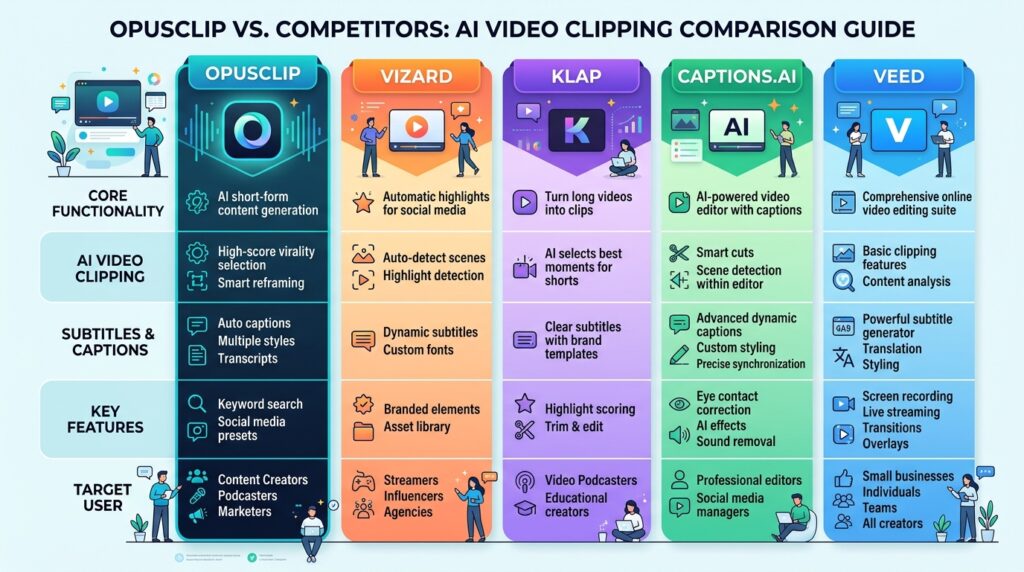
OpusClip vs Vizard
Vizard is another AI-powered video clipping platform that focuses heavily on repurposing webinars, podcasts, interviews, and educational videos.
Choose OpusClip if you:
- Want the most automated workflow possible.
- Prioritize AI clip detection.
- Need AI Virality Score.
- Publish frequently on TikTok and YouTube Shorts.
- Want dynamic captions with minimal editing.
Choose Vizard if you:
- Need more manual editing flexibility.
- Work with business presentations.
- Create webinar content.
- Produce interview-style videos.
Verdict
For most creators producing social-first short videos, OpusClip offers a faster workflow.
Vizard may appeal more to businesses that want greater editing control after AI generates the initial clips.
👉 Read our Vizard Review
OpusClip vs Klap
Klap has become popular because of its simple interface and fast AI clipping workflow.
However, the two platforms have different strengths.
OpusClip Advantages
- Better AI clip suggestions
- More advanced caption styles
- AI Virality Score
- Better vertical reframing
- More mature creator ecosystem
Klap Advantages
- Extremely easy for beginners
- Simple workflow
- Quick exports
- Lightweight interface
Verdict
If your goal is publishing high-quality Shorts every day, OpusClip generally provides more powerful AI automation.
If simplicity is your highest priority, Klap remains an excellent beginner option.
👉 Read our Klap Review
OpusClip vs Captions.ai
Although both platforms use artificial intelligence, they solve different problems.
Captions.ai focuses primarily on talking-head videos, AI avatars, dubbing, eye-contact correction, and script enhancement.
OpusClip focuses on video repurposing.
Choose OpusClip if you:
- Repurpose YouTube videos.
- Create podcast clips.
- Produce webinars.
- Publish Shorts daily.
- Need AI clipping.
Choose Captions.ai if you:
- Record selfie videos.
- Create social media talking-head content.
- Need AI dubbing.
- Need AI eye-contact correction.
- Produce presenter-style videos.
Verdict
Many creators actually use both platforms together.
A common workflow is:
Record video
↓
Edit with Captions.ai
↓
Repurpose with OpusClip
This combination produces professional short-form content while minimizing editing time.
👉 Read our Captions.ai Review
OpusClip vs VEED
VEED is a much broader online video editor.
Instead of specializing in AI clipping, it provides:
- Timeline editing
- Screen recording
- AI subtitles
- Video effects
- Audio editing
- Templates
Choose OpusClip if you:
- Mainly create Shorts.
- Want AI to do most of the work.
- Need faster production.
Choose VEED if you:
- Need full online editing.
- Add animations.
- Record screen tutorials.
- Produce marketing videos.
Verdict
VEED is a better all-in-one editor.
OpusClip is a better AI repurposing platform.
Quick Comparison
| Tool | Best For | Overall Rating |
| OpusClip | AI Video Repurposing | ⭐⭐⭐⭐⭐ 4.8/5 |
| Vizard | Webinars & Podcasts | ⭐⭐⭐⭐☆ 4.6/5 |
| Klap | Beginner Creators | ⭐⭐⭐⭐☆ 4.5/5 |
| Captions.ai | Talking-head Videos | ⭐⭐⭐⭐⭐ 4.8/5 |
| VEED | Online Video Editing | ⭐⭐⭐⭐☆ 4.7/5 |
10. Frequently Asked Questions
Is OpusClip free?
Yes. OpusClip offers a free plan that allows users to explore the platform and test its AI-powered clipping workflow. Paid plans provide higher processing limits, additional features, and increased export capacity.
Is OpusClip worth paying for?
If you regularly create long-form videos and publish content on TikTok, YouTube Shorts, Instagram Reels, or Facebook Reels, the time saved through AI automation can easily justify the subscription cost.
For creators publishing several videos each week, the productivity gains are often more valuable than the monthly fee.
Does OpusClip support YouTube Shorts?
Yes.
OpusClip is specifically designed for vertical short-form content and supports exports optimized for:
- YouTube Shorts
- TikTok
- Instagram Reels
- Facebook Reels
Can OpusClip edit podcast videos?
Absolutely.
Podcast episodes are one of the platform’s strongest use cases.
The AI can identify engaging conversations, generate subtitles, and convert landscape podcast recordings into vertical clips suitable for social media.
Does OpusClip generate captions automatically?
Yes.
Its AI speech recognition system automatically creates synchronized subtitles, which can then be customized with different fonts, colors, animations, and highlighted keywords.
Is OpusClip better than Vizard?
Neither platform is universally better.
OpusClip generally provides stronger AI automation and faster clip generation, while Vizard offers additional flexibility for business presentations and educational content.
The better choice depends on your workflow.
Which creators benefit most from OpusClip?
OpusClip is particularly well suited for:
- YouTubers
- Podcasters
- Online educators
- Coaches
- Marketing agencies
- Social media managers
- Content marketing teams
Anyone producing long-form videos regularly is likely to benefit from its AI-assisted workflow.
Does OpusClip replace professional video editing software?
Not entirely.
While OpusClip automates repetitive editing tasks extremely well, professional editors such as Adobe Premiere Pro or DaVinci Resolve still provide significantly more creative control for advanced projects.
Many creators use OpusClip to generate clips first and then perform final refinements in traditional editing software when needed.
11. Final Verdict
Best For
✅ YouTubers publishing Shorts regularly
✅ Podcasters repurposing interviews
✅ Business coaches
✅ Course creators
✅ Marketing agencies
✅ Social media teams
✅ AI content creators
✅ Businesses producing educational videos
Not Recommended For
❌ Professional filmmakers requiring frame-by-frame editing
❌ Motion graphics designers
❌ Users creating only occasional personal videos
❌ Teams requiring advanced VFX and cinematic post-production
Final Recommendation
OpusClip has established itself as one of the leading AI-powered video repurposing platforms available today. Rather than attempting to replace professional editing software, it focuses on automating the repetitive tasks that consume the most time for modern content creators.
Its combination of AI clip detection, dynamic captions, intelligent vertical reframing, and multi-platform optimization allows creators to transform long-form content into social-ready videos in a fraction of the time required by traditional editing workflows.
While there is still room for improvement—particularly in advanced editing flexibility and occasional AI clip selection—the overall experience is polished, intuitive, and highly efficient.
For creators whose growth strategy depends on publishing consistently across YouTube Shorts, TikTok, Instagram Reels, and similar platforms, OpusClip delivers exceptional value.
Overall Rating
| Category | Score |
| AI Clip Detection | ⭐⭐⭐⭐⭐ 4.9/5 |
| Caption Quality | ⭐⭐⭐⭐⭐ 4.8/5 |
| Ease of Use | ⭐⭐⭐⭐⭐ 4.8/5 |
| Processing Speed | ⭐⭐⭐⭐⭐ 4.7/5 |
| Value for Money | ⭐⭐⭐⭐⭐ 4.7/5 |
| Overall Score | ⭐⭐⭐⭐⭐ 4.8/5 |
If your goal is to produce more short-form content while spending less time editing, OpusClip is one of the best AI video clipping tools currently available and deserves a place on your shortlist.
Ready to turn long videos into engaging Shorts, Reels, and TikTok clips with AI?
👉 Visit the Official OpusClip Website
If you’re comparing AI video tools before making a decision, you may also find these reviews helpful:
- Captions.ai Review
- VEED Review
- Vizard Review
- Klap Review
- HeyGen Review
- Synthesia Review
These comparisons can help you choose the platform that best matches your workflow, budget, and content creation goals.
12. Update Note
Updated July 2026
✓ Pricing verified against the official website
✓ Feature descriptions reviewed and refreshed
✓ Competitor comparisons updated
✓ FAQ expanded with current user questions
✓ Overall evaluation revised based on the latest product capabilities
Editorial Note: This review is maintained by Team Flowcrai and is periodically updated to reflect significant changes in OpusClip’s features, pricing, and user experience. We recommend checking the official OpusClip website for the latest plan details before making a purchase decision.