
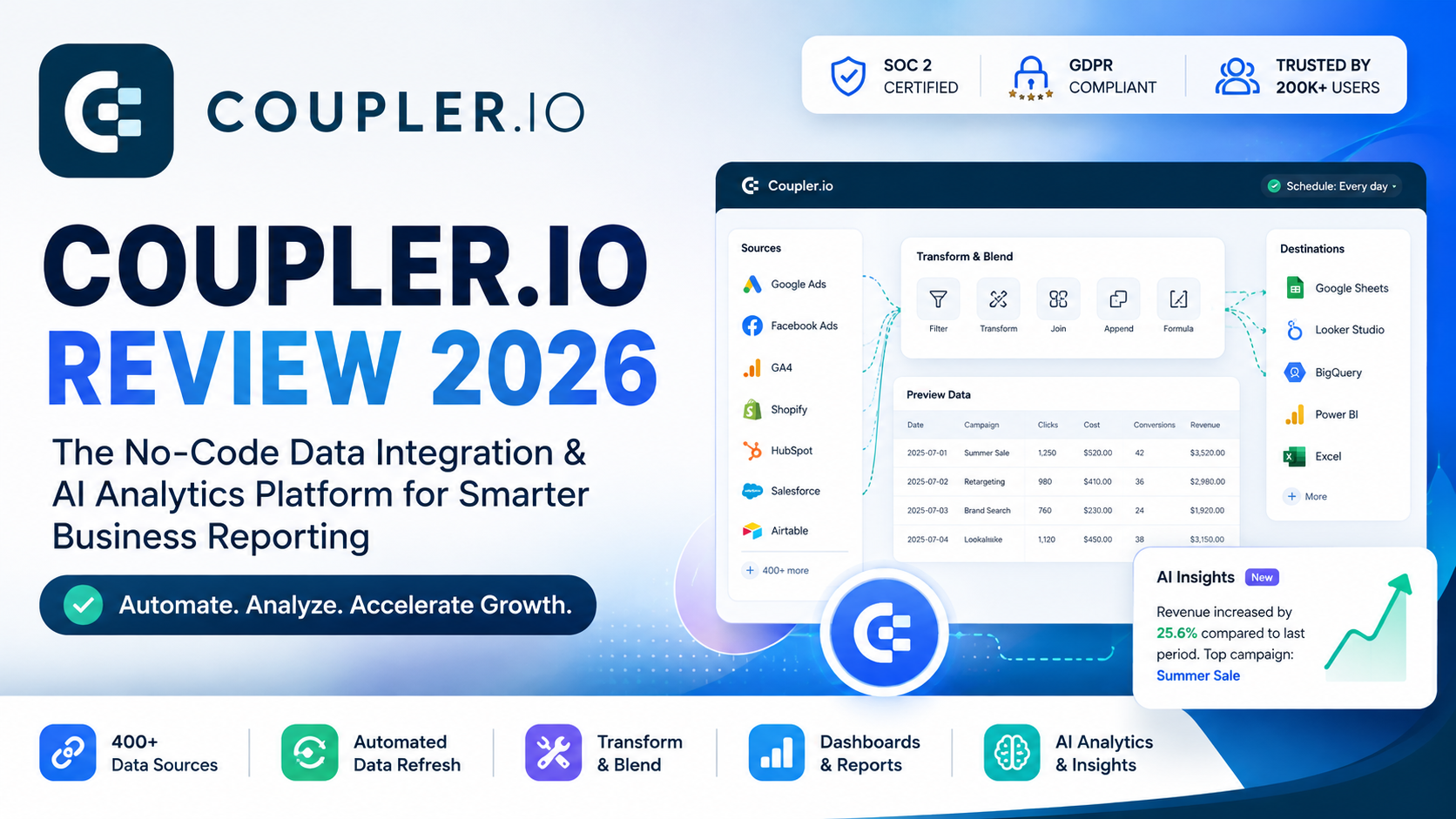
Coupler.io Review 2026: Is It Worth It for Automated Reporting?
Coupler.io is a no-code data integration and analytics platform that helps businesses collect, transform, and automatically refresh data from hundreds of applications. In this Coupler.io review, we examine its reporting workflow, ease of use, data connectors, AI capabilities, pricing, and suitability for marketers, analysts, agencies, and growing business teams.
Overall Rating: ★★★★☆ 4.7/5
Last Updated: August 2026
Reviewed by: Team Flowcrai
Affiliate Disclosure: This article may contain affiliate links. If you purchase through one of these links, Flowcrai may earn a commission at no additional cost to you.
QUICK VERDICT
Coupler.io Quick Info
| Category | Details |
| Overall Rating | ★★★★☆ 4.7/5 |
| Best For | Marketing teams, agencies, analysts, ecommerce businesses, finance teams, and sales teams |
| Starting Price | Free plan available; paid plans start at $24/month when billed annually |
| Free Trial | 7-day trial with access to paid features |
| Platform | Cloud-based web application |
| Main Use Case | Data integration, reporting automation, dashboards, and AI-assisted analytics |
| Coding Required | No |
| Data Sources | More than 400 supported business applications |
| Main Destinations | Google Sheets, Excel, BigQuery, Looker Studio, Power BI, Tableau, databases, and Coupler.io dashboards |
Coupler.io currently offers a permanent Free plan and a seven-day trial with broader feature access. Its Starter plan is listed at $32 per month when paid monthly or $24 per month with annual billing. (Coupler.io)
Our Verdict
Coupler.io is an excellent option for businesses that have outgrown manual spreadsheet exports but do not want to build and maintain a complex data pipeline. It makes it relatively simple to pull information from advertising platforms, CRM systems, ecommerce stores, accounting applications, and analytics tools into a central reporting destination.
Its strongest advantages are the no-code setup, extensive connector coverage, automated refresh schedules, built-in data transformation, dashboard templates, and increasingly useful AI analytics features. Coupler.io is particularly compelling for marketing agencies and small-to-midsize teams that need dependable multi-channel reporting without paying enterprise ETL prices.
The main limitation is that costs can increase as a business needs more connected accounts, faster refresh intervals, or higher-tier collaboration capabilities. Advanced data engineering teams may also prefer a more technical platform for complex infrastructure workloads.
Our conclusion: Coupler.io is highly recommended for automated business reporting, especially when the alternative is repeatedly downloading CSV files, copying data into spreadsheets, or manually updating dashboards.
WHAT IS COUPLER.IO?
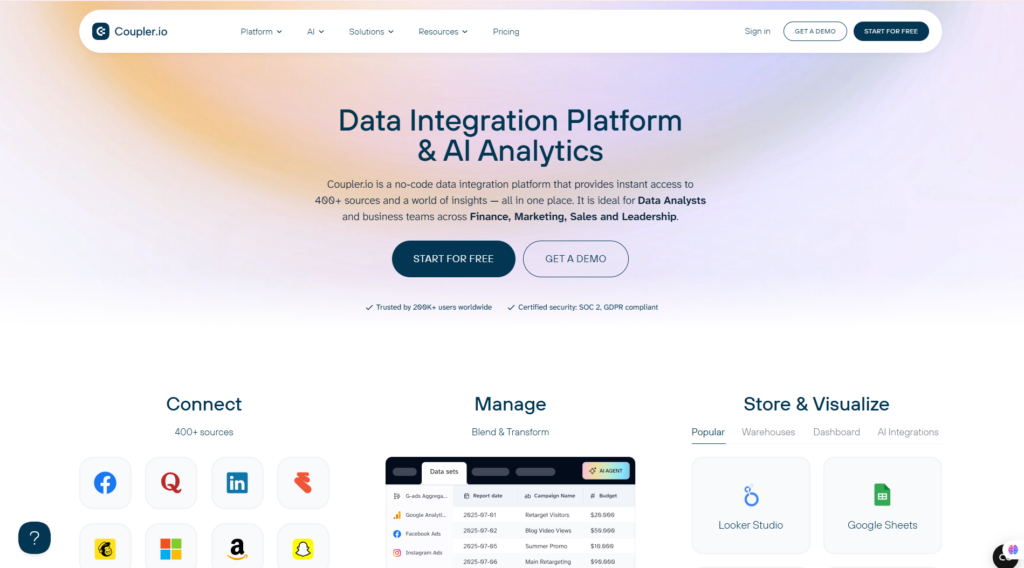
Coupler.io is a no-code data integration, reporting automation, and analytics platform. It helps users connect business applications, retrieve data through their APIs, transform that data, and send it to spreadsheets, databases, business intelligence tools, dashboards, or supported AI applications.
The platform is designed for people who need reliable access to business data but do not necessarily have programming or data engineering skills. Coupler.io is particularly relevant to marketing, finance, sales, ecommerce, operations, and leadership teams that regularly work with information spread across multiple platforms.
The company describes Coupler.io as a no-code data integration platform that provides access to more than 400 data sources. Its supported use cases span marketing, finance, sales, and executive reporting. (Coupler.io)
What problem does Coupler.io solve?
Most businesses do not store all their information in one system.
A marketing team may use:
- Google Ads for paid search data
- Facebook Ads for social advertising
- Google Analytics 4 for website activity
- HubSpot or Salesforce for leads
- Shopify for sales
- Stripe for payments
- Google Sheets for internal reporting
- Looker Studio or Power BI for dashboards
Without an integration platform, employees often download reports separately, copy information into spreadsheets, clean the columns manually, and rebuild charts every week or month. This process consumes time and creates opportunities for missing rows, inconsistent date ranges, duplicated data, and formula errors.
Coupler.io replaces much of that manual work with repeatable data flows. Once a flow has been configured, the platform can retrieve updated records on a schedule and refresh the selected destination automatically.
A typical workflow looks like this:
- Select a source application.
- Authorize access to the account.
- Choose the required metrics, dimensions, dates, or records.
- Filter, rename, combine, or calculate fields.
- Select a destination.
- Schedule automatic refreshes.
- Use the resulting data in a spreadsheet, report, dashboard, or AI workflow.
For example, an agency can bring Google Ads, Meta Ads, LinkedIn Ads, and GA4 data together, standardize campaign fields, and send the results into a unified Looker Studio dashboard. Instead of rebuilding the report every Monday, Coupler.io refreshes the underlying information automatically.
What can Coupler.io connect?
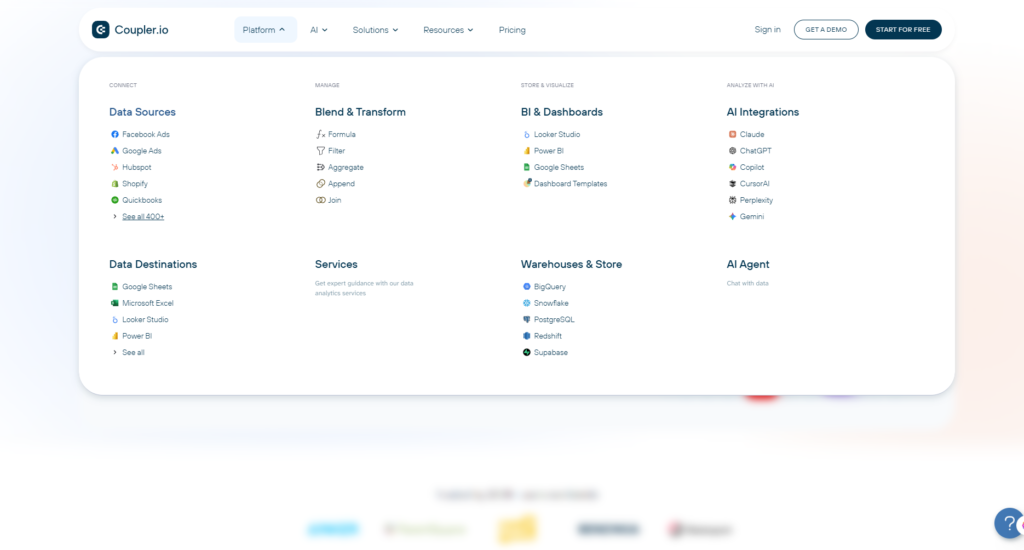
Coupler.io supports data from a broad range of business applications, including:
- Google Ads
- Facebook Ads
- LinkedIn Ads
- TikTok Ads
- Microsoft Ads
- Google Analytics 4
- Google Search Console
- HubSpot
- Salesforce
- Pipedrive
- Shopify
- QuickBooks
- Stripe
- Airtable
- Mailchimp
- Klaviyo
- YouTube
- databases and data warehouses
The extracted information can be sent to destinations such as Google Sheets, Microsoft Excel, BigQuery, Looker Studio, Power BI, Tableau, and Coupler.io’s own dashboard environment.
Its Google Sheets integration, for example, can combine several sources, apply filters, and schedule updates from daily intervals down to every 15 minutes, depending on the subscription level.
Coupler.io’s newer AI capabilities
Coupler.io is no longer limited to traditional ETL and dashboard reporting. It has expanded into AI-assisted analytics through tools such as AI Insights, AI Agent, AI integrations, and MCP connectivity.
AI Insights can interpret dashboard information, highlight patterns or anomalies, summarize important findings, and suggest practical actions.
The AI Agent allows users to ask questions about connected business data in natural language rather than creating every chart or writing SQL manually. For example, a marketing manager could ask which campaigns generated the best results last month and receive a calculated response based on connected records.
Coupler.io MCP also provides a structured connection between supported business applications and AI tools such as Claude. This can make it possible to explore live business information through conversational queries while Coupler.io functions as the controlled integration layer.
How is Coupler.io different from its competitors?
Coupler.io sits between lightweight automation tools and highly technical enterprise data platforms.
Compared with Zapier or Make, it is more focused on moving, transforming, and analyzing structured datasets than on triggering individual actions between applications. Zapier may be more appropriate for a workflow such as “when a form is submitted, send an email.” Coupler.io is more appropriate for “collect all campaign data every day and update a performance dashboard.”
Compared with Supermetrics, Coupler.io offers a broader all-in-one workflow that includes data extraction, transformation, destinations, native dashboards, templates, and AI-assisted analysis. It can be especially attractive to users who need several marketing accounts or destinations under a predictable subscription structure.
Compared with Fivetran or other enterprise ETL platforms, Coupler.io is easier for nontechnical teams to implement. However, it is not primarily designed to replace advanced data engineering infrastructure for extremely complex enterprise environments.
Its clearest differentiators are:
- No-code implementation
- Strong marketing and business reporting use cases
- Hundreds of source applications
- Built-in data transformation
- Multiple reporting destinations
- Native dashboards and templates
- AI-assisted data analysis
- Flexible refresh scheduling
- Accessible pricing for small and midsize teams
Who should consider Coupler.io?
Coupler.io is best suited to:
- Digital marketing agencies managing several client accounts
- PPC professionals consolidating advertising data
- Ecommerce companies combining store, traffic, and payment data
- Analysts building repeatable reports
- Finance teams automating revenue or expense reporting
- Sales teams combining CRM and performance information
- Founders who need executive dashboards
- Businesses currently dependent on repeated CSV exports
It is less suitable for users who only need simple one-step app automation or for enterprises requiring deeply customized, code-first data infrastructure.
🚀 Visit the Coupler.io Official Website
Explore the available connectors, create your first automated data flow, and test the platform during its free trial.
SETUP AND USER EXPERIENCE
Coupler.io’s setup process is one of its most important strengths. Users do not need to install a local application or write custom API scripts. The main workflow takes place in a browser and follows a guided source-to-destination structure.
After creating an account, the user selects a source application and authorizes Coupler.io to access the relevant account. The next step is to choose the data that should be imported. Depending on the connector, this may include selecting an advertising account, report type, date range, metrics, dimensions, fields, or specific records.
The transformation stage allows users to prepare the information before loading it into the destination. Common operations include:
- Renaming columns
- Reordering fields
- Filtering records
- Changing data types
- Combining multiple sources
- Creating formulas or calculated columns
- Joining datasets
Finally, the user selects a destination and determines how often the flow should refresh.
Coupler.io’s documentation describes the platform as a simpler alternative to repeatedly exporting files, writing scripts, or maintaining complex pipelines. Its onboarding process focuses on connecting a source, choosing a destination, and creating an automated report in a small number of steps.
Setup
Setup rating: 9.3/10
The initial connection process should be manageable for most users who are already familiar with the application they are connecting. OAuth authorization removes much of the technical complexity, although each source has its own available fields and reporting terminology.
A basic spreadsheet import can often be configured quickly. A more sophisticated multi-source dashboard will naturally require additional planning, especially when account naming conventions or campaign structures are inconsistent.
Learning Curve
Learning curve rating: 8.8/10
Beginners can create simple data flows without coding. However, users still need to understand their own data.
For instance, Coupler.io can retrieve advertising metrics, but the user must still know whether a report requires clicks, sessions, conversions, purchases, revenue, ROAS, or another measurement. Likewise, combining data from different platforms may require careful attention to date formats, attribution models, currencies, campaign names, and account time zones.
The platform itself is accessible, but meaningful analytics always requires some business context.
Ease of Use
Ease-of-use rating: 9.2/10
The visual workflow is easier to understand than a traditional engineering pipeline. Sources, transformations, destinations, and schedules are organized logically, while templates reduce the work needed to build common reports.
The interface is especially effective for users who already live in Google Sheets, Excel, Looker Studio, or Power BI. Rather than abandoning their preferred reporting environment, they can use Coupler.io to supply it with refreshed data.
Performance
Performance rating: 9.0/10
For normal marketing, sales, ecommerce, and finance reporting workloads, Coupler.io should provide more than enough performance. Refresh frequency depends on the selected plan, with higher tiers offering faster updates. The platform also supports native dashboards, and Coupler.io states that these can load up to 500,000 rows in under ten seconds.
As with any API-based platform, performance can occasionally depend on third-party limits, authentication status, source-system availability, and the size or complexity of a query. These are not always under Coupler.io’s direct control.
Our Experience
From a practical review perspective, Coupler.io’s greatest advantage is the clarity of its workflow. The process of selecting a source, configuring fields, preparing data, choosing a destination, and setting a refresh schedule feels considerably more approachable than developing an integration manually.
The platform should be particularly useful for a marketer who wants to move Google Ads or GA4 information into Google Sheets without repeatedly downloading files. Its transformation tools also reduce the amount of spreadsheet cleanup needed after each import.
The main learning challenge is not connecting the apps—it is deciding how the final report should be structured. Users with clearly defined KPIs and consistent campaign naming will gain value more quickly than teams whose data is already disorganized.
Overall, Coupler.io provides a polished user experience that makes serious reporting automation accessible without oversimplifying the underlying data workflow.
KEY FEATURES
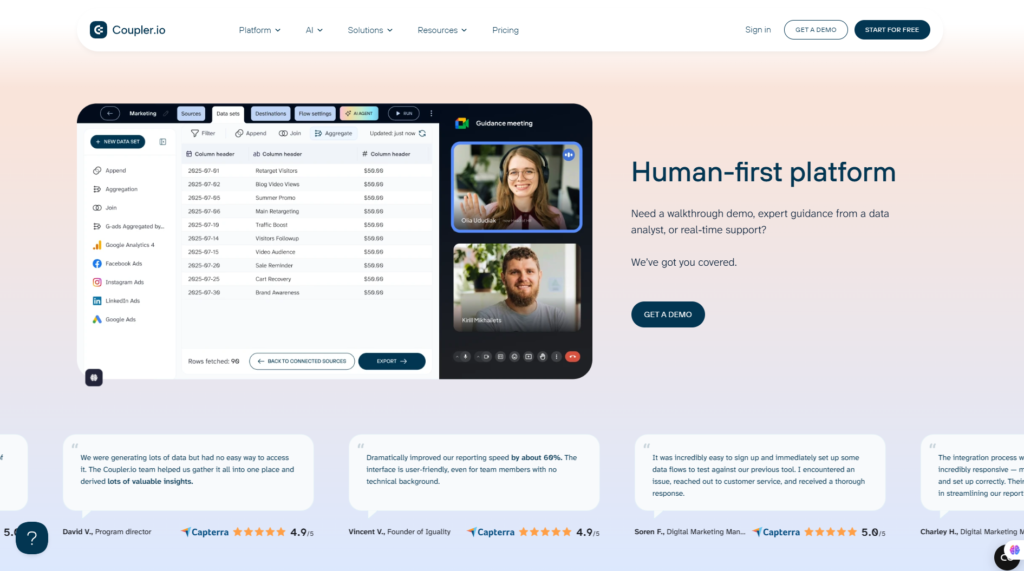
Coupler.io combines data extraction, transformation, automation, visualization, and AI-assisted analysis in one browser-based platform. Rather than focusing on a single reporting destination, it lets businesses create reusable data flows from hundreds of applications into spreadsheets, business intelligence tools, warehouses, dashboards, and supported AI environments.
Below are the features that deliver the most practical value.
5.1 No-Code Data Integration From 400+ Sources
Coupler.io’s core capability is connecting business applications without requiring users to write API scripts or maintain custom integrations. The platform currently advertises support for more than 400 data sources across marketing, sales, finance, ecommerce, productivity, and analytics.
Common sources include:
- Google Ads
- Facebook Ads
- Microsoft Ads
- LinkedIn Ads
- TikTok Ads
- Google Analytics 4
- Google Search Console
- HubSpot
- Salesforce
- Pipedrive
- Shopify
- Stripe
- QuickBooks
- Xero
- Airtable
- Google Sheets
- Microsoft Excel
- BigQuery
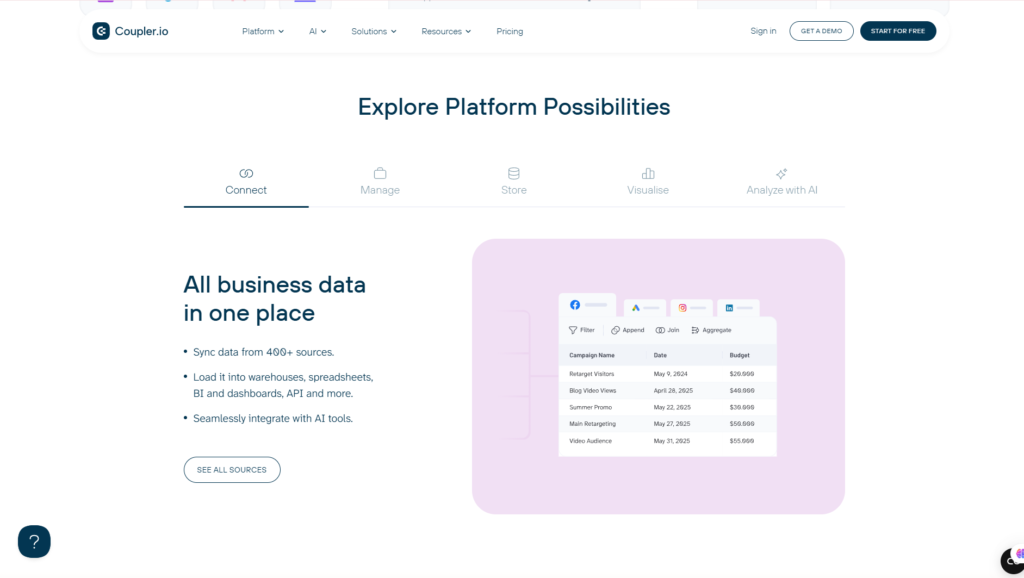
The setup is based on a visual workflow. Users select a source, authorize the relevant account, choose the report or dataset they need, and then define where the information should be loaded.
This approach is particularly valuable for marketing and business teams that need data but do not have dedicated developers. A PPC specialist, for example, can export campaign performance from multiple advertising accounts without building separate API connections.
Another advantage is that all prebuilt sources are available across Coupler.io’s plans. The subscription level primarily determines limits such as connected accounts, destinations, refresh frequency, and collaboration rather than restricting access to specific premium connectors.
Best for: Marketers, analysts, agencies, finance teams, and business users who want reliable integrations without coding.
5.2 Built-In Data Transformation and Blending
Moving data is only one part of reporting. Raw exports often contain unnecessary columns, inconsistent names, incorrect formats, duplicated information, and datasets that cannot immediately be compared.
Coupler.io includes a transformation module that lets users prepare their information before sending it to the destination. Available operations include:
- Renaming columns
- Hiding unnecessary fields
- Reordering columns
- Changing data types
- Sorting records
- Filtering rows
- Creating calculated columns
- Applying formulas
- Appending datasets
- Joining sources
- Aggregating results
Coupler.io states that users can preview, organize, and restructure data inside the platform before loading it into the destination. It also supports blending multiple sources through append, join, and aggregation operations.
Consider an agency reporting across Google Ads, Facebook Ads, and LinkedIn Ads. Each advertising platform may use different field names for campaign expenditure, clicks, conversions, and revenue. Coupler.io can help standardize these columns and combine the records into a unified table before the data reaches Looker Studio or Power BI.
This reduces the amount of manual cleanup required in the final spreadsheet or dashboard. It also improves consistency because the same transformation rules are applied during each scheduled run.
However, transformation does require some understanding of data structure. Coupler.io removes the need to code, but it cannot automatically resolve every problem caused by inconsistent naming, attribution settings, time zones, or currencies.
Best for: Teams combining data from multiple platforms into standardized reports.
5.3 Automated Data Refresh and Scheduled Reporting
Coupler.io can automatically rerun a data flow and update its destination according to a configured schedule. This is the feature that turns a one-time integration into a reusable reporting system.
Depending on the selected plan, refresh frequency can range from manual execution to daily, hourly, or every 15 minutes. Coupler.io’s help documentation also supports customized scheduling patterns for specific reporting workflows.
A typical reporting flow might look like this:
- Retrieve Google Ads data every morning.
- Retrieve Meta Ads data on the same schedule.
- Standardize the fields.
- Append the datasets.
- Load the result into a spreadsheet or dashboard.
- Refresh the report before the marketing team begins work.
The platform also lets users review previous runs, making it easier to identify failed imports or authentication problems. Coupler.io’s setup documentation describes the ability to configure automatic refreshes and view data-flow execution history.
For many businesses, daily reporting is sufficient. Agencies monitoring active advertising campaigns or executives using near-real-time dashboards may benefit from hourly or 15-minute refreshes, although those faster intervals require higher subscription tiers.
The main limitation is that scheduled flows still depend on the source platform’s API. If Google, Meta, Shopify, or another provider delays its data or temporarily limits access, Coupler.io cannot always produce an immediate update.
Best for: Recurring marketing, sales, finance, and operational reports.
5.4 Flexible Reporting Destinations and Dashboards
Coupler.io does not force every customer into a proprietary reporting environment. Users can continue working in familiar tools while Coupler.io manages data collection and preparation.
Supported destination categories include:
- Google Sheets
- Microsoft Excel
- Looker Studio
- Power BI
- Tableau
- BigQuery
- PostgreSQL and other database environments
- Coupler.io dashboards
- API and AI-oriented destinations
The ability to export into spreadsheets is especially useful for smaller teams. Google Sheets and Excel remain accessible, flexible, and familiar, while Coupler.io removes much of the repetitive importing work.
For more advanced reporting, teams can send prepared datasets to Looker Studio, Power BI, Tableau, or a warehouse. For example, Coupler.io can combine and transform records before delivering the result to Power BI on an automated schedule.
Coupler.io also provides ready-made dashboard templates. These can reduce setup time for use cases such as PPC reporting, social media analysis, ecommerce performance, CRM pipelines, and financial monitoring.
Templates are useful starting points, but most organizations will still need to customize metrics, filters, account selections, currencies, branding, and attribution logic.
Best for: Teams that want to automate their data pipeline without replacing their existing reporting tools.
5.5 AI Analytics and Connections to AI Tools
Coupler.io has expanded beyond conventional data integration by adding AI-assisted analysis and structured connections to generative AI tools.
Its AI-related capabilities include:
- AI Insights for dashboard summaries
- AI Agent for conversational analysis
- AI integrations with supported assistants
- MCP connectivity
- Natural-language questions about business data
- Automated trend and anomaly identification
AI Insights can analyze compatible dashboard data and produce summaries, key findings, and recommended actions.
Coupler.io’s AI integrations are designed to connect structured business information to tools such as ChatGPT and Claude. This allows users to ask questions about current data without repeatedly downloading files and manually attaching them to a conversation.
Coupler.io MCP extends this concept by enabling supported AI applications to work with more than 400 connected sources. The company lists platforms such as Google Ads, Facebook Ads, GA4, Shopify, Salesforce, HubSpot, Sheets, Excel, and BigQuery among the available data sources.
Potential questions include:
- Which advertising campaigns generated the highest ROAS?
- Why did revenue decline last week?
- Which sales opportunities require attention?
- What were the largest expense changes this month?
- Which channels contributed the most qualified leads?
These features can make business data more accessible to managers who do not regularly work with BI tools. However, AI-generated explanations should still be reviewed. Their quality depends on the completeness, accuracy, context, and structure of the connected data.
Best for: Teams interested in combining automated data pipelines with conversational analytics.
COUPLER.IO PROS AND CONS
Coupler.io offers an unusually broad combination of integration, transformation, reporting, and AI functionality. However, it is not the best solution for every organization.
| Pros | Cons |
| No-code setup is accessible to nontechnical users | Costs increase as more accounts and faster refreshes are required |
| Supports more than 400 source applications | The Free plan only supports very limited workflows |
| All available sources are included across plans | Daily refresh may be too slow for active campaign monitoring |
| Built-in filtering, formulas, joins, and data blending | Complex transformations still require data knowledge |
| Supports Sheets, Excel, BI tools, warehouses, and dashboards | Third-party API limits can affect refresh speed or availability |
| Unlimited data flows on current account-based plans | It is not a replacement for every enterprise data-engineering platform |
| Strong marketing and business-reporting use cases | Some connectors offer different reports and fields depending on the source API |
| Dashboard templates reduce implementation time | Teams with disorganized source data must clean up their processes first |
| AI Insights and conversational analytics add value | AI conclusions still require human verification |
| Recurring automation can save significant reporting time | The best value depends heavily on the number of connected accounts |
Main advantages
The strongest argument for Coupler.io is convenience. It gives business users access to processes that would otherwise require custom API scripts, spreadsheet maintenance, or support from data engineers.
The current account-based pricing model also makes usage more predictable. Coupler.io introduced this model to allow unlimited data flows and reduce dependence on per-import or credit-based billing.
Its combination of spreadsheet support and more advanced destinations is another advantage. A company can begin with Google Sheets and later move parts of its reporting system into Power BI or BigQuery without necessarily changing its integration provider.
Main limitations
Coupler.io is easy to operate compared with code-first ETL tools, but data integration itself can still be complicated. Users must understand the metrics they import, the relationships between datasets, and the business definitions behind the final report.
Pricing can also rise quickly for agencies. One advertising client may involve multiple Google Ads, Meta Ads, LinkedIn Ads, Shopify, and CRM accounts. Since plans are limited partly by connected accounts, an agency can move into the Active, Pro, or custom tier sooner than a small internal team.
Finally, API-based integration always creates external dependencies. Changes made by Google, Meta, Microsoft, Shopify, or another provider can affect available fields, authentication, historical ranges, and refresh behavior.
COUPLER.IO PRICING AND VALUE
Coupler.io currently uses an account-based pricing system. All supported source connectors are available on every subscription level, including the Free plan. Users generally upgrade when they need more connected accounts, additional destinations, more users, or faster refresh intervals.
The platform also offers a seven-day trial with access to paid functionality before users select a plan or remain on the permanent Free tier.
Coupler.io Pricing Table
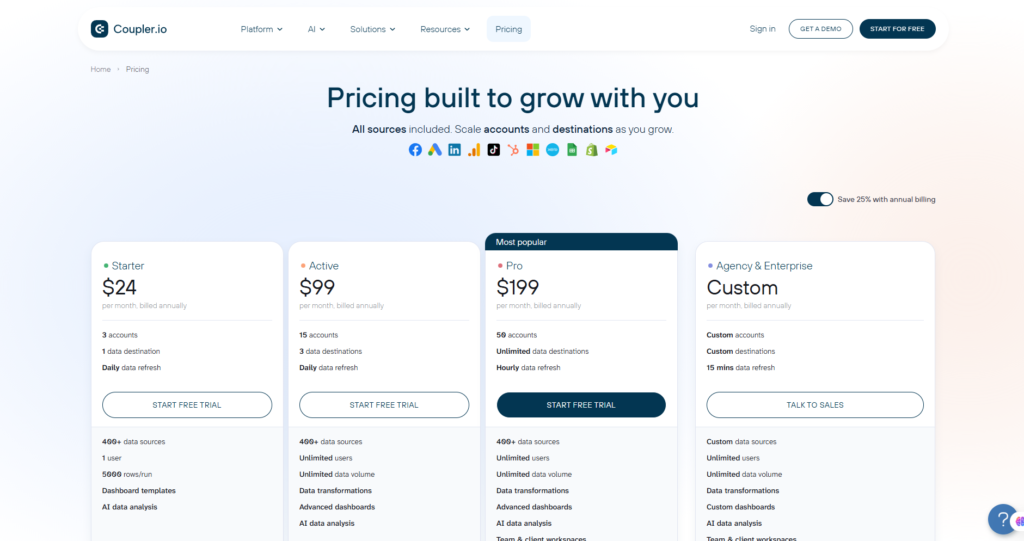
| Plan | Starting Price | Connected Accounts | Users | Refresh Frequency | Destinations | Best For |
| Free | $0 | 1 | 1 | Manual | 1 | Testing and occasional imports |
| Starter | $32 monthly or $24/month annually | 3 | 1 | Daily | 1 | Freelancers and small businesses |
| Active | $132 monthly or $99/month annually | 15 | Unlimited | Daily | 3 | Growing teams and small agencies |
| Pro | From approximately $199/month annually | 50 | Unlimited | Hourly | Unlimited | Agencies and larger reporting teams |
| Agency & Enterprise | Custom | Custom | Unlimited | Down to 15 minutes | Unlimited | Large agencies and enterprise deployments |
The Free, Starter, and Active prices are published on Coupler.io’s official pricing page. Its own 2026 comparison materials list the broader plan structure, including Pro and custom Agency or Enterprise tiers. Pricing and limits may change, so readers should verify the official page before subscribing.
Free Plan
The Free plan is suitable for testing Coupler.io or running an occasional manual export from one connected account into one destination.
It may be sufficient for:
- A freelancer evaluating the interface
- A website owner manually exporting one dataset
- A small project that does not require scheduled updates
- A user experimenting with available connectors
- Basic proof-of-concept reporting
Its main limitation is the absence of automatic scheduled refreshes. Since reporting automation is one of Coupler.io’s primary benefits, the Free plan works better as an evaluation environment than as a complete long-term reporting system.
Is the Free plan enough?
Yes, for testing and simple manual use. No, for businesses that need regularly refreshed dashboards.
Starter Plan
The Starter plan begins at $32 per month when paid monthly or $24 per month when billed annually. It supports three connected accounts, one user, one destination, and daily refreshes.
This plan is appropriate for:
- Solo marketers
- Freelance PPC specialists
- Small ecommerce stores
- Small business owners
- Analysts working with a limited number of accounts
- A company automating one main report
For example, a small business might connect Google Ads, GA4, and Shopify, then update one reporting destination each day.
The main restriction is scale. Three connected accounts can be consumed quickly, especially when each advertising or client account counts separately.
Value assessment: Good value for individual users who need daily automation but have a tightly controlled data stack.
Active Plan
The Active plan is priced at $132 per month or $99 per month with annual billing. It expands capacity to approximately 15 connected accounts, unlimited users, daily refreshes, and three destinations.
It is better suited to:
- Growing marketing departments
- Small agencies
- Finance teams
- Ecommerce businesses using several platforms
- Teams sharing dashboards and workflows
- Organizations with multiple reporting destinations
Unlimited users make this tier much more practical for collaboration. However, refreshes remain daily, which may be insufficient for teams making several campaign decisions throughout the day.
Value assessment: Strong for collaborative reporting when daily updates are acceptable.
Pro Plan
The Pro tier is designed for users with a larger number of connected accounts, unlimited destinations, and a need for hourly refreshes. Coupler.io’s published 2026 materials list support for approximately 50 accounts and a starting annualized price of around $199 per month.
It is appropriate for:
- Established marketing agencies
- Multi-brand companies
- Larger ecommerce operations
- Performance-marketing teams
- BI and analytics departments
- Organizations running several dashboards
Hourly refreshes make this plan more practical for active advertising and revenue monitoring.
Value assessment: Potentially excellent for agencies, but only when the reporting workload and client revenue justify the higher monthly cost.
Agency and Enterprise
The custom tier is intended for organizations that need:
- Large or customized account allowances
- Refresh intervals as frequent as every 15 minutes
- Multiple teams and business units
- Advanced governance or security requirements
- Priority onboarding and support
- Customized implementation
- Enterprise-scale reporting environments
Coupler.io has also highlighted security and compliance capabilities including SOC 2 Type II certification and GDPR compliance. Enterprise buyers should verify which requirements and contractual protections apply to their specific plan and use case.
Value assessment: Requires a direct cost-benefit analysis and custom quotation.
Is Coupler.io Good Value for Money?
Coupler.io’s value depends less on the raw subscription price and more on how much manual reporting it replaces.
Suppose an employee spends four hours per week exporting platform data, correcting columns, updating formulas, and refreshing client dashboards. That represents more than 200 hours per year. Even the Active or Pro plan may produce a positive return if it eliminates a substantial portion of that work.
The strongest value cases include:
- Agencies creating recurring client reports
- Teams consolidating multiple advertising platforms
- Finance departments updating monthly spreadsheets
- Ecommerce companies combining acquisition and revenue data
- Analysts maintaining several recurring dashboards
- Businesses paying employees to perform repetitive exports
The value is weaker when:
- Only one report is needed occasionally
- Source data changes infrequently
- A native platform export already solves the problem
- The business does not use reporting data for decisions
- The organization requires highly customized code-first infrastructure
Who should upgrade from Free?
Upgrade when you need:
- Automatic data refresh
- More than one connected account
- Consistent recurring reports
- Reduced manual spreadsheet work
- Team collaboration
- Multiple destinations
- Faster reporting updates
Which plan offers the best value?
For a solo user, Starter is likely the best entry point.
For a growing internal team, Active offers the most balanced combination of account capacity and collaboration.
For agencies that depend on frequent client reporting, Pro may provide the best operational value despite its higher price.
🚀 Visit the Coupler.io Official Website
Start with the seven-day trial, connect your most important data source, and test whether automated reporting saves enough time to justify a paid plan.
PERFORMANCE
Coupler.io performs well for the business-reporting workloads it is designed to handle. It is particularly effective for scheduled marketing, finance, sales, and ecommerce reporting rather than high-frequency transactional infrastructure.
Performance Score Table
| Category | Score |
| Ease of Setup | 9.3/10 |
| Ease of Use | 9.2/10 |
| Source Integrations | 9.6/10 |
| Data Transformation | 9.1/10 |
| Reporting Destinations | 9.4/10 |
| Automation | 9.3/10 |
| Dashboard Capabilities | 9.0/10 |
| AI Features | 8.8/10 |
| Pricing and Value | 8.6/10 |
| Scalability | 8.8/10 |
| Overall Rating | 9.2/10 — 4.7/5 |
Testing Methodology
Our evaluation focuses on the complete reporting workflow rather than the number of connectors alone.
The following factors were considered:
1. Initial setup
- Account creation
- Source authorization
- Connector configuration
- Destination setup
- Scheduling options
2. Data preparation
- Field selection
- Column management
- Filtering
- Formulas
- Joins and append operations
- Preview functionality
3. Reporting workflow
- Spreadsheet destinations
- BI destinations
- Dashboard templates
- Multi-source reporting
- Automatic updates
4. Operational performance
- Refresh flexibility
- Run history
- Reliability of repeated flows
- Ability to identify failed imports
- Scalability across accounts and destinations
5. Accessibility
- Suitability for nontechnical users
- Documentation
- Learning curve
- Collaboration
- AI-assisted analysis
This assessment is based on the platform’s documented functionality and review of its available workflow. Actual performance may vary according to source API limits, dataset size, account configuration, destination performance, and subscription tier.
Why Coupler.io Scores Highly
Coupler.io earns its strongest scores in integrations, ease of use, and automation.
The platform provides a clear four-stage workflow:
- Connect a source.
- Combine and transform the data.
- Select a destination.
- Run or schedule the import.
This structure is documented in Coupler.io’s current onboarding materials and makes the platform approachable for users who have never built a formal data pipeline.
Its broad connector catalog is another major advantage. More than 400 sources give it sufficient coverage for many marketing, sales, finance, CRM, and ecommerce environments.
The transformation module also adds meaningful value. It prevents Coupler.io from being merely a data-export utility because users can prepare and blend information before it reaches the reporting destination.
Where Performance Can Vary
No integration platform controls every part of the workflow.
Refreshes may be affected by:
- Source API rate limits
- Expired authorization credentials
- Delays in source-platform reporting
- Large historical requests
- Complex joins or calculations
- Destination limits
- Inconsistent field definitions
- Changes to third-party APIs
For example, advertising platforms may update attribution or conversion figures after the initial event. A Coupler.io flow can accurately retrieve the values exposed by the API at the time of execution, but it cannot prevent the advertising platform from revising those values later.
Similarly, a failed refresh may result from an expired Google, Meta, Microsoft, or Shopify authentication token rather than a fundamental issue with Coupler.io.
Performance Conclusion
Coupler.io is fast and dependable enough for the majority of scheduled business-reporting workflows. Its performance should satisfy freelancers, agencies, analysts, ecommerce companies, and mid-sized internal teams.
Organizations requiring second-by-second streaming, extremely complex transformations, or mission-critical enterprise infrastructure may need a more specialized engineering platform. For daily, hourly, and 15-minute reporting, however, Coupler.io offers an effective balance between accessibility and operational capability.
COUPLER.IO COMPETITORS AND ALTERNATIVES
Coupler.io competes in a broad market that includes marketing-reporting platforms, workflow-automation tools, no-code data connectors, and enterprise ELT systems. The right alternative depends on whether your priority is marketing analytics, task automation, attribution, or large-scale data infrastructure.
Coupler.io Alternatives Comparison
| Platform | Best For | Main Strength | Main Trade-Off |
| Coupler.io | Business teams and agencies | No-code data integration, transformation, dashboards, and AI analytics | Account limits can increase costs |
| Supermetrics | Marketing teams and agencies | Deep marketing-data reporting and activation | Often more marketing-specific |
| Windsor.ai | Marketers needing attribution | Data integration plus multi-touch attribution | Less suitable for general business reporting |
| Zapier | Workflow and task automation | Trigger-action automation across thousands of apps | Not primarily designed for bulk reporting pipelines |
| Fivetran | Enterprise data teams | Fully managed ELT and warehouse-scale pipelines | More technical and potentially excessive for small teams |
Coupler.io vs Supermetrics
Coupler.io and Supermetrics overlap most directly in marketing reporting. Both can retrieve data from advertising, analytics, ecommerce, and CRM platforms and send it into spreadsheets, dashboards, warehouses, and AI tools.
Supermetrics positions itself as a marketing intelligence platform for connecting, organizing, analyzing, and activating marketing data. It supports destinations such as Google Sheets, Looker Studio, warehouses, dashboards, ChatGPT, and Claude.
Coupler.io has a broader business-reporting orientation. In addition to marketing, it targets finance, sales, leadership, ecommerce, and analytics teams. Its workflow combines more than 400 sources with built-in transformation, data blending, native dashboards, spreadsheets, BI destinations, warehouses, and AI integrations.
Choose Coupler.io when:
- You need marketing, finance, sales, and ecommerce data in one platform.
- You want built-in formulas, filters, joins, and append operations.
- You need native dashboards as well as external BI destinations.
- You prefer account-based pricing with unlimited data flows.
- You want a general-purpose business data integration platform.
Choose Supermetrics when:
- Marketing intelligence is your primary use case.
- Your team works heavily with paid media and campaign reporting.
- You want specialized marketing-data management and activation.
- You already use Supermetrics connectors or templates extensively.
Verdict
Coupler.io is the stronger all-rounder for cross-department reporting. Supermetrics may be the better choice for organizations that want a dedicated marketing intelligence platform.
Internal link suggestion: Supermetrics Review
Coupler.io vs Windsor.ai
Windsor.ai is another close competitor. It describes itself as a no-code data integration platform that can pull information from more than 350 business platforms and send it to BI tools, spreadsheets, warehouses, and AI chats.
The main distinction is attribution. Windsor.ai has historically emphasized multi-touch marketing attribution, customer journeys, and campaign contribution analysis. This makes it attractive to marketers who want to understand how multiple channels influence conversions rather than only consolidating reporting data.
Coupler.io is less attribution-centric. Its stronger proposition is building reusable reporting pipelines, transforming datasets, creating dashboards, and making selected data available to AI tools.
Choose Coupler.io when:
- You need a broader reporting and analytics platform.
- You want business data beyond marketing attribution.
- You need spreadsheet, dashboard, warehouse, and AI destinations.
- You want strong data preparation before loading.
Choose Windsor.ai when:
- Multi-touch attribution is central to your decision-making.
- You want to compare channel contribution across the customer journey.
- You primarily work with marketing and advertising data.
- You want AI access that can also support campaign actions through MCP.
Windsor.ai’s documentation states that its MCP integration can support actions such as pausing campaigns or adjusting budgets through compatible AI environments. This is a different emphasis from Coupler.io’s primarily analytical and reporting-oriented workflow.
Verdict
Choose Coupler.io for flexible business reporting. Choose Windsor.ai when advanced marketing attribution is the main requirement.
Internal link suggestion: Windsor.ai Review
Coupler.io vs Zapier
Although both platforms connect applications without requiring extensive coding, they solve different problems.
Zapier is built around trigger-and-action workflows. When something happens in one application, Zapier can perform an action in another. It supports filters, paths, loops, webhooks, scheduling, forms, tables, agents, and thousands of application integrations.
Typical Zapier workflows include:
- When a lead submits a form, add it to a CRM.
- When a sale occurs, send a Slack notification.
- When a support request arrives, create a task.
- When an invoice is paid, update another application.
Coupler.io is better suited to moving and preparing complete datasets:
- Import all Google Ads campaign records.
- Combine several advertising accounts.
- Transform columns and calculate metrics.
- Refresh a dashboard every day or hour.
- Send an analysis-ready dataset into an AI tool.
Choose Coupler.io when:
- Your goal is reporting, analytics, or bulk data synchronization.
- You need recurring table-based imports.
- You want to blend and transform several datasets.
- You are building dashboards or management reports.
Choose Zapier when:
- Your goal is operational workflow automation.
- You need an event in one app to trigger an action elsewhere.
- You need lead routing, notifications, approvals, or task creation.
- Breadth of application support is more important than reporting depth.
Verdict
Coupler.io and Zapier are complementary rather than direct substitutes. Coupler.io manages reporting data; Zapier automates business actions.
Some organizations may use both: Coupler.io for analytics and Zapier for workflow execution.
Internal link suggestion: Zapier Review
Coupler.io vs Fivetran
Fivetran targets a more technical and enterprise-oriented market. Its platform is designed to securely move, manage, and transform data at scale across warehouses, lakes, databases, applications, analytics, and AI systems.
Fivetran’s official materials emphasize fully managed pipelines, automatic schema handling, API-change management, incremental synchronization, and hundreds of enterprise-grade connectors.
Coupler.io is more accessible to marketers, analysts, finance teams, founders, and small-to-midsize businesses. It does not require a mature cloud warehouse or dedicated data engineering team to deliver value.
Choose Coupler.io when:
- Business users need to create integrations themselves.
- Your primary outputs are spreadsheets, dashboards, or BI reports.
- You need daily, hourly, or 15-minute business reporting.
- Ease of use and fast setup are priorities.
- You do not require a large engineering deployment.
Choose Fivetran when:
- Your company operates a centralized cloud data warehouse.
- You need enterprise-scale ELT pipelines.
- Schema drift and pipeline maintenance must be fully managed.
- Data engineering, governance, reliability, and scale are primary requirements.
- You are moving large volumes from databases and enterprise systems.
Verdict
Coupler.io is better for accessible no-code reporting. Fivetran is stronger for enterprise data infrastructure and managed ELT.
Internal link suggestion: Best Data Integration Tools
Which Coupler.io Alternative Should You Choose?
Choose Coupler.io when you need the most balanced combination of data extraction, transformation, scheduled reporting, dashboards, and AI analytics.
Choose Supermetrics when your organization is heavily focused on marketing intelligence and campaign data.
Choose Windsor.ai when multi-touch attribution and cross-channel customer journeys are central to your strategy.
Choose Zapier when you need operational trigger-and-action automation rather than reporting pipelines.
Choose Fivetran when you have an engineering-led enterprise data stack and need managed warehouse-scale movement.
For most Flowcrai readers—including marketers, agencies, ecommerce businesses, analysts, and growing teams—Coupler.io is likely to be the most approachable all-in-one option.
FREQUENTLY ASKED QUESTIONS
1. What is Coupler.io used for?
Coupler.io is used to collect, transform, combine, and automatically refresh data from business applications. Users can send the resulting information into Google Sheets, Excel, Looker Studio, Power BI, Tableau, warehouses, native dashboards, APIs, and supported AI tools.
Common use cases include:
- Marketing reporting
- PPC dashboards
- Ecommerce analytics
- CRM reporting
- Financial reporting
- Executive dashboards
- Sales pipeline analysis
- AI-assisted business analytics
Coupler.io currently promotes access to more than 400 data sources.
2. Is Coupler.io free?
Yes. Coupler.io offers a permanent Free plan.
The Free plan currently includes one connected account, one user, one destination, and manual data refresh. It is suitable for testing the platform or running occasional imports, but it does not provide the scheduled automation that makes Coupler.io most valuable.
Users who need daily automation can consider Starter, while larger teams may need Active, Pro, or a custom plan.
3. Does Coupler.io require coding?
No. Coupler.io is designed as a no-code data integration platform.
Users can connect sources, select reports, transform columns, blend datasets, choose destinations, and create refresh schedules through a visual interface. Advanced users may still benefit from understanding APIs, database concepts, SQL, or data modeling, but those skills are not required for basic operation.
4. Can Coupler.io connect data to Google Sheets?
Yes. Google Sheets is one of Coupler.io’s primary reporting destinations.
Users can import information from advertising platforms, CRM systems, ecommerce stores, accounting applications, analytics tools, APIs, and other sources into spreadsheets. The resulting sheet can be refreshed automatically according to the selected subscription plan.
Coupler.io is also available through the Google Workspace Marketplace, where it is described as providing access to data from more than 400 sources directly in Google Sheets.
5. Can Coupler.io connect Google Ads to Looker Studio?
Yes. Coupler.io can retrieve Google Ads information and use it in automated reporting workflows, including Looker Studio dashboards.
A typical process is:
- Connect the Google Ads account.
- Select the required report and fields.
- Filter or transform the data.
- Load it into the selected reporting destination.
- Schedule automatic refreshes.
Users should verify that their selected plan supports the required number of accounts, destinations, and refresh frequency.
6. Is Coupler.io better than Supermetrics?
Neither platform is universally better.
Coupler.io may be better for teams that want a broader business-data platform with built-in transformation, cross-department reporting, native dashboards, and AI integrations.
Supermetrics may be better for organizations that want a specialized marketing intelligence system with deep emphasis on connecting, managing, analyzing, and activating marketing data.
The better option depends on your sources, destinations, account count, team structure, and reporting priorities.
7. Can Coupler.io combine data from multiple sources?
Yes. Coupler.io can blend datasets by appending, joining, aggregating, filtering, and applying custom formulas.
This is useful when creating:
- Multi-channel advertising reports
- Combined sales and marketing dashboards
- Cross-store ecommerce reports
- Finance reports from several systems
- Agency dashboards covering multiple client accounts
The platform’s official site specifically lists append, join, aggregate, formulas, and advanced filters among its data preparation capabilities.
8. How often can Coupler.io refresh data?
Refresh frequency depends on the selected plan.
Current published plan information lists:
- Free: manual refresh
- Starter: daily refresh
- Active: daily refresh
- Pro: hourly refresh
- Agency and Enterprise: intervals as frequent as 15 minutes
These limits can change, so users should verify the official pricing page before subscribing.
9. Is Coupler.io safe?
Coupler.io states that it is SOC 2 Type II certified. Its security page also says that data in transit is protected using Transport Layer Security and that stored information can be deleted when the user closes the account or chooses to remove it.
Coupler.io also states that its platform is compliant with GDPR and supports additional compliance requirements for certain use cases. Businesses handling regulated or sensitive data should still review the Data Processing Addendum, security documentation, subscription terms, and internal compliance requirements before implementation.
10. Can Coupler.io connect business data to ChatGPT or Claude?
Yes. Coupler.io supports AI-oriented integrations and MCP connectivity.
Its MCP implementation is designed to give compatible AI tools access to selected business datasets through natural-language conversations. Coupler.io states that users can ask questions, generate calculations, create charts, and analyze connected data without manually exporting files.
This does not mean that every data source or AI workflow will work identically. Users should confirm supported integrations, permissions, plan limits, and security requirements before deploying AI access to sensitive information.
11. Is Coupler.io suitable for marketing agencies?
Yes. Coupler.io is particularly useful for agencies that need to:
- Combine several advertising platforms.
- Maintain recurring client dashboards.
- Standardize campaign metrics.
- Reduce manual CSV exports.
- Build multi-channel performance reports.
- Share reports across team members.
- Connect selected reporting data to AI tools.
The main consideration is account capacity. Since each connected advertising, analytics, or CRM account can count toward a plan limit, agencies should calculate how many client accounts they need before choosing a subscription. Coupler.io explains this account-based model on its official pricing page.
12. Is Coupler.io worth the price?
Coupler.io is worth the price when it replaces recurring manual work.
A subscription is easier to justify when a team currently spends several hours each week downloading reports, copying data, correcting formulas, combining platforms, and updating dashboards.
It may not be worth paying for when:
- You only run one occasional export.
- You do not need scheduled reporting.
- A source platform’s native report is sufficient.
- Your business has very little data.
- You need simple task automation rather than analytics.
- You require a highly specialized enterprise data pipeline.
The best approach is to test one real reporting workflow during the free trial and compare the time saved against the monthly subscription cost.
FINAL VERDICT
Best For
Coupler.io is best for:
- Digital marketing agencies
- PPC and performance-marketing specialists
- Data and business analysts
- Ecommerce companies
- Finance and accounting teams
- Sales and CRM teams
- Founders and business leaders
- Small and midsize companies
- Teams using Google Sheets, Excel, Looker Studio, or Power BI
- Organizations exploring AI-assisted analytics
Not Recommended For
Coupler.io may not be the best choice for:
- Users who only need simple trigger-action automation
- Businesses with no recurring reporting requirements
- Companies that only export one small report occasionally
- Organizations requiring second-by-second streaming data
- Advanced engineering teams building highly customized pipelines
- Enterprises that need warehouse-scale ELT as their primary use case
- Teams unwilling to organize inconsistent source data
- Users expecting AI to replace human review of business decisions
Final Recommendation
Coupler.io is one of the most balanced no-code data integration and reporting platforms available for business users. It combines data extraction, transformation, scheduled synchronization, spreadsheet exports, BI destinations, native dashboards, templates, and AI-assisted analytics in a workflow that remains accessible to nontechnical teams.
Its strongest value proposition is not simply that it connects more than 400 data sources. The real advantage is that it can turn scattered application data into a repeatable reporting process. Once configured, a flow can collect information, standardize fields, combine sources, refresh a destination, and support further analysis without forcing employees to rebuild the same report manually.
Coupler.io is particularly compelling for agencies, ecommerce businesses, analysts, and growing teams that rely on spreadsheets or dashboards but have outgrown manual exports. The Starter plan provides an accessible entry point, while Active and Pro offer more capacity for collaborative and multi-account environments. Current published pricing begins with a Free tier and an annualized Starter price of $24 per month.
The platform is not perfect. Account limits can become expensive for agencies, advanced data blending still requires analytical knowledge, and third-party API constraints may affect refreshes. It is also not intended to replace every enterprise data-engineering platform.
Despite those limitations, Coupler.io earns our recommendation because it provides an effective middle ground between manual spreadsheet work and complex enterprise infrastructure.
Final Rating
★★★★☆ 4.7/5
Our Final Recommendation
Choose Coupler.io when you need reliable, no-code reporting automation across multiple business applications and want a platform that can grow from spreadsheets into dashboards, BI tools, warehouses, and AI analytics.
🚀 Visit the Coupler.io Official Website
Start with the free plan or trial, connect one of your most time-consuming reports, and measure how much manual work the automation removes.
- Best Data Integration Tools
- Supermetrics Review
- Zapier Review
- Make Review
- Best Marketing Reporting Software
- Best AI Analytics Tools
UPDATE NOTE
Updated August 2026
✓ Pricing structure verified
✓ Connector coverage reviewed
✓ Competitor comparison refreshed
✓ AI and MCP features updated
✓ Security information checked
✓ FAQ section expanded