
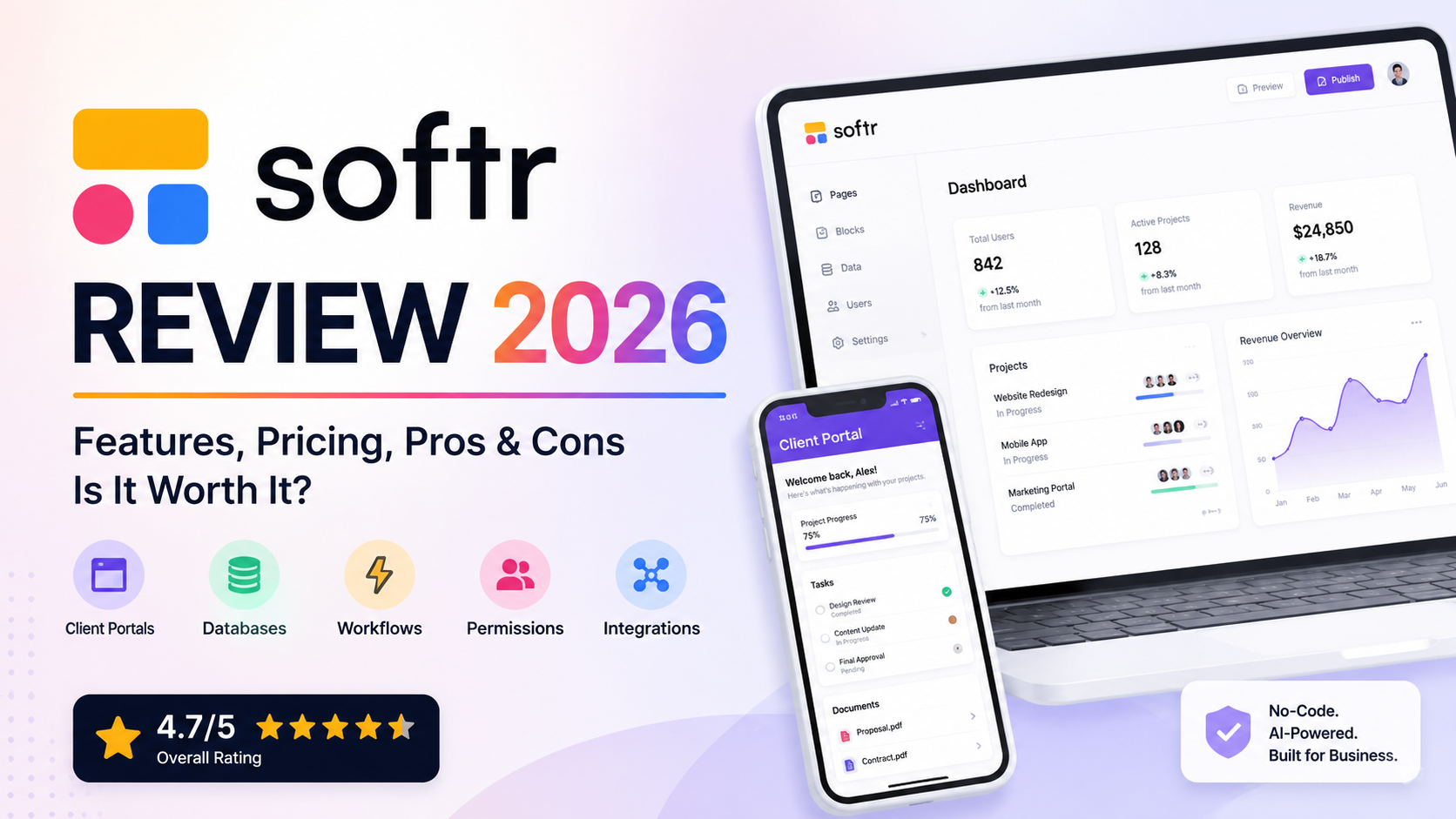
Softr Review 2026: Features, Pricing, Pros & Cons
Overall Rating: 4.7/5
Best For: Small businesses, agencies, operations teams, consultants, and non-technical users who want to build business apps, portals, and internal tools without coding.
Free Plan: Available
Platform: Web-based SaaS
Last Updated: August 2026
Reviewed by: Team Flowcrai
Affiliate Disclosure: This article may contain affiliate links. If you sign up or purchase through one of our links, Flowcrai may earn a commission at no additional cost to you. Our opinions and recommendations remain independent.
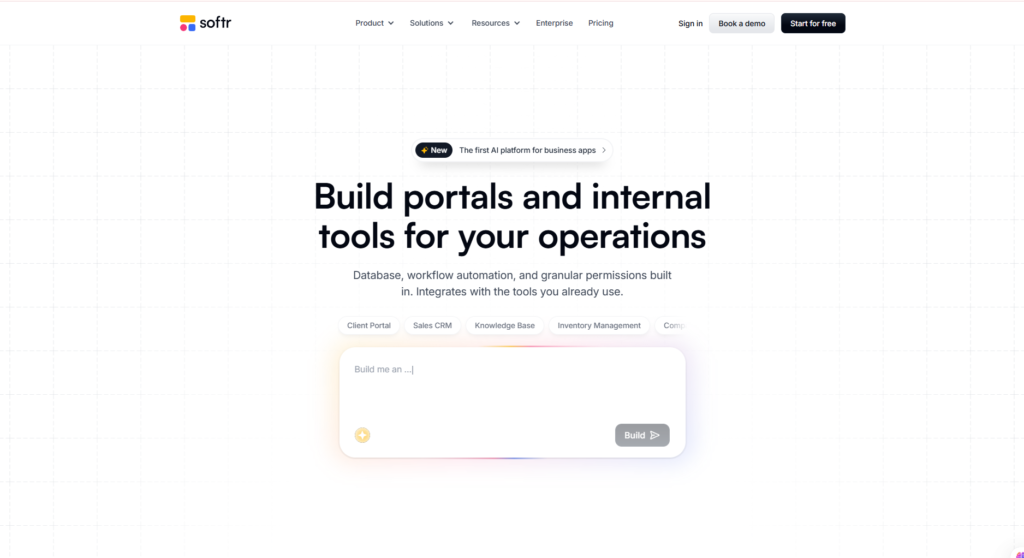
Softr has evolved far beyond a simple no-code website builder. In 2026, the platform is positioned as an AI-powered business app builder designed to help teams create client portals, internal tools, CRMs, dashboards, inventory systems, and other operational software without traditional programming.
Instead of hiring a development team to build an application from scratch, Softr lets users describe what they need, generate an initial app with AI, connect business data, define user permissions, customize the interface, and publish the finished application.
But how useful is Softr for real businesses, and is it the right no-code platform for your needs?
In this Softr review, we examine what Softr does, who it is best for, how easy it is to use, its key strengths and limitations, pricing, and how it compares with alternatives such as Bubble, Glide, Retool, and Lovable.
Key Takeaways From Our Softr Review
- Softr is built primarily for business applications, including client portals, internal tools, CRMs, dashboards, inventory systems, and operational workflows.
- Its AI Co-Builder can generate more than the interface, helping create the app structure, database, and business logic from a prompt.
- Softr is particularly attractive to non-technical business users who want custom software without hiring developers.
- It can work with native Softr Databases or connect to external data sources such as Airtable, Google Sheets, Supabase, SQL databases, and other business platforms.
- The platform offers strong ease of use, but highly customized or technically complex applications may still be better suited to traditional development or more developer-oriented platforms.
Softr Review – Quick Verdict
Softr Quick Info
| Item | Information |
| Overall Rating | 4.7/5 |
| Best For | Business apps, portals and internal tools |
| Product Type | AI / No-Code App Builder |
| Free Plan | Yes |
| Coding Required | No for core functionality |
| AI App Generation | Yes |
| Native Database | Yes |
| External Data Sources | Yes |
| Workflow Automation | Yes |
| Ideal Users | SMBs, agencies, operations teams, consultants and founders |
Our Verdict
Softr is one of the more compelling no-code platforms for businesses that need functional internal or customer-facing software rather than just a website.
Its main advantage is the combination of AI-assisted app creation, databases, permissions, workflows, integrations, and visual editing within a single platform. This makes it particularly useful for businesses that currently rely on spreadsheets, email, and several disconnected tools to manage everyday operations.
Softr should be especially appealing to small businesses, agencies, consultants, and operations teams without dedicated developers.
However, users requiring unrestricted source-code control or highly specialized backend architecture may find more developer-oriented platforms a better fit.
Flowcrai Rating: 4.7/5
→ Visit Softr Official Website
What Is Softr?
Softr is an AI-powered no-code app-building platform that allows businesses and teams to create custom software without writing traditional code.
Rather than focusing only on websites or landing pages, Softr is designed around practical business applications.
Businesses can use the platform to build solutions such as:
- Client portals
- Customer portals
- Internal tools
- Custom CRMs
- Employee portals
- Vendor portals
- Inventory management systems
- Project trackers
- Company intranets
- Knowledge bases
- Dashboards and reporting tools
- ERP-style operational systems
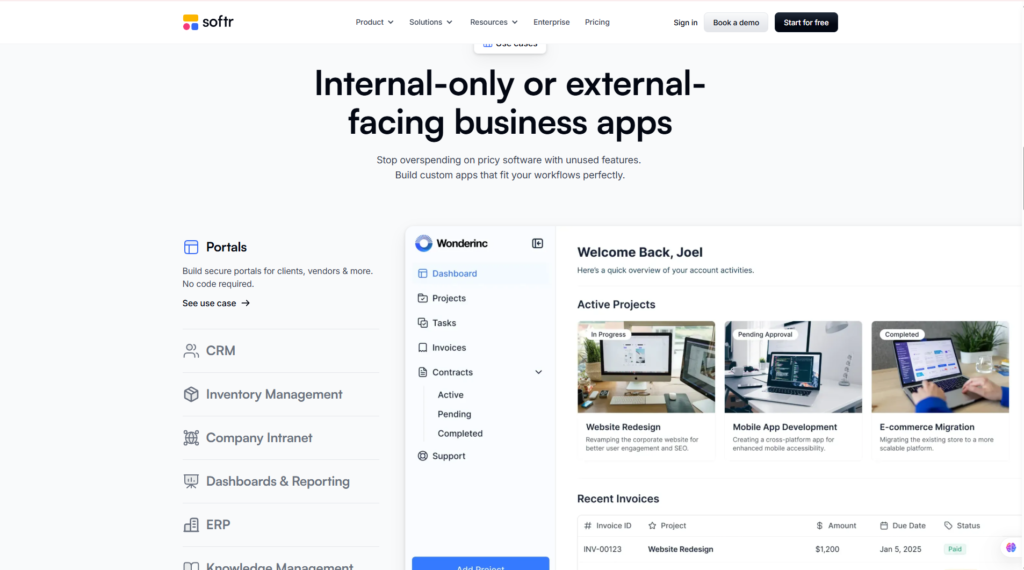
Softr officially positions its platform around both internal and external-facing business applications, with portals, CRM, inventory management, intranets, dashboards, ERP, and knowledge management among its highlighted use cases.
What Problem Does Softr Solve?
Many small and growing businesses operate with a collection of disconnected tools.
A typical workflow might look something like this:
Google Sheets → Email → Forms → Project Management Tool → CRM → Manual Reporting
The problem is that information becomes fragmented across multiple platforms, employees spend time transferring data manually, and customers may have no central place to access the information relevant to them.
Softr provides another approach:
Business Data → Softr App → Users → Permissions → Workflows
For example, an agency could create a client portal where customers log in to view projects, upload files, submit forms, and access relevant information.
A sales team could build a lightweight CRM around its existing data.
An operations team could create an inventory-management system.
A consultant could build a private customer dashboard.
This is where Softr becomes more useful than a conventional website builder: the product is designed around business processes and data, not simply web pages.
How Does Softr Work?
Softr provides several ways to start building an application, including AI-assisted generation and visual customization.
A typical workflow looks like this:
1. Describe the application you want to build
You can start by explaining the type of software you need—for example, a client portal, CRM, inventory tracker, or internal project-management application.
2. Generate the initial application
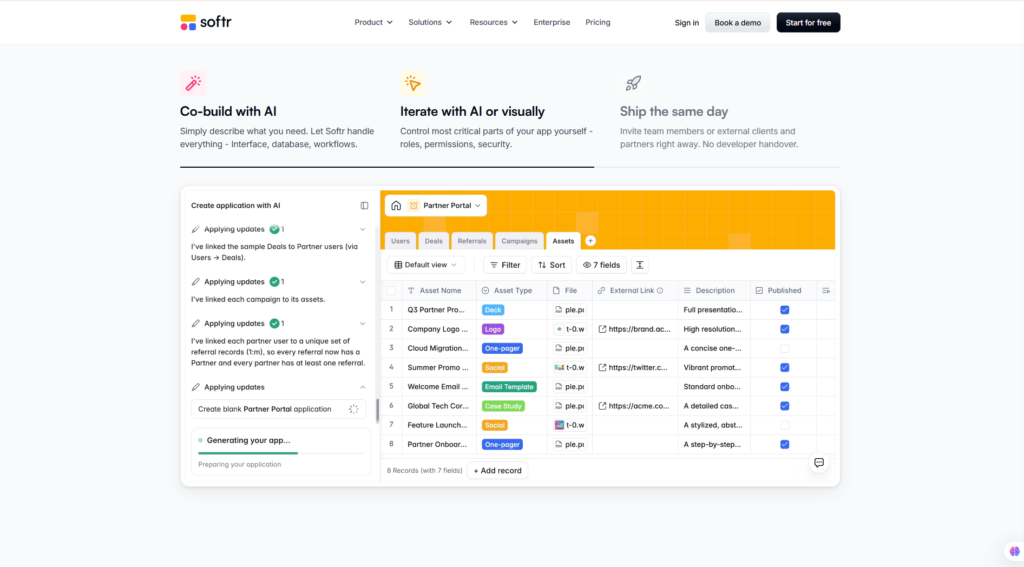
Softr’s AI Co-Builder can generate the initial application structure and associated database and logic, giving users a functional starting point rather than a blank canvas.
3. Customize the interface
Pages, layouts, blocks, fields, navigation, branding, and application structure can then be adjusted through Softr’s visual environment.
4. Connect your business data
Users can work with Softr’s native database or connect supported external data sources.
These include options such as Airtable, Google Sheets, Supabase, PostgreSQL, MySQL, monday.com, ClickUp, and other supported business systems.
5. Configure users and permissions
Businesses can control who can log in and what information different users or groups are allowed to access.
6. Add workflows
Automations and workflows can be used to support operational processes such as record updates, notifications, approvals, and other business actions.
7. Publish the application
Once configured, the application can be made available to internal employees, customers, partners, vendors, or other intended users.
What Makes Softr Different?
The most important distinction is that Softr is not simply an AI website generator.
Many AI website tools focus primarily on generating pages, copy, layouts, and visual interfaces.
Softr’s approach is more business-oriented.
Its AI Co-Builder is designed to help create not only an application’s user interface but also the underlying database structure and business logic.
That makes the platform particularly relevant when the end goal is something such as:
“Build a client portal for my agency.”
rather than:
“Build a five-page marketing website.”
Softr can also connect applications to existing business data. Official documentation currently lists data-source options including Softr Databases, Airtable, Google Sheets, monday.com, ClickUp, Supabase, SQL databases, BigQuery, and other integrations.
This combination of AI + no-code building + business data + permissions + workflows is the core reason Softr stands out from simpler AI site-building tools.
Who Should Use Softr?
Softr is most useful when a business needs customized software but does not want to build and maintain a traditional software application from scratch.
Softr Is Best For
Small and Medium-Sized Businesses
Small businesses can use Softr to replace spreadsheet-heavy processes with more structured applications.
Examples include customer databases, inventory trackers, internal dashboards, and employee tools.
Agencies
Agencies are particularly strong candidates for Softr.
An agency could create a branded client portal where customers can:
- View active projects
- Access reports
- Submit requests
- Upload documents
- Review information
- Track progress
Consultants and Freelancers
Consultants can create private client dashboards, resource portals, onboarding systems, or project-management environments without developing custom software.
Operations Teams
Softr can help operations teams turn business data into internal tools for managing projects, inventory, vendors, approvals, employees, or other workflows.
Non-Technical Founders
Founders with a business idea but limited development experience can use Softr to create an initial operational application or MVP without starting with a full software-development team.
Who Should Skip Softr?
Softr will not be the ideal solution for every project.
You may want to consider another platform if:
- You need complete control over the source code.
- Your application requires highly specialized backend engineering.
- You are building an extremely complex consumer application.
- Your development team wants unrestricted control over infrastructure and architecture.
- You only need a simple blog or content-focused website.
Developers building highly customized software may prefer traditional development frameworks or platforms that provide deeper code-level control.
Softr Setup & User Experience
Getting Started With Softr
One of Softr’s biggest advantages is the relatively low technical barrier to entry.
Users can begin with an AI-generated application, a template, or their own structure.
A basic workflow is:
Create an account → define your app → generate or select a starting point → configure data → customize the interface → set permissions → publish
The platform’s visual approach means users do not need to understand traditional front-end development before creating a functional application.
Learning Curve
Softr is beginner-friendly, but the learning curve depends heavily on what you want to build.
Creating a simple client portal based on a spreadsheet is very different from designing a sophisticated multi-role business application with relational data, permissions, and automated workflows.
For beginners, the AI Co-Builder and templates can significantly reduce the amount of setup required.
For advanced projects, however, users still need to understand their business processes.
No-code removes much of the programming complexity—it does not eliminate the need to think carefully about data structure, user roles, permissions, and workflows.
Ease of Use and Interface
Softr’s visual approach makes it accessible to business users who may not be comfortable with conventional development tools.
The platform brings together app design, data, users, permissions, and business workflows within the same ecosystem.
It also offers flexibility in data-source complexity. Softr’s own documentation notes that options such as Softr Databases, Airtable, Google Sheets, HubSpot, and monday.com are generally easier for non-technical users, while databases and services such as Supabase, Xano, SQL, and REST APIs require more technical knowledge.
Our Analysis
From a usability perspective, Softr’s strongest advantage is not that every business application becomes effortless. Rather, it significantly lowers the technical barrier between a business idea and a functioning internal or customer-facing application.
For a small business that needs a client portal, custom CRM, dashboard, or internal workflow system, Softr can eliminate much of the front-end and infrastructure work associated with building software traditionally.
The trade-off is flexibility. The more specialized an application’s architecture and business logic become, the more important it is to compare the convenience of no-code development with the freedom offered by custom development.
For its target audience—business teams that need practical software without becoming software developers—Softr makes a strong first impression.
Key Features of Softr
Softr combines AI-assisted app creation, databases, visual development, user management, integrations, and workflows in a single no-code environment.
For businesses, this means the platform can potentially replace several disconnected tools with one customized application.
Here are the most important Softr features to consider in 2026.
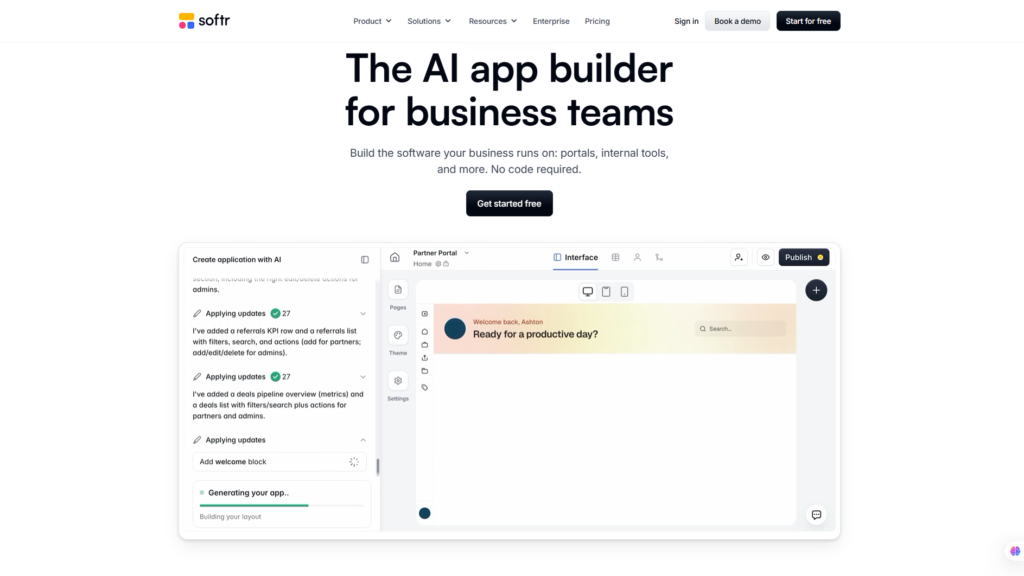
1. AI App Builder
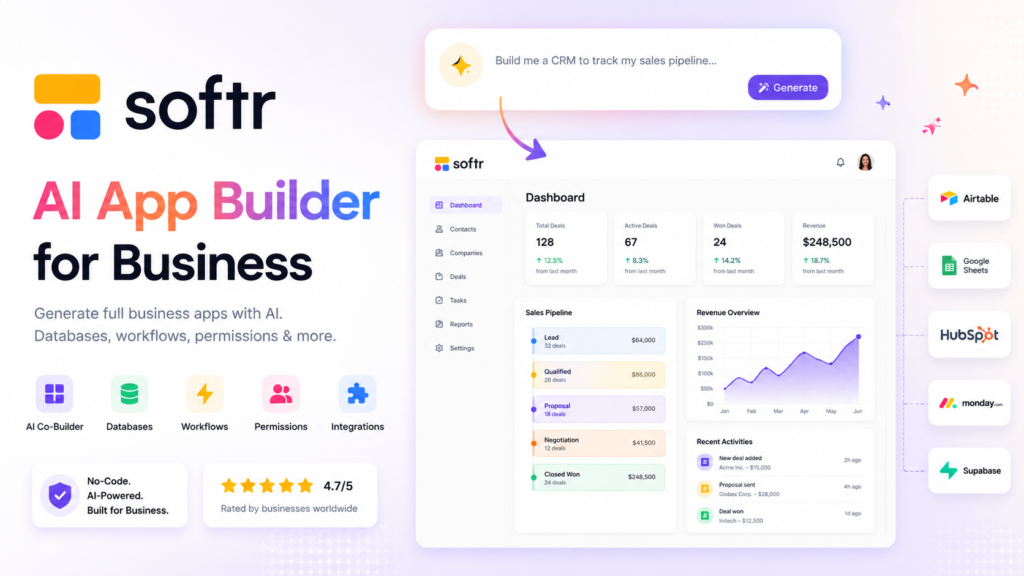
One of Softr’s standout features is its AI Co-Builder, which helps users turn a natural-language description into a working business application.
Instead of starting with a completely blank project, you can describe what you want to build, such as:
- A client portal for an agency
- A lightweight CRM
- An employee directory
- An inventory tracker
- A vendor management portal
- A project management system
Softr can then generate an initial application based on those requirements.
More importantly, Softr’s AI approach goes beyond simply creating attractive pages. The platform is designed to help generate the interface, database structure, and application logic needed to create functional business software.
This makes Softr particularly attractive to non-technical founders and business teams that understand their operational problem but do not necessarily know how to translate it into database schemas and application architecture.
2. Softr Databases
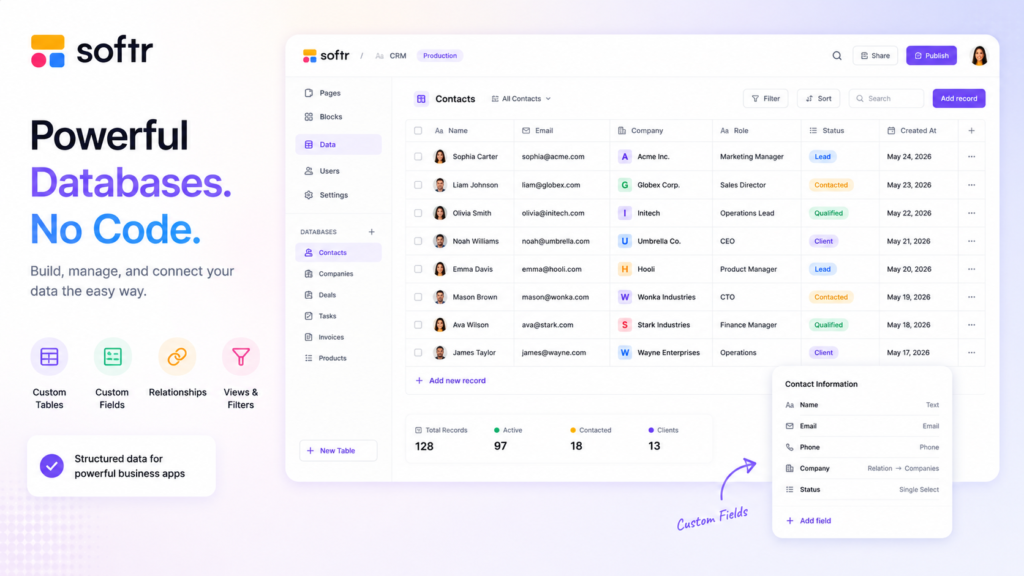
A business application is only as useful as the data behind it, which makes Softr Databases another important part of the platform.
Users can create structured databases for information such as:
- Customers
- Employees
- Projects
- Products
- Inventory
- Orders
- Vendors
- Applications
- Tasks
- Documents
Instead of storing everything across multiple spreadsheets, businesses can structure their information around the application they are building.
For example, an agency could create separate records for clients, projects, tasks, invoices, and account managers and then display the appropriate information inside a client portal.
Softr also supports relational data concepts, making it possible to connect different types of records rather than treating every table as an isolated spreadsheet.
For businesses starting from scratch, having the database and app-building environment within the same ecosystem can simplify development considerably.
3. Client Portals and Internal Tools
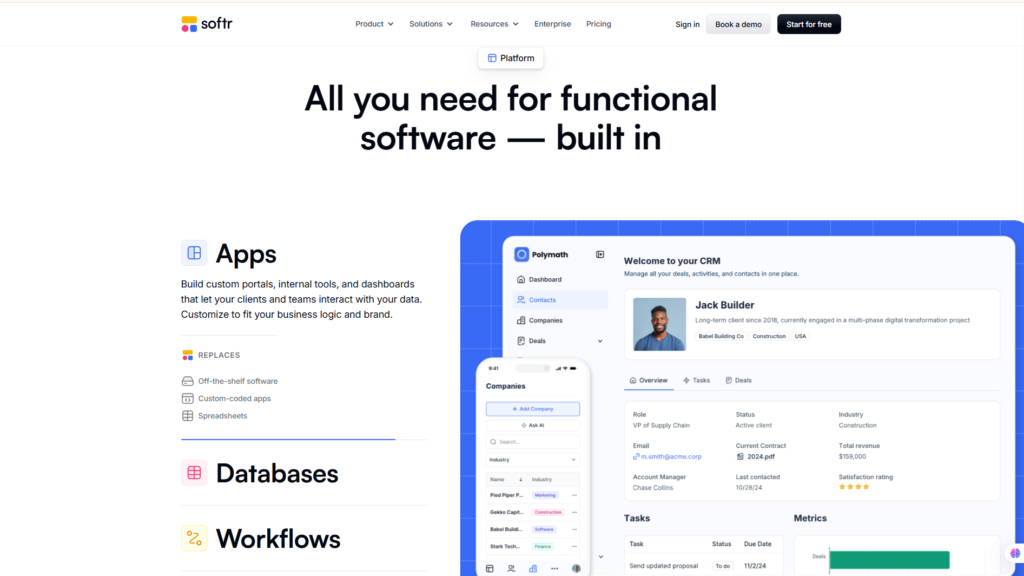
Client portals are arguably one of Softr’s strongest use cases.
A business can create a secure application where customers log in and see information relevant to their account rather than giving everyone access to the same generic dashboard.
A typical agency client portal might include:
- Project status
- Reports
- Documents
- Forms
- Tasks
- Account information
- Support requests
- Important resources
The same concept can be applied internally.
Companies can create employee portals, vendor management systems, CRMs, inventory tools, project trackers, knowledge bases, and operational dashboards.
This is where Softr has a clear advantage over traditional website builders.
A conventional website is primarily designed to publish information.
Softr is designed to help businesses interact with data and processes.
For organizations currently managing important workflows through spreadsheets, email threads, and shared folders, this can be a meaningful upgrade.
4. Data Sources and Integrations
Not every business wants to move its existing data into a new database.
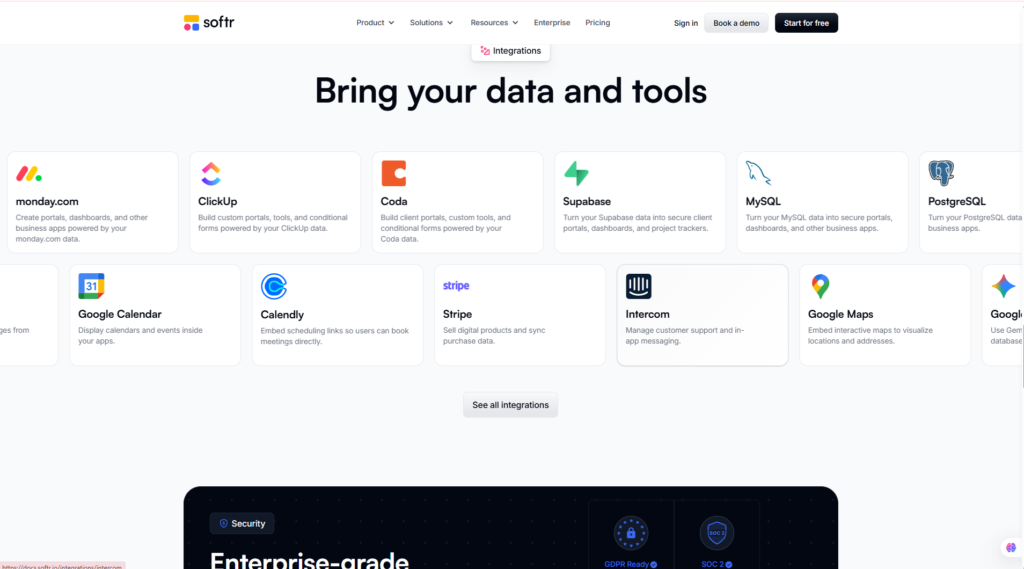
Softr addresses this by supporting connections with external data sources and business platforms.
Depending on the current integration options and plan, Softr can work with sources such as:
- Airtable
- Google Sheets
- monday.com
- ClickUp
- HubSpot
- Supabase
- Xano
- PostgreSQL
- MySQL
- BigQuery
- REST APIs
This flexibility creates an important use case.
Imagine a company that already manages hundreds of customer records in Airtable. Instead of rebuilding its entire system, it could use Softr to create a customer-facing interface around that existing data.
The basic architecture becomes:
Existing Data → Softr → Custom Business Application
For non-technical teams, sources such as Google Sheets or Airtable provide an accessible starting point, while SQL databases, Supabase, Xano, and APIs offer more advanced possibilities for technically capable organizations.
5. Workflow Automation
Building the interface is only one part of creating useful business software.
The application also needs to respond when something happens.
This is where Softr Workflows becomes important.
Workflows can help businesses automate multi-step processes and connect application activity with business operations.
Potential use cases include:
- Updating records
- Sending notifications
- Processing form submissions
- Managing approval processes
- Customer onboarding
- Assigning tasks
- Updating CRM information
- Triggering actions when data changes
For example, a consulting company could create an onboarding process where a new client submits information through a Softr app, relevant records are created or updated, team members are notified, and subsequent steps are triggered automatically.
The combination of app + database + workflow moves Softr beyond simple no-code page building and closer to a lightweight business-software platform.
6. Users, Permissions and Access Control
Business applications frequently contain information that should not be visible to every user.
Softr includes user-management and permission capabilities designed to control access to applications and data.
This is particularly important for portals.
For example:
Client A should see Client A’s projects.
Client B should see Client B’s projects.
Employees may need broader access.
Administrators may require control over the entire system.
Softr allows businesses to structure experiences around different users and user groups, helping determine what information and functionality each group can access.
This makes the platform much more practical for client portals, employee systems, partner portals, and other applications where personalized access matters.
Businesses handling sensitive or regulated data should still evaluate Softr’s current security documentation, compliance capabilities, plan-specific controls, and their own regulatory obligations before deploying critical applications.
Softr Pros and Cons
No platform is ideal for every project. A balanced Softr review needs to consider both the convenience of no-code development and the limitations that come with working inside a managed platform.
Softr Pros
1. No traditional coding required
Business users can create useful applications without learning a full programming stack.
2. AI-assisted application creation
Softr’s AI Co-Builder can accelerate the transition from an idea to an initial app structure.
3. Built-in database
Softr Databases makes it possible to manage application data without automatically relying on another database platform.
4. Excellent fit for portals
Client, employee, partner, and vendor portals are among the platform’s strongest business use cases.
5. Strong external data connectivity
Businesses can build interfaces around data that already exists in supported platforms and databases.
6. User permissions
User groups and access controls make Softr more useful for personalized business applications.
7. Workflow automation
Workflows help connect the application’s front end with operational processes.
8. Accessible to business teams
The platform is particularly appealing to organizations that know what business process they want to improve but lack dedicated software developers.
Softr Cons
1. Advanced applications still require planning
No-code does not remove the need to understand databases, relationships, permissions, and business processes.
2. Less freedom than custom development
Developers who need complete architectural or source-code control may find a managed no-code environment restrictive.
3. Advanced requirements can increase costs
As applications require more users, permissions, integrations, capacity, or advanced functionality, businesses may need higher-priced plans.
4. Some functionality is plan-dependent
Not every feature, capacity limit, or advanced capability is available at every subscription level.
5. It is not designed for every software project
Highly specialized consumer applications or systems requiring extensive custom backend engineering may be better built with other development approaches.
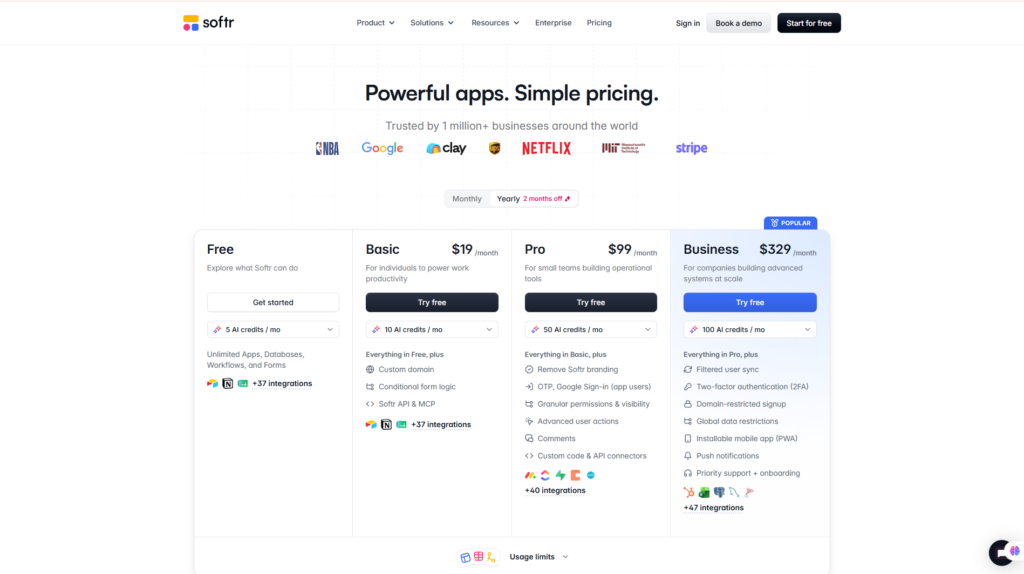
Softr Pricing & Value for Money
Softr pricing is an important part of the buying decision because the right plan depends not only on the number of applications you want to build but also on your users, features, data requirements, and business complexity.
Softr provides a Free plan, allowing new users to explore the platform before committing to a paid subscription.
Paid tiers are designed for progressively more demanding use cases, from relatively small projects to sophisticated business applications and larger organizations.
Softr Pricing Overview
| Plan | Best For | Pricing |
| Free | Learning, testing and simple apps | $0 |
| Basic | Individual builders and smaller applications | Check current pricing |
| Professional | Growing businesses and professional apps | Check current pricing |
| Business | Advanced business applications and teams | Check current pricing |
| Enterprise | Larger organizations with advanced requirements | Custom / Contact Sales |
Important: Softr may update prices, usage limits, user allowances, and plan features. Always check the official Softr pricing page for the latest information before choosing a plan.
Is Softr Free?
Yes. Softr offers a Free plan.
This is valuable because potential users can explore the app-building workflow and understand whether Softr fits their needs without immediately purchasing a subscription.
The Free plan is most appropriate for:
- Learning the platform
- Testing an app idea
- Creating an early prototype
- Exploring Softr Databases
- Evaluating the visual builder
- Understanding basic application workflows
However, a production application used by a growing business may eventually require capabilities or limits available only on paid plans.
The key question is therefore not simply:
“Can I use Softr for free?”
but:
“Does the Free plan support the requirements of the application I actually want to run?”
Which Softr Plan Offers the Best Value?
There is no single best plan for every user.
A practical way to approach Softr pricing is:
Free → Learn and validate
Use it to understand the platform and test whether your application idea works.
Basic → Smaller projects
Consider this level when a simple application has outgrown the Free plan but does not yet require advanced business functionality.
Professional → Growing business use
This is likely to be more relevant for organizations running meaningful customer-facing or internal applications that require broader capabilities.
Business → Advanced operational apps
Larger teams or more sophisticated applications should compare the Business tier’s current limits and functionality against their requirements.
Enterprise → Larger organizations
Organizations requiring enterprise-level capacity, governance, support, security, or contractual arrangements should discuss the current Enterprise offering directly with Softr.
Is Softr Worth the Price?
Softr’s value should not be evaluated only against another website builder.
A more useful comparison is the cost and complexity of solving the same business problem another way.
For example:
Option A: Hire developers to create and maintain a custom client portal.
Option B: Combine a database, form builder, authentication system, automation platform, and front-end tool.
Option C: Use a platform such as Softr to bring several of those capabilities into one environment.
For a small business, agency, or operations team, Option C can be attractive because it reduces the technical barrier and potentially shortens development time.
However, Softr is only good value if the platform fits the underlying application.
A business should not pay for advanced functionality it does not need, and companies with highly specialized software requirements should compare the long-term cost of no-code with custom development.
For new users, the most sensible approach is to start with the Free plan, validate the application, and upgrade only when specific requirements justify it.
Softr Performance Evaluation
Based on Softr’s documented capabilities, current product positioning, breadth of business use cases, and comparison with the wider no-code app-building market, here is our Flowcrai assessment.
Flowcrai Softr Scorecard
| Category | Score |
| Ease of Use | 4.8/5 |
| Features | 4.7/5 |
| AI Capability | 4.6/5 |
| Database & Data Sources | 4.8/5 |
| Integrations | 4.7/5 |
| Business Use Cases | 4.9/5 |
| Customization | 4.4/5 |
| Pricing & Value | 4.4/5 |
| Overall Rating | 4.7/5 |
Evaluation Methodology
Our Softr rating is based on several factors rather than unsupported claims of hands-on testing.
We consider:
- Official Softr product information
- Feature and integration documentation
- Database capabilities
- AI functionality
- User and permission management
- Business use cases
- Pricing structure
- Market positioning
- Flexibility for non-technical users
- Comparison with competing no-code and AI app builders
Softr scores particularly well for ease of use, business use cases, portals, and data-driven applications.
Its main trade-off is the same one found across many no-code platforms: convenience comes with less architectural freedom than building custom software from the ground up.
For the right audience, however, that trade-off may be entirely reasonable.
A small business that needs a functional client portal or internal tool is unlikely to care about unrestricted source-code access if Softr can solve the operational problem faster and with less technical complexity.
That is why our current overall assessment remains 4.7/5.
Softr vs Competitors: How Does It Compare?
Softr is not the only platform that makes application development more accessible. Depending on your requirements, alternatives such as Bubble, Glide, Retool, and Lovable may offer a better fit.
The key is not to ask which platform is universally “best.” Instead, consider what you are trying to build, how technical your team is, how much customization you need, and whether your priority is speed, business workflows, or development flexibility.
Here is a quick comparison.
Softr Alternatives Comparison
| Platform | Best For | Coding Required | Main Strength | Learning Curve |
| Softr | Business apps, portals and internal tools | No | Business-focused no-code development | Low–Moderate |
| Bubble | Complex no-code web applications | No | Deep visual customization | Moderate–High |
| Glide | Data-driven business apps | No | Fast app development | Low–Moderate |
| Retool | Developer-oriented internal tools | Low-code | Technical flexibility | Moderate–High |
| Lovable | AI-generated web applications | AI-assisted | Prompt-driven app development | Low–Moderate |
Each platform approaches application development differently, so let’s look at the most relevant comparisons.
Softr vs Bubble
Bubble is one of the best-known no-code application development platforms and is often considered when users want to build more complex web applications without adopting a traditional programming stack.
The biggest difference is accessibility versus customization.
Softr focuses heavily on practical business applications such as:
- Client portals
- Internal tools
- CRMs
- Inventory systems
- Dashboards
- Employee portals
- Vendor portals
Its structured approach makes it relatively accessible to non-technical business teams.
Bubble, by comparison, generally provides deeper control over application behavior and visual development. That flexibility can be valuable for founders creating more customized software products, but it can also result in a steeper learning curve.
Choose Softr if: you want to create a business portal or internal application quickly without dealing with extensive application-development complexity.
Choose Bubble if: you need deeper customization and are willing to invest more time learning a more flexible no-code environment.
For agencies, consultants, operations teams, and small businesses, Softr’s simpler business-oriented approach may be more practical.
Softr vs Glide
Glide is another strong Softr alternative, particularly for businesses that want to transform structured data into usable applications.
Both platforms can serve non-technical business users, making this one of the more relevant comparisons.
Glide emphasizes fast application development around business data and provides a polished visual development experience.
Softr also supports data-driven applications but has a particularly strong position around portals, business workflows, user permissions, and customer-facing or internal applications.
The decision therefore depends on the application.
Choose Softr if:
- You need a client portal.
- You want an employee or partner portal.
- User permissions are important.
- You are building a business-facing web application.
- You want AI, database, interface, and workflows in one environment.
Choose Glide if:
- You prioritize rapid development of data-driven applications.
- Your use case aligns strongly with Glide’s application model.
- You prefer Glide’s approach to app design and data management.
Neither platform is automatically better. The right choice depends on your data structure, interface requirements, permissions, and intended users.
Softr vs Retool
Retool occupies a somewhat different position in the market.
While Softr emphasizes accessibility for business teams and non-technical builders, Retool is generally more developer-oriented.
Retool is particularly well suited to technical teams creating internal applications around databases, APIs, and existing infrastructure.
This makes it powerful, but potentially more technical than what many small businesses need.
A useful way to think about the difference is:
Softr → Business-user-friendly app building
Retool → Developer-oriented internal tool building
A marketing agency that wants a customer portal may find Softr easier to implement.
A software company with engineers building sophisticated internal administrative tools around APIs and databases may prefer Retool’s development-oriented approach.
Choose Softr if: ease of use, portals, visual building, and accessibility for non-developers matter most.
Choose Retool if: your development team needs deeper technical control when creating internal software.
Softr vs Lovable
Softr vs Lovable is an increasingly relevant comparison as AI changes the way software is created.
Both platforms can dramatically lower the barrier between an idea and a working application, but their approaches are different.
Softr provides a structured no-code ecosystem built around:
- Visual application development
- Databases
- Business logic
- User permissions
- Portals
- Workflows
- External data sources
Lovable takes a more AI-first development approach, allowing users to describe applications conversationally and generate working software through prompts.
This means the two platforms can overlap while appealing to somewhat different users.
Choose Softr if:
You want a structured no-code environment for building business applications, particularly portals and internal tools.
Choose Lovable if:
You prefer an AI-driven development workflow and want greater proximity to generated application code and modern software-development workflows.
For a non-technical operations manager creating a client portal, Softr may feel more structured and predictable.
For an entrepreneur experimenting with AI-generated SaaS products, Lovable may be more attractive.
Which Softr Alternative Should You Choose?
A simple decision framework can make the choice easier:
Choose Softr → Business portals and internal tools
Best when your priority is turning business data and workflows into practical software without traditional coding.
Choose Bubble → Complex no-code web apps
Consider Bubble when you need greater customization and are prepared for a steeper learning curve.
Choose Glide → Fast data-driven apps
A strong option for teams prioritizing rapid development around structured data.
Choose Retool → Developer-focused internal tools
Best suited to technical teams that want to build sophisticated tools around APIs, databases, and existing infrastructure.
Choose Lovable → AI-generated web applications
Worth considering when prompt-driven software creation is central to your workflow.
The important point is that Softr does not need to outperform every competitor in every category.
Its strongest proposition is simpler:
Softr makes it relatively easy for business teams to turn data, workflows, and operational requirements into usable applications without becoming software developers.
Frequently Asked Questions About Softr
Is Softr Free?
Yes. Softr offers a Free plan that allows users to start building and exploring the platform without immediately purchasing a paid subscription.
The Free plan is particularly useful for learning Softr, experimenting with an application idea, or creating an early prototype.
However, businesses running production applications should compare current user limits, feature availability, data capacity, and other restrictions against their actual requirements.
Always check the official pricing page for current plan details.
What Is Softr Used For?
Softr is used to build no-code business applications.
Common use cases include:
- Client portals
- Employee portals
- Partner portals
- Internal tools
- CRMs
- Inventory systems
- Project trackers
- Dashboards
- Knowledge bases
- Vendor management applications
- Business workflow applications
It is particularly useful when an organization wants customized software without developing the entire application through traditional programming.
Is Softr Good for Beginners?
Yes, Softr is relatively beginner-friendly compared with traditional application development.
Its visual development environment, templates, native database tools, and AI-assisted app creation can significantly reduce the technical knowledge required to get started.
However, beginners should understand that building a good business application still requires planning.
You need to know:
- What data the application needs
- Who will use it
- What each user should see
- How records relate to one another
- Which actions should be automated
Softr simplifies implementation, but it cannot replace good business-process design.
Do You Need Coding Skills to Use Softr?
No traditional coding skills are required for Softr’s core no-code workflow.
Users can visually create pages, connect data, configure users, set permissions, and build applications without manually programming the entire system.
This makes Softr especially attractive to entrepreneurs, agencies, consultants, and business teams without dedicated developers.
More advanced data sources and integrations may still require greater technical knowledge.
Can Softr Build a Client Portal?
Yes. Client portals are one of Softr’s most compelling use cases.
A business can create a private environment where clients log in and access information relevant to them.
Depending on how the application is configured, this could include:
- Project information
- Reports
- Documents
- Tasks
- Forms
- Account details
- Resources
- Customer-specific records
User groups and permissions can help control which information different users are allowed to access.
This makes Softr particularly interesting for agencies, consultants, professional services firms, and other businesses that regularly share information with customers.
Can Softr Connect to Airtable and Google Sheets?
Yes. Softr supports external data sources, including Airtable and Google Sheets, alongside other business platforms and database technologies.
This can be useful for companies that already have operational data stored outside Softr.
Instead of rebuilding everything immediately, they may be able to create a Softr application around their existing data infrastructure.
Businesses should check Softr’s current documentation for plan-specific integration availability and limitations.
Is Softr Better Than Bubble?
It depends on what you want to build.
Softr may be better for non-technical users who prioritize:
- Client portals
- Internal tools
- Faster setup
- Business applications
- Structured no-code workflows
Bubble may be preferable for builders who want deeper customization and are willing to work with a more complex development environment.
Therefore, asking whether Softr or Bubble is “better” is less useful than asking:
Which platform better matches the complexity of my application and my team’s technical capabilities?
What Are the Best Softr Alternatives?
Some of the most relevant Softr alternatives include:
Bubble — for highly customizable no-code web applications.
Glide — for fast, data-driven business applications.
Retool — for developer-oriented internal tools.
Lovable — for AI-assisted, prompt-driven web application development.
The right alternative depends on whether your priority is ease of use, customization, AI development, data management, internal tooling, or developer control.
Final Verdict: Is Softr Worth It in 2026?
After evaluating its positioning, features, databases, integrations, workflows, user-management capabilities, pricing structure, and competitors, Softr stands out as a strong option for businesses that need custom software without the complexity of traditional software development.
Softr Is Best For
Softr is particularly well suited to:
- Small and medium-sized businesses
- Agencies
- Consultants
- Operations teams
- Non-technical founders
- Professional service businesses
- Businesses creating client portals
- Companies building employee or partner portals
- Teams replacing spreadsheet-heavy workflows
- Organizations that need custom internal tools
Softr Is Not Ideal For
You may want to consider another solution if:
- You require complete source-code control.
- Your application needs highly specialized backend engineering.
- You are building an unusually complex consumer application.
- Your developers require unrestricted architectural control.
- You only need a simple blog or marketing website.
Final Recommendation
The biggest advantage of Softr is not simply that it lets you build an application without coding.
Its more important value proposition is the ability to bring AI-assisted app creation, databases, user management, permissions, business logic, external data, and workflows into one business-focused environment.
For an agency trying to build a client portal, an operations team replacing spreadsheet-based processes, or a small business that needs custom internal software, this combination can be compelling.
The main limitation is flexibility.
As application requirements become increasingly specialized, the convenience of a managed no-code environment needs to be weighed against the deeper control available through more technical platforms or custom development.
For its intended audience, however, Softr strikes an attractive balance between capability and accessibility.
The availability of a Free plan also lowers the barrier to evaluating the platform. Instead of committing immediately to a paid subscription, potential users can explore Softr, create an initial application, and determine whether the platform fits their workflow before upgrading.
Flowcrai Overall Rating: 4.7/5
Best For: Business apps, client portals, internal tools, and non-technical teams.
Bottom Line: If you want to turn business data and workflows into a functional application without building everything from scratch, Softr deserves serious consideration in 2026.
Start with the Free plan and see whether Softr fits your application requirements before upgrading.
→ Explore More AI & SaaS Reviews
Compare Softr with other AI and no-code platforms on Flowcrai before making your final decision.
References
For the latest product information, features, limits, and pricing, consult:
- Softr Official Website
- Softr Pricing
- Softr AI App Builder
- Softr Databases
- Softr Data Sources & Integrations
- Softr Workflows
- Softr Help Center
- Softr Security Documentation
Note: SaaS features, pricing, plan limits, integrations, and product capabilities can change over time. Verify current information on Softr’s official website before making a purchasing decision.