
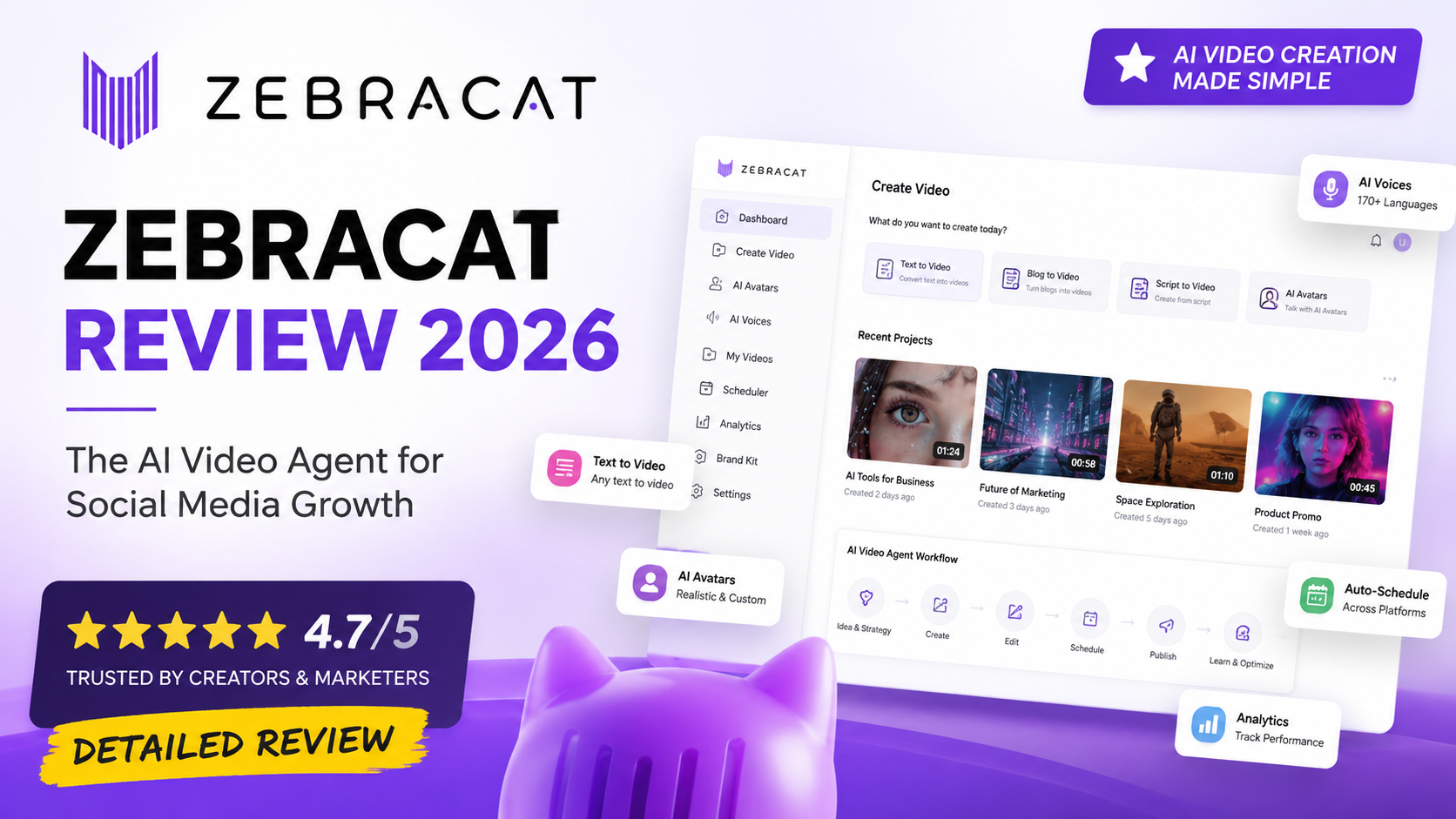
Zebracat Review 2026: Features, Pricing, Pros & Cons
Meta Description: Read our Zebracat review 2026 to explore its AI video features, pricing, pros and cons, use cases, and whether Zebracat is worth using.
Overall Rating: ★★★★★ 4.7/5
Best For: Content creators, social media marketers, faceless video creators, small businesses, and agencies
Last Updated: August 2026
Reviewed by: Team Flowcrai
Affiliate Disclosure: This article may contain affiliate links. Flowcrai may earn a commission if you purchase through our links, at no additional cost to you.
Zebracat Review 2026: Key Takeaways
- Zebracat is an AI-powered video creation platform designed to help creators, marketers, and businesses produce finished videos without relying heavily on traditional editing workflows.
- It can turn text, scripts, blog URLs, and other content into videos, making it particularly useful for social media and content repurposing.
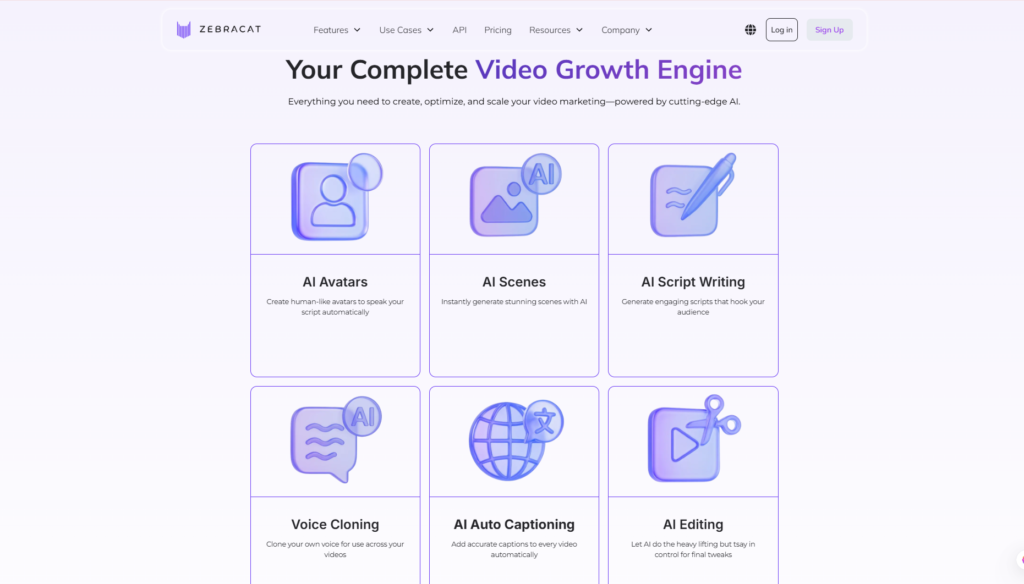
- Zebracat combines tools such as AI visuals, avatars, voiceovers, voice cloning, captions, and automated editing within one platform.
- Its biggest advantage is speed and workflow automation, while users who require detailed timeline-level editing may prefer a professional video editor.
- Zebracat is especially attractive to creators publishing Shorts, Reels, TikToks, faceless videos, marketing content, and other social-first videos.
Quick Verdict
Zebracat Quick Info
| Item | Information |
| Overall Rating | ★★★★★ 4.7/5 |
| Best For | Creators, marketers & small businesses |
| Main Use | AI video creation & social media content |
| Free Option | Available |
| Text-to-Video | Yes |
| Blog-to-Video | Yes |
| AI Avatars | Yes |
| AI Voice / Voice Cloning | Yes |
| Platform | Web-based |
| Skill Level | Beginner–Intermediate |
Our Verdict
Zebracat is a compelling option for creators and marketers who want to produce more video content without spending hours scripting, sourcing footage, recording voiceovers, and manually editing every scene.
Its biggest strength is that it goes beyond basic text-to-video generation. Zebracat brings together AI-generated visuals, scripts, voices, avatars, captions, editing, and content repurposing in one workflow. Its official feature set also increasingly focuses on helping users create social-first content rather than simply generating isolated video clips.
However, AI automation does not eliminate the need for human review. Creators seeking cinematic production or highly detailed manual editing may still need tools such as Adobe Premiere Pro or DaVinci Resolve.
Overall, Zebracat is best suited to people who value production speed, scalability, and simplicity over frame-by-frame editing control.
→ Visit Zebracat Official Website
What Is Zebracat?
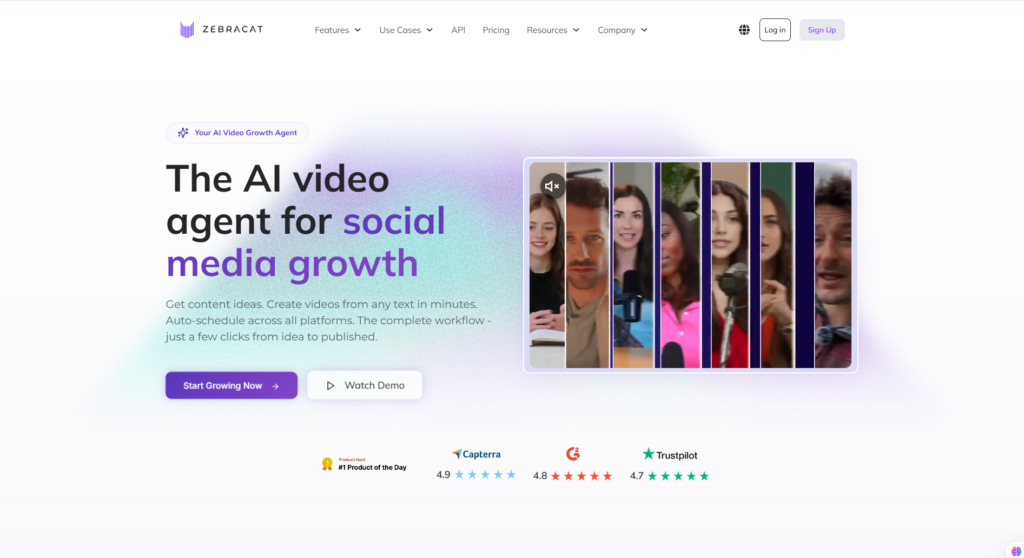
Zebracat is an AI-powered video creation platform built to help creators, marketers, entrepreneurs, and businesses produce ready-to-publish videos faster.
According to Zebracat, the platform is designed for users who want to grow through video without depending on traditional editors or agencies.
Instead of manually going through a conventional workflow such as:
Idea → Script → Voiceover → Footage → Editing → Captions → Export
Zebracat attempts to automate much of that process with artificial intelligence.
Users can start from written content, prompts, scripts, or existing articles and allow the platform to generate the visual and audio components needed to create a video. Zebracat’s dedicated text-to-video tool, for example, is built around turning written material into ready-to-share videos.
What Problem Does Zebracat Solve?
Video marketing can be resource-intensive.
A traditional production workflow may require a writer, presenter, voice actor, designer, stock media library, video editor, captioning software, and several hours of manual work.
That creates a problem for creators and businesses trying to maintain a high publishing frequency.
Zebracat aims to reduce that friction.
Its tools can help automate tasks such as:
- Turning ideas into scripts
- Converting text into videos
- Turning blog posts into videos
- Generating AI visuals
- Creating voiceovers
- Generating AI avatars
- Adding captions
- Editing video sequences
- Producing faceless social videos
For example, its blog-to-video workflow allows users to paste a blog URL, after which Zebracat analyzes the article and converts it into a video-oriented script before users choose elements such as visuals, voice, and pacing.
This makes the platform particularly relevant for businesses that already have written content but want to expand into video without rebuilding everything from scratch.
How Does Zebracat Work?
The core Zebracat workflow can be simplified into four stages:
Input → AI Generation → Editing → Export or Publish
First, users provide source content.
Depending on the workflow, that could be:
- A text prompt
- An existing script
- A blog post
- A website URL
- Written content
- Audio or a voice note
Zebracat then uses AI to transform that source into a video concept.
For script-based videos, for example, the platform can automatically add visuals, avatars, voiceovers, and editing elements to the supplied script.
Users can then adjust the generated output before completing the video.
For faceless video creation, Zebracat specifically supports starting from text, audio, or a URL and then selecting elements such as video style, voice, and music.
The result is a workflow that can significantly reduce the number of separate applications needed to create one social media video.
What Makes Zebracat Different?
Zebracat should not be viewed only as another basic AI text-to-video generator.
That is certainly part of what it does, but its broader direction is more interesting.
Zebracat increasingly positions its technology around an AI-assisted social video workflow in which video generation is connected with content creation, publishing, and performance-driven iteration. Its own 2026 material describes its video-generation agent as supporting video creation, scheduling, posting to social channels, and learning from performance to improve future content.
That positioning separates it from AI tools focused only on generating clips from prompts.
The platform also combines several important AI video capabilities in one ecosystem, including text-to-video, avatars, voice cloning, AI visuals, and editing tools.
For creators trying to scale social content, the potential value is therefore not just:
“Can AI generate a video?”
The more important question becomes:
“Can AI reduce the entire amount of work required to publish videos consistently?”
That is where Zebracat becomes particularly interesting.
Who Should Use Zebracat?
Zebracat has a fairly broad audience, but it is most compelling when frequent video production matters more than highly technical manual editing.
Zebracat Is Best For
Social Media Creators
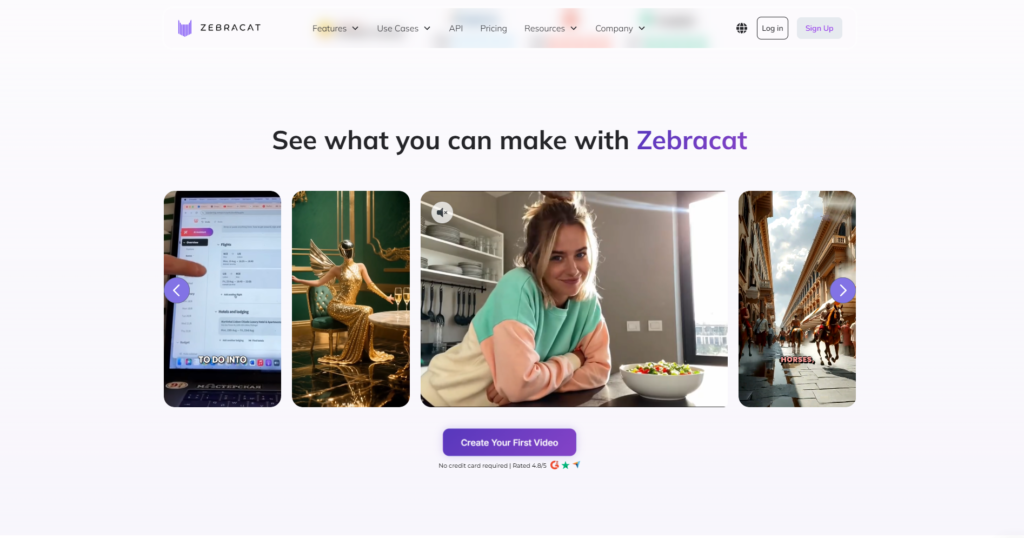
Creators producing TikTok videos, Instagram Reels, YouTube Shorts, and other social content can use Zebracat to turn ideas and scripts into finished videos faster.
Its emphasis on AI-assisted production makes it particularly suitable for users who need to publish consistently rather than spending hours editing every video.
Faceless Content Creators
Zebracat is particularly relevant to people building channels without appearing on camera.
Its faceless video workflow can turn text, audio, or article URLs into video concepts and combine them with AI voices, visuals, and music.
That can be useful for educational content, storytelling, list videos, informational Shorts, and niche social accounts.
Digital Marketers
Marketers can use Zebracat to create:
- Social media videos
- Product explainers
- Promotional content
- Educational videos
- Content repurposing campaigns
- Short-form advertisements
Zebracat also provides dedicated product-video capabilities using AI avatars, visuals, and automated video production.
Affiliate Marketers
Affiliate marketers may find Zebracat especially useful for turning written reviews, comparison posts, product descriptions, and informational articles into social video content.
For example, an affiliate website could potentially repurpose a long-form review into several YouTube Shorts, TikTok videos, or Instagram Reels rather than producing each piece manually.
The important point is to review and fact-check AI-generated scripts before publication, particularly when discussing prices, product specifications, or marketing claims.
Small Businesses
Small businesses often do not have dedicated video teams.
Zebracat can reduce the technical barrier by automating significant portions of scripting, voice production, visuals, and editing.
This may make regular video marketing more achievable without hiring separate specialists for every production step.
Agencies
Marketing and content agencies may benefit from Zebracat when managing high-volume social content.
The biggest potential benefit here is scalability: an AI-assisted workflow can help teams create initial drafts faster while leaving human staff to focus on messaging, brand consistency, fact-checking, and final approval.
Who Should Skip Zebracat?
Zebracat will not be the right tool for everyone.
You may want to consider an alternative if you are:
- A professional filmmaker requiring advanced cinematic workflows
- An editor who needs detailed timeline and keyframe control
- Producing complex long-form documentaries
- Working heavily with professional color grading
- Creating projects with complex audio mixing
- Producing videos only occasionally
- Looking only for basic trimming or simple editing
Traditional professional editors still provide significantly more granular creative control.
Zebracat’s strength is automation and speed, not replacing every capability of advanced editing software.
Zebracat Setup & User Experience
Account Setup
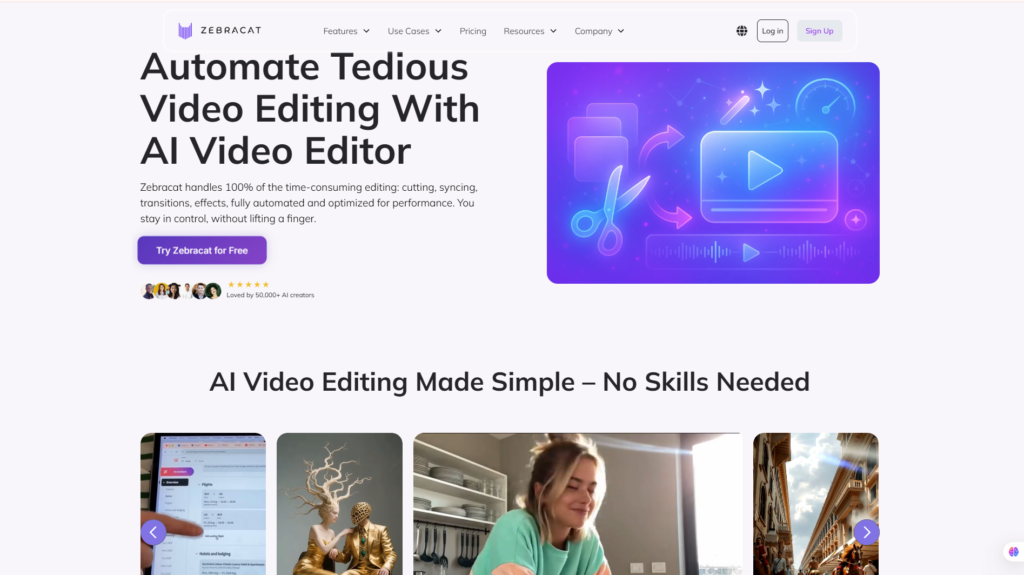
The platform is web-based, which eliminates the need to install traditional desktop video-editing software before getting started.
A typical Zebracat workflow looks like this:
Create an account → Select a video workflow → Add your prompt, script, text, or URL → Select visual and voice preferences → Generate the video → Review and edit → Export or publish
The platform’s script-to-video workflow is specifically designed to automatically add elements such as visuals, avatars, voiceovers, and editing to an existing script.
Learning Curve
Zebracat appears primarily designed for users who are not professional video editors.
That makes the learning curve considerably different from software such as Premiere Pro, Final Cut Pro, or DaVinci Resolve.
Instead of mastering timelines, layers, keyframes, effects, transitions, and complex audio controls, much of the initial production process is driven by content inputs and AI automation.
This should make Zebracat relatively approachable for beginners.
However, obtaining consistently good AI-generated videos still requires users to understand:
- How to write clear prompts
- How to structure effective scripts
- How to select appropriate visuals
- How to review AI-generated content
- How to optimize videos for different platforms
AI simplifies the technical production process, but strong content strategy still matters.
Ease of Use
Zebracat’s main usability advantage is workflow consolidation.
A creator might otherwise need one application for scriptwriting, another for AI voice generation, another for footage, another for avatars, and another for editing.
Zebracat brings many of these capabilities together.
Its official features include text-to-video, AI avatars, voice cloning, and advanced editing tools within the same broader platform.
For users primarily interested in output rather than learning professional video-editing software, this approach can save substantial workflow complexity.
Interface & Workflow
The platform follows a content-first approach.
Rather than opening an empty professional editing timeline and asking users to build everything manually, Zebracat starts with the content itself.
You provide the idea, text, script, article, or other source material.
The AI then assists with production.
That approach makes particular sense for marketers, bloggers, affiliate publishers, and social media managers because these users often already have ideas or written content. Their challenge is converting those assets into video efficiently.
Our UX Analysis
Based on Zebracat’s official product pages, feature documentation, available workflows, and positioning, its user experience appears optimized primarily around reducing production friction rather than maximizing manual editing control.
That is an important distinction.
Zebracat is unlikely to replace professional software for editors who want complete control over every frame. Instead, it targets creators and marketers who want AI to handle a larger share of repetitive production tasks.
The availability of text-to-video, article-to-video, AI avatars, AI voices, faceless video creation, and automated editing makes the platform particularly attractive for repeatable social media workflows.
For that audience, Zebracat’s biggest usability advantage may simply be this: fewer tools, fewer manual steps, and a faster path from an idea to a publishable video.
Key Features of Zebracat
The feature set is where Zebracat becomes more interesting than a basic AI video generator.
Instead of focusing on only one stage of production, Zebracat combines several tasks involved in creating social video content: generating scripts, producing visuals, adding AI voices or avatars, editing scenes, adding captions, and preparing content for publishing.
Here are the most important Zebracat features to consider.
1. AI Text-to-Video Generation
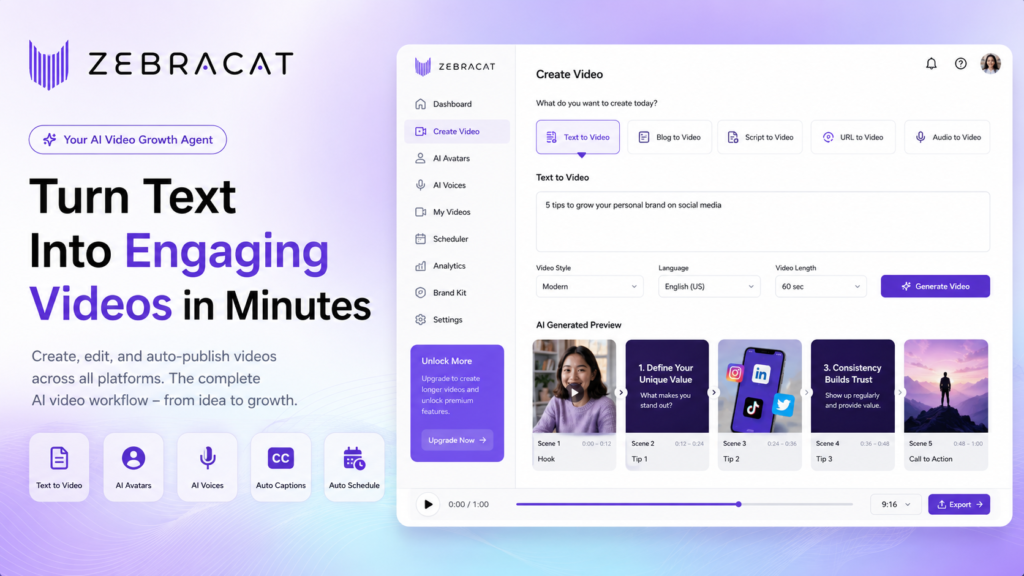
Text-to-video is one of Zebracat’s core capabilities.
Rather than starting with raw footage and manually assembling a timeline, users can provide written content and allow AI to build the initial video around it.
Depending on the workflow, that input can include:
- A simple idea or prompt
- A prepared script
- Written content
- A blog post
- A URL
- Other source material
Zebracat then helps transform that information into a video using AI-generated scenes, visuals, voiceovers, music, captions, and editing.
This can be especially valuable for marketers who already have written assets.
For example, instead of leaving a 2,000-word blog post as text only, a publisher could repurpose its main ideas into short-form videos for TikTok, Instagram Reels, or YouTube Shorts.
The major benefit is therefore not just video generation itself.
It is content repurposing at scale.
For creators publishing frequently, reducing the amount of manual production required for each video can potentially make a significant difference.
2. AI Script Writing
A video is only as effective as the message behind it.
Zebracat includes AI-assisted script generation designed to help users move from an initial idea to a structured video script.
This can be useful when you know what topic you want to cover but do not want to write every line manually.
Potential applications include:
- YouTube Shorts
- TikTok videos
- Instagram Reels
- Product explainers
- Educational videos
- Marketing videos
- Affiliate content
- Faceless videos
For marketers, AI script generation can also reduce the gap between content research and production.
Instead of using one AI writing tool to create a script, copying that script into a voice generator, finding visuals elsewhere, and finally importing everything into an editor, Zebracat attempts to keep more of that workflow inside one environment.
However, AI-generated scripts should still be reviewed before publication.
This is particularly important when discussing product specifications, prices, health-related information, statistics, or other factual claims.
AI can accelerate the first draft.
Human judgment should still determine the final message.
3. AI Avatars
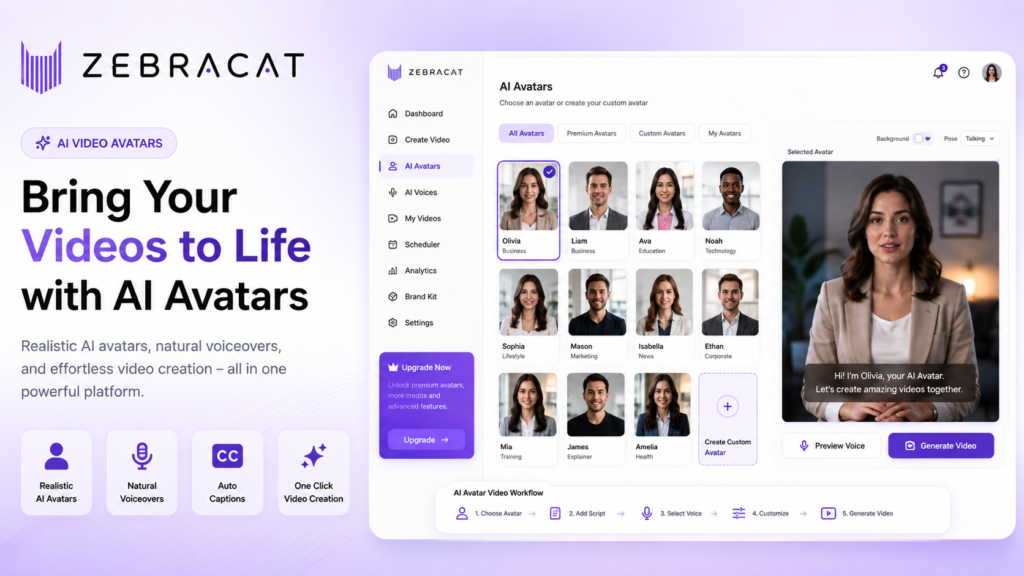
Zebracat also supports AI avatars, allowing users to create presenter-style videos without filming a human presenter for every piece of content.
This feature can be valuable for:
- Tutorials
- Product presentations
- Educational videos
- Marketing content
- Social media videos
- Explainer videos
- Faceless brands
An AI avatar can provide a visible presenter while removing several traditional production requirements such as cameras, lighting, physical studios, and repeated recording sessions.
Depending on the available plan and current feature configuration, users can work with existing avatars and more personalized avatar options.
This is particularly useful for creators who want a human-like presence in their videos but prefer not to appear on camera themselves.
That said, avatars are not automatically the best choice for every project.
For entertainment-driven short-form content, AI-generated scenes and dynamic visuals may feel more natural. For educational or explanatory content, an avatar presenter may provide a clearer structure.
The right choice depends on the audience and the format rather than the technology alone.
4. AI Voices and Voice Cloning
Voiceover production is another area where AI can dramatically simplify video creation.
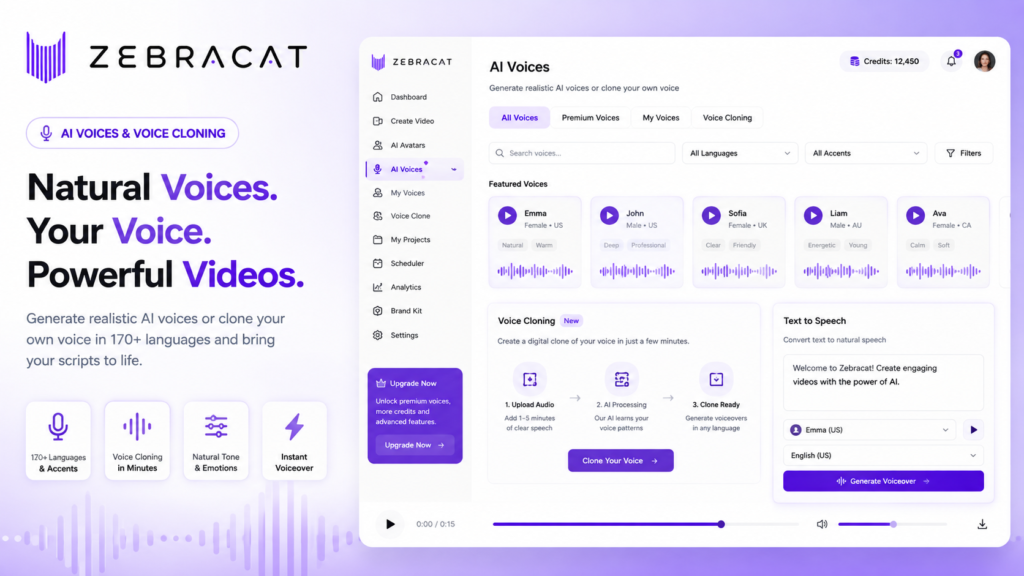
Zebracat provides AI voice capabilities and voice cloning features on eligible plans, allowing creators to generate narration without recording every script manually.
Potential benefits include:
- Faster voiceover production
- Consistent narration
- Faceless content creation
- Easier content localization
- Reduced dependence on external voice actors
- Faster revisions when scripts change
Voice cloning can be particularly useful for creators who want to maintain a recognizable voice across many videos without repeatedly recording each script.
For example, a creator could potentially build a workflow where a written script is converted into narration using an approved cloned voice and then combined with AI-generated visuals.
This could substantially reduce production time for high-volume channels.
However, creators should use voice cloning responsibly and only clone voices when they have appropriate rights or consent.
AI-generated narration should also be reviewed for pronunciation, pacing, tone, and context before publication.
5. AI Scenes and Generative Visuals
One challenge with traditional automated video tools is that many rely heavily on stock footage.
The result can sometimes feel generic, particularly when multiple creators use similar libraries.
Zebracat addresses this partly through AI-generated visual capabilities.
Instead of relying exclusively on pre-existing footage, generative AI can help create visual scenes tailored more closely to the script or prompt.
This expands the creative possibilities for content such as:
- Storytelling
- Educational explainers
- Promotional videos
- Social media content
- Concept videos
- Faceless channels
Generative visuals can also help when suitable stock footage simply does not exist.
However, AI-generated scenes are not guaranteed to be perfect.
Users should check for visual inconsistencies, inaccurate details, awkward motion, incorrect text, or other common generative AI artifacts.
The best workflow is not necessarily to accept every generated scene automatically.
Instead, AI can produce the initial visual material while the creator retains responsibility for final quality control.
6. AI Editing and Automatic Captions
Generating video assets is only part of the production process.
Those assets still need to be assembled into something viewers will actually watch.
Zebracat therefore includes AI-assisted editing functionality designed to reduce the manual effort involved in turning generated assets into finished content.
Depending on the workflow, users can work with elements such as:
- Scenes
- Visuals
- Voiceovers
- Music
- Captions
- Text
- Timing
- Video structure
Automatic captions are particularly important for social media.
Many viewers encounter videos while scrolling without immediately enabling audio. Clear captions can therefore improve comprehension and make content easier to consume in sound-off environments.
Captions also help creators adapt one piece of content for platforms such as TikTok, Instagram Reels, YouTube Shorts, and other vertical-video environments.
The trade-off is control.
AI-assisted editing prioritizes speed and convenience. Professional timeline editors such as Premiere Pro or DaVinci Resolve still provide much deeper control over advanced transitions, keyframes, audio mixing, effects, color grading, and other production details.
For Zebracat’s target audience, however, that may be an acceptable compromise.
7. Social Media Content Workflow
This may be one of the most important aspects of Zebracat’s current positioning.
Many AI video platforms essentially stop after generating a video.
Zebracat is moving toward a broader social content workflow where AI can assist with more than the initial generation stage.
The concept can be summarized as:
Strategy → Create → Edit → Schedule → Publish → Learn
This matters because the real problem for many marketers is not producing one AI video.
The challenge is consistently producing relevant videos week after week.
A creator may need to:
- Find topics.
- Develop content ideas.
- Write scripts.
- Create videos.
- Edit them.
- Publish across social channels.
- Analyze performance.
- Decide what to create next.
By connecting more of these stages, Zebracat potentially becomes more useful to high-frequency social creators than a standalone text-to-video generator.
This also explains why Zebracat is particularly relevant to marketers, agencies, affiliate publishers, and businesses rather than only hobbyist AI users.
Zebracat Pros and Cons
No AI video platform is perfect, and Zebracat should be evaluated according to the type and volume of content you actually plan to produce.
Pros
1. All-in-one AI video workflow
Zebracat combines multiple stages of video production rather than requiring separate tools for every task.
2. Beginner-friendly approach
Prompt-, script-, and content-driven generation lowers the technical barrier compared with professional editing software.
3. Strong text-to-video capabilities
Existing written material can become a starting point for video creation.
4. Useful content repurposing
Bloggers, marketers, and publishers can potentially turn existing articles and other content into social videos.
5. AI avatars
Useful for presenter-style videos without requiring users to record themselves on camera.
6. AI voices and voice cloning
Can reduce the time and cost associated with repeated voiceover recording.
7. Generative AI visuals
AI-generated scenes provide an alternative to relying exclusively on generic stock footage.
8. Suitable for faceless content
The combination of AI scripts, visuals, voices, avatars, and editing makes Zebracat particularly relevant to faceless creators.
9. Social-media-focused workflow
Zebracat’s broader emphasis on social video production differentiates it from tools that only generate isolated clips.
10. Free entry point
Users can explore the platform before deciding whether a paid plan makes financial sense.
Cons
1. Advanced functionality requires paid plans
The free option is primarily useful for evaluating the platform. Serious or frequent production will generally require more capacity.
2. AI credits can become a constraint
Generative AI features consume computational resources, meaning usage allowances matter when comparing plans.
High-volume creators should therefore evaluate the number of videos they actually plan to produce rather than focusing only on the advertised monthly subscription price.
3. AI output still requires human review
Scripts, visuals, captions, voiceovers, and generated scenes can contain errors.
Automation does not remove the need for quality control.
4. Less granular control than professional editors
Users who need frame-level editing, advanced motion graphics, detailed audio mixing, or sophisticated color grading may still need dedicated editing software.
5. Generative quality can vary
The quality of AI-generated content depends partly on the prompt, source material, selected style, and generation model.
Not every result will be publish-ready on the first attempt.
6. Costs may increase with production volume
Creators generating many videos or using resource-intensive generative features may need higher-tier plans.
Zebracat Pricing 2026
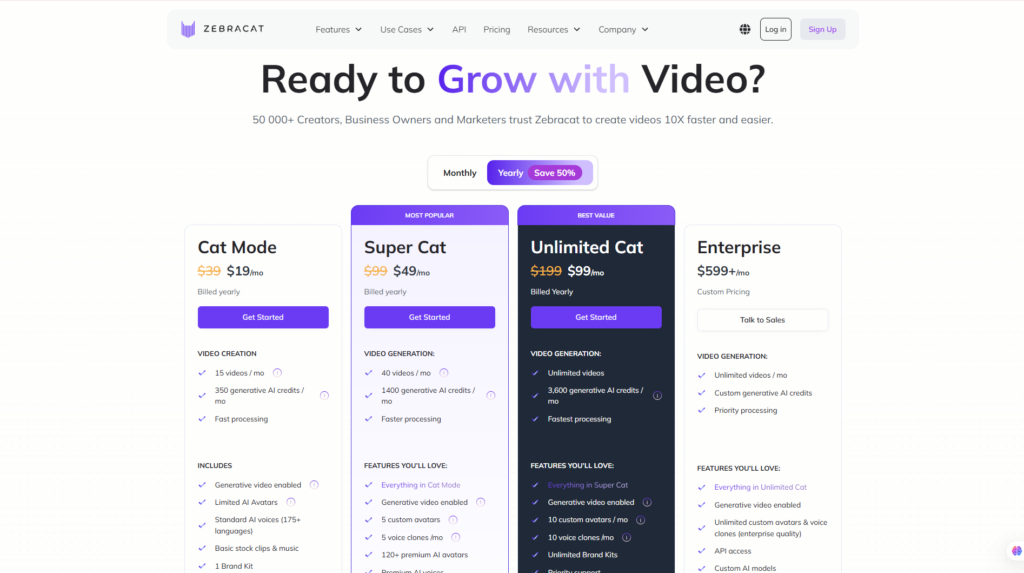
Zebracat offers a free entry point along with several paid tiers designed for different levels of video production.
Because AI video platforms frequently update pricing, credits, feature allowances, and annual discounts, it is important to check Zebracat’s official pricing page before subscribing.
Zebracat Pricing Overview
At the time of this review, Zebracat’s plan structure includes options such as:
| Plan | Cost | Best For |
| Free | $0 | Testing Zebracat |
| Cat Mode | Check current pricing | Individual creators |
| Super Cat | Check current pricing | Regular creators & marketers |
| Unlimited Cat | Check current pricing | High-volume video production |
| Enterprise | Custom / current quote | Businesses & larger teams |
Important: Prices, AI credits, video limits, export quality, avatar access, voice-cloning allowances, and other plan features may change. Always verify the current offer on the official Zebracat pricing page before purchasing.
Zebracat Free Plan
The Free plan is the logical starting point for new users.
Its main purpose is not to support a large-scale content operation indefinitely.
Instead, it gives prospective users an opportunity to understand the Zebracat workflow before committing to a subscription.
A new user should use the free option to answer practical questions such as:
- Is the interface easy enough for my workflow?
- Does the AI generate the type of videos I want?
- Are the available styles suitable for my niche?
- Do the voices sound appropriate for my audience?
- How much manual editing do my videos require?
- Would Zebracat actually save me time?
That last question is particularly important.
An AI tool is not good value simply because it can generate content.
It becomes valuable when it reduces the amount of time, labor, or software required to achieve an acceptable result.
For occasional experimentation, the Free plan may be enough.
For consistent publishing, however, most creators will eventually need a paid tier.
Cat Mode
Cat Mode is positioned toward individual creators who have moved beyond basic experimentation and want to produce AI videos more regularly.
Compared with the free tier, a paid creator-level plan generally makes more sense when you have an established publishing schedule.
For example, if you intend to create multiple social videos every week, the important metric is not simply the subscription price.
Instead, calculate:
Monthly subscription cost ÷ number of usable videos produced
That gives you a more realistic cost per finished video.
If Zebracat replaces several hours of editing or reduces the need for additional AI voice and video tools, the subscription may become easier to justify.
Super Cat
Super Cat is more relevant to creators and marketers who need higher AI generation capacity or access to more advanced functionality.
This type of tier is likely to make the most sense for users producing content as part of a business rather than occasionally experimenting with AI.
Potential users include:
- Full-time content creators
- Affiliate marketers
- Social media managers
- Digital marketers
- Small marketing teams
- Freelancers
- Agencies managing regular campaigns
Features such as higher generative allowances, advanced AI functionality, avatars, and voice-related capabilities become more valuable when video production is frequent.
However, buyers should compare actual monthly output with the plan allowances before upgrading.
Unlimited Cat
Unlimited Cat is aimed at users whose biggest constraint is production volume.
This could be relevant to agencies, content operations, or creators running several social channels.
The key question here is whether you genuinely need unlimited or very high video-generation capacity.
A higher-tier subscription is poor value if you produce only a handful of videos per month.
Conversely, if video is a major acquisition channel and Zebracat becomes part of your daily production workflow, higher capacity can be economically justified.
Always check what “unlimited” applies to because AI credits, premium models, avatars, generative scenes, or other resource-intensive functions may have separate conditions.
Zebracat Enterprise
Enterprise plans are intended for organizations with requirements beyond standard creator subscriptions.
Depending on Zebracat’s current offering, enterprise use cases may involve areas such as:
- Higher production capacity
- Team workflows
- API requirements
- Custom limits
- Priority support
- Organization-specific needs
Companies considering this tier should request current information directly from Zebracat rather than relying on standard consumer pricing tables.
Is Zebracat Worth the Price?
For the right user, potentially yes.
But Zebracat’s value should be measured in production efficiency, not just subscription cost.
Consider a creator who currently uses several separate tools:
- AI writing software for scripts
- AI voice software
- Stock footage
- AI image or video generation
- Caption software
- Video editing software
- Social publishing tools
If Zebracat can consolidate several of those tasks into one workflow, its effective value can be considerably higher than the monthly price alone suggests.
On the other hand, someone who produces one or two videos per month may not need an advanced subscription.
Is the Free Plan Enough?
Yes, for testing.
It is the best place to determine whether Zebracat fits your content style and workflow.
It is less suitable for a serious high-volume publishing strategy.
Who Should Upgrade?
Consider a paid plan if you:
- Publish videos every week
- Manage multiple social channels
- Create faceless content regularly
- Repurpose blog content into videos
- Need AI avatars or voice functionality
- Want to reduce manual video editing
- Use video for marketing or revenue generation
Which Zebracat Plan Offers the Best Value?
There is no single best plan for everyone.
For most users, the best approach is:
Start Free → Measure your actual usage → Upgrade only when production limits become restrictive.
Individual creators should generally avoid paying for capacity they do not use.
Businesses and high-volume creators, however, should focus more on cost per usable video and hours saved than on finding the cheapest subscription.
That is ultimately the more meaningful measure of Zebracat’s value.
→ Check Zebracat Latest Pricing
Zebracat Performance Evaluation
Zebracat is best evaluated as an AI-powered social video production platform, not as a direct replacement for a professional video editor.
Its strongest value comes from reducing the number of manual steps between an idea and a finished video. Zebracat can analyze written input, combine it with visuals and voice, and produce an automatically edited video ready for further customization. Its official text-to-video workflow specifically emphasizes matching input with visuals, voice, pacing, and automated editing.
For creators and marketers, that can translate into a much faster production workflow.
However, the more automation a platform provides, the more important it becomes to review the generated output carefully. AI-generated visuals, scripts, voices, captions, and scene selections may still require manual correction.
Zebracat Score Breakdown
| Category | Score |
| Ease of Use | 4.8/5 |
| AI Video Features | 4.7/5 |
| AI Voices & Avatars | 4.7/5 |
| Content Automation | 4.8/5 |
| Editing Flexibility | 4.4/5 |
| Social Media Workflow | 4.8/5 |
| Pricing & Value | 4.5/5 |
| Overall Rating | 4.7/5 |
Evaluation Methodology
Our Zebracat rating is based on a combination of:
- Official Zebracat product information
- Current feature documentation
- Current pricing structure
- AI generation capabilities
- Editing workflow
- Target audience fit
- Content production efficiency
- Available customization
- Market positioning
- Comparison with competing AI video platforms
This review does not assume unsupported hands-on testing.
The scores reflect an editorial assessment of how well Zebracat’s documented capabilities fit the needs of creators, marketers, small businesses, and other users looking to automate video production.
The relatively high ease-of-use score reflects Zebracat’s focus on automation rather than traditional timeline editing.
The slightly lower editing score reflects the opposite trade-off: users gain speed and convenience but sacrifice some of the granular control available in professional software.
Zebracat Alternatives: How Does It Compare?
Zebracat operates in an increasingly competitive AI video market.
Several platforms can turn text into video or generate avatars, but they do not all solve the same problem.
The best Zebracat alternative depends on whether your priority is:
- Social video automation
- AI avatars
- Corporate training
- Blog-to-video repurposing
- General AI video generation
- Manual editing flexibility
Zebracat vs Competitors
| Tool | Best For | Key Strength | Main Trade-Off |
| Zebracat | Social video automation | Integrated AI video workflow | Credit and plan limits |
| HeyGen | AI avatars & localization | Strong avatars and translation | Less focused on end-to-end social content automation |
| Synthesia | Business & training videos | Professional AI presenters | More corporate-oriented |
| Pictory | Content repurposing | Blog and text-to-video workflows | Less emphasis on generative social content |
| InVideo AI | General AI video generation | Prompt-to-video simplicity | Broader rather than specialized workflow |
Zebracat vs HeyGen
Zebracat and HeyGen overlap in areas such as AI avatars, voices, and automated video creation, but they serve somewhat different priorities.
HeyGen is particularly strong when the video revolves around an AI presenter.
It is widely suited to:
- Talking-avatar videos
- Business presentations
- Product explainers
- Localization
- Multilingual communication
- Avatar-based marketing
Zebracat, by comparison, makes more sense when the goal is broader social video production.
Its workflow is oriented toward combining:
Script + Visuals + Voice + AI Scenes + Editing + Social Content Production
Choose Zebracat if your priority is producing varied short-form social content efficiently.
Choose HeyGen if high-quality avatars, presenter videos, and localization are central to your workflow.
Internal Link Suggestion: HeyGen Review
Zebracat vs Synthesia
Synthesia is another major AI avatar platform, but its strongest use cases differ significantly from Zebracat.
Synthesia is particularly well suited to:
- Employee training
- Internal communication
- Educational modules
- Corporate presentations
- Business explainers
- Standardized presenter-led videos
Its workflow typically centers on a digital presenter delivering structured information.
Zebracat is more appealing for creators focused on social media, marketing, short-form videos, faceless content, and fast content experimentation.
A simple distinction is:
Choose Synthesia for structured business communication.
Choose Zebracat for social-first video creation and content automation.
This does not make one objectively better than the other.
They are optimized for different workflows.
Internal Link Suggestion: Synthesia Review
Zebracat vs Pictory
Pictory has long been associated with turning written content into video.
That makes it particularly relevant for:
- Bloggers
- Content marketers
- Webinar repurposing
- Article-to-video production
- Long-form content recycling
Zebracat also supports text and URL-based workflows, but its broader AI generation capabilities make it particularly interesting for users who want more than traditional article-to-stock-video conversion.
Zebracat combines generative visuals, AI voices, avatars, and automated video editing within the same ecosystem. Its official product materials also emphasize AI-assisted scene generation and automated editing rather than only traditional stock-footage assembly.
Choose Pictory if straightforward content repurposing is your main objective.
Choose Zebracat if you want a more generative and social-media-oriented workflow.
Internal Link Suggestion: Pictory AI Review
Zebracat vs InVideo AI
InVideo AI is one of the closest comparisons because both platforms attempt to turn prompts or written ideas into complete videos.
Both can reduce the need to manually assemble a video from scratch.
However, there is an important difference in positioning.
InVideo AI works well as a relatively broad prompt-to-video platform.
Zebracat increasingly emphasizes the broader social-content production process, including AI-generated video, avatars, voice technology, and automation designed around marketing and audience growth.
Choose InVideo AI if your main requirement is straightforward prompt-driven AI video generation.
Choose Zebracat if you want a workflow more specifically oriented toward frequent social media production.
Which Zebracat Alternative Should You Choose?
There is no universal winner.
Choose based on your actual content workflow:
- Choose Zebracat if you want AI-assisted social videos, faceless content, text-to-video, avatars, voices, and automation in one platform.
- Choose HeyGen if AI avatars, digital presenters, and multilingual localization are your priority.
- Choose Synthesia if you produce professional business, training, or corporate videos.
- Choose Pictory if you mainly repurpose existing articles and long-form content.
- Choose InVideo AI if you want a flexible general-purpose AI video generator.
For creators publishing several social videos every week, Zebracat’s integrated workflow is likely to be its strongest competitive advantage.
Frequently Asked Questions About Zebracat
What Is Zebracat AI?
Zebracat is an AI-powered video creation platform that helps users turn prompts, scripts, text, URLs, and other source content into videos.
It combines tools for visuals, AI voices, avatars, captions, and automated editing, making it especially relevant to creators and marketers producing social media content.
Is Zebracat Free?
Yes.
Zebracat currently allows users to start for free by creating an account. Paid subscriptions provide higher usage limits and additional functionality. Zebracat’s own help center confirms that users can sign up and begin using the platform without initially purchasing a subscription.
The Free plan is best treated as a way to evaluate the platform rather than as a complete solution for high-volume production.
Is Zebracat Worth It?
Zebracat can be worth it if you create video frequently and value automation.
It is particularly compelling if you currently use several separate tools for:
- Scriptwriting
- AI voiceovers
- Visual generation
- Captions
- Editing
- Social content production
The value becomes less obvious if you only produce one or two videos occasionally.
In that case, a free plan or a simpler editing tool may be enough.
Can Zebracat Turn Text Into Videos?
Yes.
Text-to-video is one of Zebracat’s central capabilities.
The official text-to-video feature analyzes user input and automatically matches it with elements such as visuals, voice, pacing, and editing to create a complete video.
This makes it suitable for scripts, ideas, educational content, marketing copy, and other forms of written material.
Can Zebracat Turn Blog Posts Into Videos?
Yes.
Zebracat supports content-repurposing workflows that allow written material and URLs to become the basis of AI-generated video content.
This can be particularly useful for bloggers, affiliate publishers, SEO teams, and content marketers who already have a large library of written content.
Instead of creating a social video from zero, existing articles can provide the research and messaging foundation.
Does Zebracat Have AI Avatars?
Yes.
Zebracat currently offers AI avatar functionality, including premium avatars and custom-avatar capabilities on applicable paid tiers.
Its pricing information states that eligible plans can support custom avatars created from prompts, digital-twin style avatars, and product-presenter avatars.
This makes Zebracat suitable for users who want presenter-style content without filming every video manually.
Does Zebracat Support Voice Cloning?
Yes.
Zebracat offers AI voice cloning.
According to its official feature information, cloned voices can be used to turn text prompts and scripts into spoken narration and can support more than 170 languages.
Current paid tiers may also include monthly allowances for creating custom voice clones.
Always use voice cloning only when you have the appropriate rights and consent.
Can Zebracat Be Used for Faceless Videos?
Yes.
Zebracat is particularly well suited to faceless content because users can combine:
- AI-generated scripts
- AI visuals
- AI voices
- AI avatars
- Captions
- Automated editing
This means a creator can potentially build a complete video without appearing on camera or recording a traditional voiceover.
That makes Zebracat relevant to faceless YouTube Shorts, TikTok accounts, educational channels, niche content pages, and affiliate marketing videos.
Is Zebracat Good for YouTube Shorts and TikTok?
Potentially, yes.
Its workflow is strongly aligned with short-form social production because it prioritizes fast AI-assisted creation and automated editing.
For creators publishing several short videos every week, this can substantially reduce repetitive production work.
However, the AI tool itself will not guarantee views.
Creators still need strong:
- Hooks
- Topics
- Scripts
- Audience targeting
- Thumbnails where applicable
- Retention
- Calls to action
The tool accelerates production.
It does not replace content strategy.
What Are the Best Zebracat Alternatives?
Some of the strongest alternatives include:
HeyGen – Best for AI avatars and localization.
Synthesia – Best for corporate and training videos.
Pictory – Strong for repurposing articles into video.
InVideo AI – Good general-purpose AI video generator.
Ssemble – Useful for AI-assisted video editing and content creation.
The best option depends on whether your primary goal is avatars, social content, repurposing, corporate training, or general AI video generation.
Final Verdict: Is Zebracat Worth It in 2026?
Zebracat is a strong option for creators and marketers who want to produce video content more frequently without building every project manually.
Its biggest strength is not one isolated feature.
It is the combination of multiple AI capabilities inside one production workflow:
Ideas → Scripts → Visuals → AI Voices → Avatars → Editing → Finished Videos
That integration can be especially valuable for social media creators, marketers, affiliate publishers, and small businesses where production speed directly affects how consistently content can be published.
Zebracat Is Best For
- Social media creators
- Faceless content creators
- YouTube Shorts creators
- TikTok creators
- Instagram Reels creators
- Affiliate marketers
- Bloggers repurposing articles
- Digital marketers
- Small businesses
- Freelancers
- Social media agencies
Zebracat Is Not Recommended For
Zebracat may not be the best choice for:
- Professional filmmakers
- Advanced video editors
- Large cinematic productions
- Users requiring detailed timeline-level control
- Complex motion graphics workflows
- Professional color grading
- Sophisticated audio post-production
- People who create video only occasionally
Those users may still be better served by traditional editors such as Premiere Pro, Final Cut Pro, or DaVinci Resolve.
Final Recommendation
The strongest argument for Zebracat is production efficiency.
Traditional content production often requires several separate steps and tools. A creator may first write the script, then generate narration, search for footage, create graphics, add captions, edit scenes, export the video, and finally prepare it for social media.
Zebracat attempts to compress much of that workflow into one AI-assisted environment.
Its official tools currently cover text-to-video generation, automated editing, AI avatars, and voice cloning, while higher-tier plans provide increasing amounts of AI-generation capacity and advanced customization.
The trade-off is predictable.
Greater automation means less granular creative control, and AI-generated material still needs human review.
For professional filmmakers, that compromise may be unacceptable.
For social creators and marketers who need to produce content consistently, it can be exactly the point.
If your goal is to create short-form videos, faceless content, marketing videos, or repurpose existing written content without spending hours on traditional editing, Zebracat is worth trying before committing to a paid subscription.
Starting with the free option is the most sensible approach. Create several videos representative of your real workflow, measure how much editing they require, and then decide whether the time saved justifies upgrading.
Final Flowcrai Rating: ★★★★★ 4.7/5
Best For: AI-powered social video creation and faceless content production
Our Recommendation: Recommended for creators and marketers who prioritize speed, automation, and scalable video production.
→ Visit Zebracat Official Website
Check the latest pricing and features directly on Zebracat before subscribing.
→ Explore More AI Video Tool Reviews
References
Information for this Zebracat review should be verified against authoritative sources, including:
- Zebracat Official Website
- Zebracat Official Pricing Page
- Zebracat Text-to-Video documentation
- Zebracat AI Voice Cloning documentation
- Zebracat AI Video Editing documentation
- Zebracat Help Center
- Current official product and feature documentation
Because Zebracat is an actively developed AI platform, pricing, credit allowances, AI models, plan names, and feature availability may change over time. Readers should confirm current information on the official Zebracat website before purchasing a subscription.