
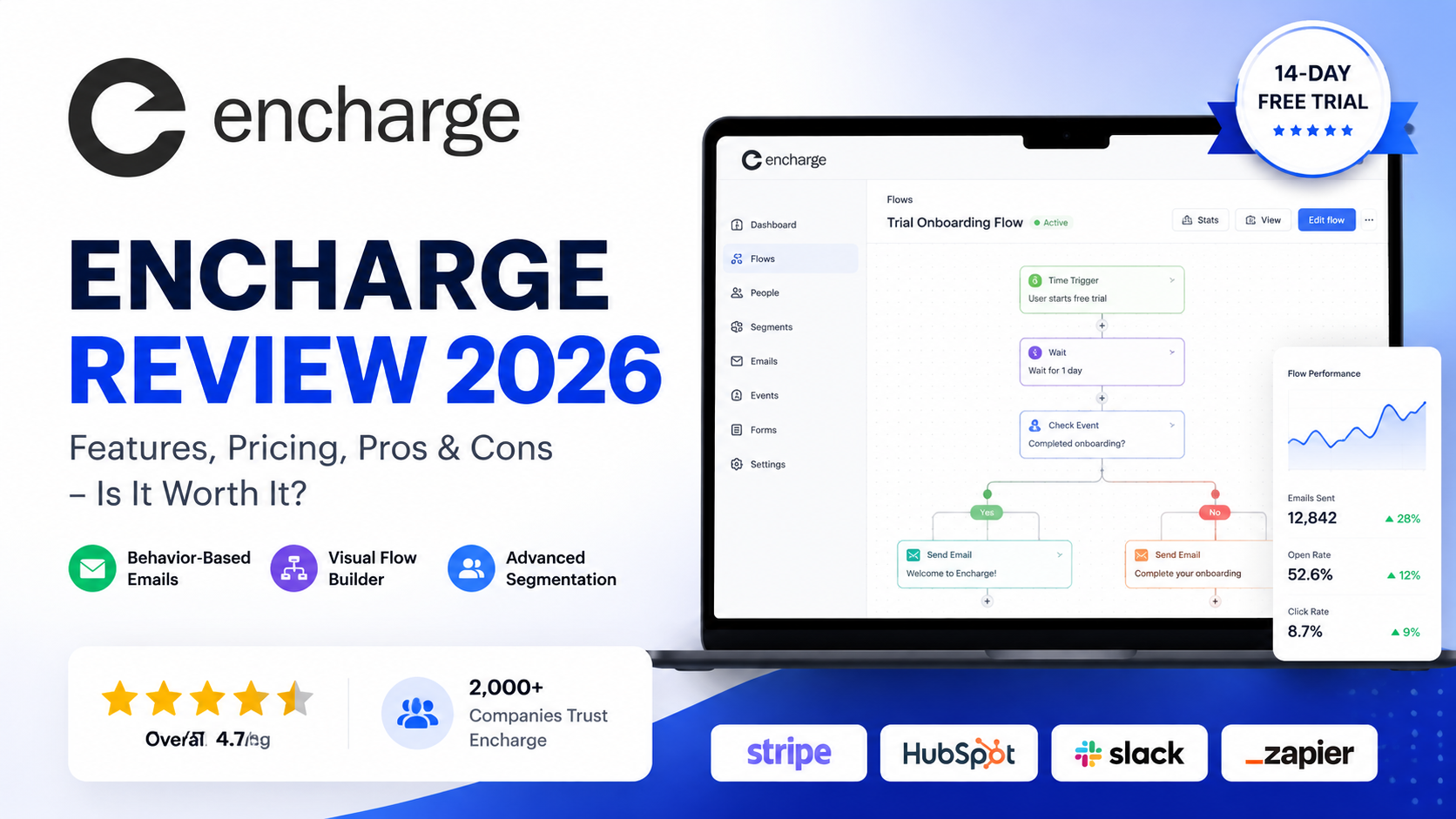
Encharge Review 2026: Features, Pricing, Pros & Cons
Overall Rating: 4.7/5
Best For: SaaS companies, startups, and digital businesses
Starting Price: $99/month
Free Trial: 14 days
Platform: Cloud-based
Last Updated: August 2026
Reviewed by: Team Flowcrai
Affiliate Disclosure: Flowcrai may earn a commission if you purchase through links on this page, at no additional cost to you.
Encharge is a marketing automation platform built for businesses that need more than basic newsletters and scheduled email sequences. Its core strength is helping teams create automated customer journeys based on what individual users actually do — such as signing up, visiting a page, interacting with a product, or reaching a specific stage in the customer lifecycle.
For SaaS companies in particular, that can make Encharge an interesting alternative to traditional email marketing software. Instead of sending the same campaigns to everyone, businesses can use behavioral data, segmentation, visual workflows, and integrations to deliver more relevant messages at different stages of the customer journey. Encharge officially positions behavior-based emails as a key capability, allowing businesses to trigger targeted emails based on actions users perform — or fail to perform — inside a product.
In this Encharge review, we’ll examine its key features, usability, pricing, strengths, limitations, and ideal use cases to help you decide whether it is worth considering in 2026.
Encharge Review: Key Takeaways
- Encharge is best suited to SaaS companies and digital businesses that need sophisticated email and customer lifecycle automation.
- Its biggest strength is combining behavior-based emails with visual automation workflows, allowing campaigns to respond to user activity rather than relying only on fixed schedules.
- Encharge integrates with a range of marketing, CRM, billing, analytics, and communication tools, including platforms such as HubSpot, Stripe, Slack, Intercom, Segment, and Zapier.
- Pricing currently starts at $99 per month for up to 2,000 users, making Encharge more appropriate for businesses with meaningful automation needs than users looking for a low-cost newsletter tool.
- Overall, Encharge is particularly compelling when user behavior, onboarding, lead nurturing, trial conversion, and lifecycle communication are central to your marketing strategy.
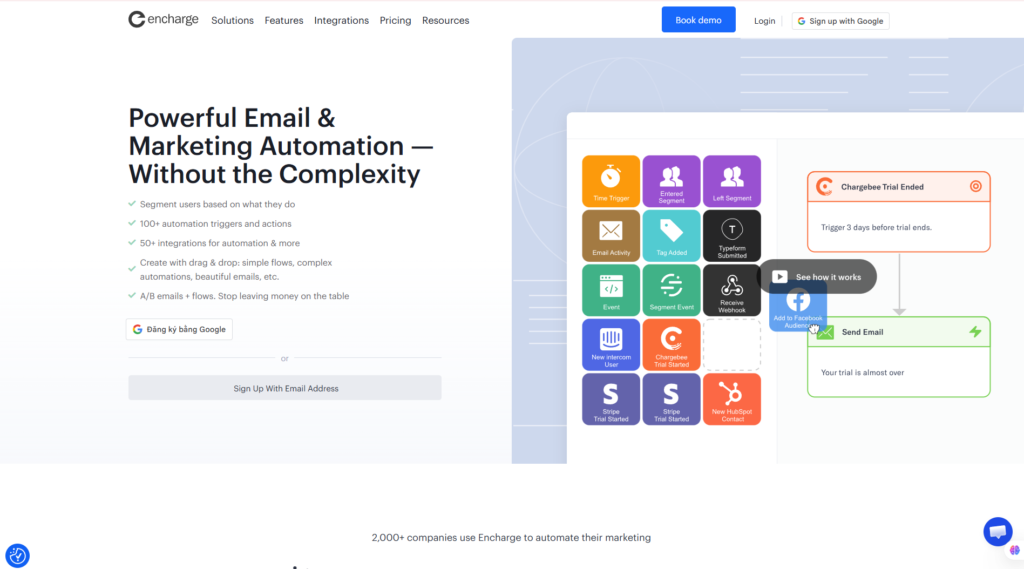
Encharge Review – Quick Verdict
Encharge Quick Info
| Item | Information |
| Overall Rating | 4.7/5 |
| Best For | SaaS, startups & digital businesses |
| Main Strength | Behavior-based marketing automation |
| Starting Price | $99/month |
| Free Trial | 14 days |
| Behavior-Based Emails | Yes |
| Visual Automation | Yes |
| Advanced Segmentation | Yes |
| Integrations | Native integrations + Zapier ecosystem |
| Free Plan | No permanent free plan |
| Platform | Web / Cloud |
Our Verdict
Encharge is worth considering if your business needs automation that goes beyond traditional email sequences. Its strongest use case is connecting customer behavior with automated marketing actions, which makes it particularly relevant for SaaS businesses, product-led companies, startups, and digital services.
The platform is less compelling for someone who simply wants to send newsletters once or twice a week. With pricing starting at $99 per month, simpler email marketing platforms may provide better value for basic use cases.
However, if your goal is to automate onboarding, nurture leads, respond to product activity, and create more personalized customer journeys, Encharge offers a feature set designed specifically around those requirements.
Start Your Encharge Free Trial
Explore Encharge with a 14-day free trial.
What Is Encharge?
Encharge is a cloud-based marketing automation platform designed to help businesses create personalized customer journeys using email, user behavior, segmentation, and connected marketing data.
At a basic level, Encharge can send marketing emails. But that description misses much of what the platform is designed to do.
The more important capability is automation based on customer behavior.
Instead of simply asking:
“When should this email be sent?”
Encharge enables marketers to think in terms of:
“What did this customer do, and what should happen next?”
For example, a SaaS company could potentially build an automation journey around actions such as:
User Signs Up → Starts Trial → Uses Key Feature → Receives Relevant Email → Becomes Qualified Lead → Sales Team Is Notified
This approach is especially valuable for businesses where different users behave differently after joining.
What Problem Does Encharge Solve?
Traditional email marketing often relies heavily on static lists and predetermined sequences.
A new subscriber enters a list, receives Email 1, waits two days, receives Email 2, and continues through the sequence regardless of what they are actually doing.
That model can work for simple funnels.
But SaaS and digital businesses often require more context.
One trial user may log in every day and explore multiple features. Another may create an account and never return. A third may repeatedly visit the pricing page without upgrading.
Those three users should not necessarily receive identical communication.
Encharge is designed to help businesses respond to these differences by combining customer data with automation.
Its behavior-email functionality allows campaigns to respond when users do — or do not — perform particular actions.
This can support use cases such as:
- SaaS user onboarding
- Trial activation
- Lead nurturing
- Product adoption
- Sales qualification
- Customer re-engagement
- Conversion campaigns
- Retention workflows
The central idea can be summarized as:
User Behavior → Segmentation → Automation → Personalized Communication
How Does Encharge Work?
Encharge revolves around automated workflows commonly referred to as Flows.
A typical workflow might look like this:
Import or Capture Contact → Identify Trigger → Check User Conditions → Segment User → Send Email → Wait → Evaluate Behavior → Trigger Next Action
Instead of requiring marketers to manually manage every customer interaction, these workflows can automate a sequence of decisions and actions.
For example:
Free Trial Started
↓
Wait 24 Hours
↓
Did the user activate an important feature?
↓
Yes → Send advanced onboarding content
No → Send getting-started guidance
This branching approach allows the customer journey to change based on behavior instead of forcing every contact through the same sequence.
Emails used inside Encharge Flows are connected to automation steps, allowing messages to be sent when contacts reach the relevant point in a workflow.
For SaaS marketers, this can be considerably more useful than building isolated autoresponder campaigns.
What Makes Encharge Different?
The main differentiator is the combination of marketing automation and product behavior data.
Encharge itself positions the platform around a gap between traditional marketing automation tools and customer messaging platforms: many marketing tools handle general workflows well but are less focused on product behavior, while product messaging tools may not automate the broader marketing stack as effectively.
Several capabilities contribute to this positioning:
Behavior-Based Emails
Encharge can trigger targeted emails according to what users do or don’t do inside a product.
Visual Automation
Teams can construct customer journeys using workflow logic rather than managing every communication manually.
Advanced Segmentation
Businesses can separate contacts based on characteristics and behavior, which enables more relevant automation.
Product Events
For more sophisticated SaaS use cases, events generated by an application can become part of the automation logic. Encharge’s API can create or update people and submit events directly from an application’s backend.
Connected Marketing Stack
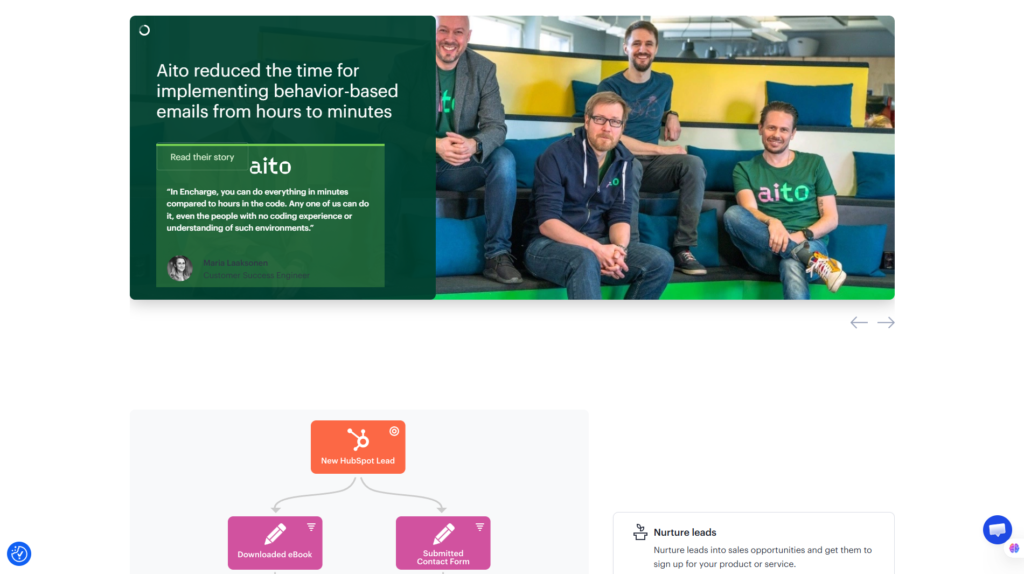
Encharge integrates with marketing and sales tools such as HubSpot, Stripe, Slack, Facebook Ads, Intercom, Segment, and others. Zapier can further expand connectivity to a much larger ecosystem of applications.
For growing SaaS businesses, this means Encharge can function as an automation layer connecting customer behavior with marketing communication.
Visit Encharge Official Website
Who Should Use Encharge?
Encharge is not designed for every type of email marketer.
Its value becomes much clearer when a business has a customer lifecycle containing multiple actions, stages, and behavioral signals.
Encharge Is Best For
SaaS Companies
This is arguably Encharge’s strongest use case.
SaaS businesses can use marketing automation throughout stages such as:
Visitor → Lead → Trial → Activated User → Paid Customer → Retained Customer
Potential workflows include:
- Welcome sequences
- Trial onboarding
- Product activation
- Feature education
- Trial expiration reminders
- Upgrade campaigns
- Re-engagement
- Churn-prevention communication
Behavior-based automation is particularly relevant here because SaaS companies can change messaging according to what customers actually do inside the product.
Startups
Startups often need sophisticated automation without having enough staff to manually manage every lead and customer interaction.
Encharge can help automate repetitive lifecycle communication while allowing teams to focus on higher-value marketing and product work.
Marketing Teams
Marketing teams running more complex funnels can use Encharge for:
- Lead nurturing
- Behavioral segmentation
- Automated email campaigns
- Lead scoring
- Sales handoffs
- Customer lifecycle campaigns
Digital Businesses
Digital service companies, online platforms, and subscription businesses may also benefit when customer behavior plays an important role in conversion.
Agencies
Agencies working with SaaS or digital-business clients may find Encharge useful when building more advanced automation systems across multiple marketing tools.
Who Should Skip Encharge?
Encharge may not be the best choice for everyone.
You should probably consider a simpler alternative if:
- You mainly send occasional newsletters.
- You have a very small email list.
- You only need basic autoresponders.
- Your budget is extremely limited.
- You want a permanent free email marketing plan.
- You don’t need behavior-based automation.
- Landing-page creation is your primary requirement.
The starting price of $99/month reinforces this positioning. Encharge is better evaluated as a marketing automation platform than as an entry-level newsletter service.
For a simple creator newsletter, that level of automation may be unnecessary.
For a SaaS business trying to improve onboarding, activation, trial conversion, and retention, the value proposition becomes much stronger.
Encharge Setup & User Experience
Account Setup
Encharge offers a 14-day free trial, giving prospective users an opportunity to explore the platform before committing to a paid subscription.
After creating an account, the more important setup work involves connecting the data and tools needed for automation.
Depending on your business, this could involve:
- Importing contacts
- Connecting your website
- Connecting Stripe
- Integrating your CRM
- Connecting Zapier
- Sending product events
- Configuring email settings
- Creating segments
- Building your first Flow
For simple automation, setup should be relatively straightforward.
More sophisticated SaaS implementations can require additional planning because behavioral automation is only as useful as the customer data and events available to the system.
Visual Flow Builder
The visual workflow approach is one of Encharge’s most important usability features.
Rather than thinking about marketing automation as a collection of unrelated campaigns, businesses can map out a customer journey visually.
For example:
Trial Started
→ Wait 1 Day
→ Check Product Activity
→ Send Relevant Email
→ Update Lead Status
→ Trigger Another Action
The benefit is not simply convenience.
Visual workflows help marketers understand the relationship between triggers, conditions, delays, customer behavior, and resulting actions.
That becomes increasingly important as automation grows more complex.
Learning Curve
Encharge appears approachable at the basic level, but there is an important distinction between using the software and designing effective automation.
Sending a simple email sequence is one thing.
Creating a sophisticated SaaS lifecycle system involving product events, behavioral segmentation, CRM data, lead scoring, and branching logic is another.
Beginners therefore shouldn’t necessarily expect to master every Encharge capability immediately.
The platform can reduce the technical complexity of implementing automation, but marketers still need to understand the customer journey they are trying to automate.
Interface and Ease of Use
Encharge’s workflow-oriented approach should be particularly attractive to marketers who prefer visual automation rather than managing large numbers of disconnected rules.
Key areas of the platform revolve around:
- Contacts
- Emails
- Segments
- Flows
- Automation actions
- Integrations
- Behavioral data
The ability to connect Encharge with external applications also means much of its value depends on how effectively the platform fits into your existing marketing stack. Encharge’s current integrations include native connections across CRM, billing, communication, analytics, and product-data categories, with Zapier providing additional integration possibilities.
Our UX Analysis
Based on Encharge’s current feature set, documentation, and product architecture, its strongest usability advantage is the ability to represent relatively sophisticated marketing logic through visual workflows.
The interface is likely most valuable to marketers who already understand the customer journey they want to automate.
For basic campaigns, Encharge may initially seem more complex than lightweight email marketing tools. But for SaaS and digital businesses, that extra complexity serves a purpose: it allows marketing communication to react to customer behavior rather than simply following a fixed calendar.
Overall, Encharge strikes a practical balance between advanced automation capabilities and marketer-friendly workflow design.
For businesses that have outgrown simple autoresponders but do not want every customer journey to depend on custom development, that balance is one of Encharge’s strongest selling points.
Key Encharge Features
The core value of Encharge lies in its ability to connect email marketing with customer behavior. Rather than treating every subscriber as part of the same static list, Encharge allows businesses to build automated customer journeys based on events, attributes, actions, and engagement.
For SaaS companies, startups, and digital businesses, the following features are particularly important.
1. Visual Flow Builder
The Visual Flow Builder is at the center of Encharge’s marketing automation system.
Instead of creating isolated autoresponders, marketers can visually map a customer journey using triggers, conditions, delays, and actions.
A SaaS onboarding Flow could look something like this:
User Starts Free Trial → Wait 1 Day → Check Product Activity → Send Relevant Email → Update Lead Score → Notify Sales
This visual approach makes it easier to understand what happens at each stage of an automation.
Flows can be used for scenarios such as:
- Lead nurturing
- Trial onboarding
- Product activation
- Customer education
- Sales qualification
- Re-engagement
- Upgrade campaigns
- Churn prevention
One major advantage is flexibility. A Flow does not have to send everyone through exactly the same sequence. Conditions and behavioral data can determine what happens next.
For example, an active trial user could receive feature-education emails, while an inactive trial user could receive onboarding assistance.
That makes the Flow Builder particularly relevant for businesses with more complex customer journeys.
2. Behavior-Based Emails
Behavior-based email is arguably one of the strongest reasons to consider Encharge.
Traditional email automation frequently depends on simple triggers such as subscribing to a list or waiting a predetermined number of days.
Encharge can go further by allowing businesses to create communication around what customers actually do — or don’t do.
Potential behavioral signals include:
- Starting a free trial
- Visiting important pages
- Completing an action
- Using a product feature
- Submitting a form
- Reaching a lifecycle stage
- Becoming inactive
- Triggering a custom product event
Encharge explicitly supports sending targeted emails based on user behavior, including actions performed within a product.
Consider two users who start the same SaaS trial.
User A logs in repeatedly and activates an important feature.
User B signs up but never completes onboarding.
Sending both users the same sequence may not be optimal.
With behavioral automation, User A could receive advanced feature guidance or an upgrade offer, while User B could receive a getting-started email designed to remove onboarding friction.
This level of relevance is where Encharge begins to differentiate itself from simpler newsletter platforms.
3. Advanced User Segmentation
Automation becomes more powerful when the platform understands who should receive a particular message.
Encharge provides segmentation capabilities that can combine customer attributes with behavioral information.
Businesses can potentially create segments around factors such as:
- User properties
- Tags
- Email engagement
- Website activity
- Product behavior
- Lifecycle stage
- Custom fields
- Events
- Data from integrated platforms
For example, a SaaS company could create a segment such as:
Free Trial Users + Visited Pricing Page + Used Core Feature + Have Not Upgraded
That group has very different intent from users who signed up six months ago but haven’t engaged recently.
Instead of sending identical campaigns to both groups, Encharge allows businesses to build more targeted customer journeys.
Advanced segmentation can therefore improve the relevance of:
- Onboarding campaigns
- Sales emails
- Product announcements
- Upgrade offers
- Retention campaigns
- Re-engagement sequences
For businesses with multiple customer types and lifecycle stages, segmentation is one of the platform’s most strategically useful capabilities.
4. Lead Scoring and Customer Profiles
Not every lead has the same likelihood of becoming a customer.
Lead scoring helps marketing and sales teams identify contacts showing stronger buying intent.
A business could assign greater importance to actions such as:
- Visiting the pricing page
- Opening important emails
- Clicking product links
- Attending a demo
- Activating a key feature
- Repeatedly using the product
This can support workflows such as:
High-Intent Activity → Increase Lead Score → Reach Qualification Threshold → Notify Sales
Instead of asking a sales team to manually inspect every lead, automation can help prioritize people whose behavior indicates stronger interest.
Customer profiles also provide context around contacts and their activities, allowing marketers to make better segmentation and automation decisions.
For B2B SaaS companies with a sales-assisted conversion process, the combination of behavioral information and lead scoring can be particularly useful.
5. Email Builder, Broadcasts and A/B Testing
Although automation is Encharge’s main differentiator, it still needs to perform the fundamental job of an email marketing platform.
Users can create emails for automated Flows as well as broadcast campaigns.
Potential use cases include:
- Newsletters
- Product announcements
- Promotional campaigns
- Welcome emails
- Onboarding sequences
- Trial reminders
- Educational emails
- Re-engagement campaigns
Encharge also supports A/B testing, giving marketers a way to compare variations and improve campaign performance over time.
Testing can help businesses evaluate elements such as subject lines, messaging, or different paths through a campaign rather than relying entirely on assumptions.
The result is a platform that can support both:
One-Time Marketing Campaigns + Automated Lifecycle Communication
However, businesses whose primary priority is highly sophisticated newsletter design may still want to compare Encharge with email platforms more heavily focused on templates and visual campaign creation.
6. Website Tracking, Product Events and Forms
Behavior-based automation requires data.
Encharge can use website and product activity to help determine what happens next in a customer journey.
For example, website tracking can provide signals around page activity, while product events can represent meaningful actions inside a SaaS application.
A hypothetical workflow might be:
User Visits Pricing Page Multiple Times → Add to High-Intent Segment → Send Relevant Email → Increase Lead Score
For SaaS products, custom events can be even more important.
Encharge’s API supports creating or updating people and submitting events from an application’s backend.
This creates possibilities such as:
User Creates First Project → Trigger Activation Email
or:
User Has Not Used Core Feature → Send Educational Sequence
Encharge also provides forms that can feed contacts into the marketing automation system, helping connect lead capture with downstream nurturing.
7. Encharge Integrations
A marketing automation platform becomes significantly more valuable when it can communicate with the rest of a company’s software stack.
Encharge offers integrations across CRM, payments, analytics, communication, product data, and marketing applications.
Its integration ecosystem includes platforms such as:
- HubSpot
- Salesforce
- Stripe
- Chargebee
- Segment
- Zapier
- Calendly
- Typeform
- Slack
- Intercom
- Google Analytics
- Google Sheets
Encharge also supports API and webhook-based workflows for more customized implementations.
Stripe integration, for example, can be useful for subscription businesses because payment and customer information can become part of marketing automation.
A possible lifecycle might be:
Trial User → Product Engagement → Stripe Purchase → Customer Segment → Onboarding Flow
Zapier further expands the number of applications that can potentially exchange data with Encharge.
This integration layer is important because sophisticated marketing automation rarely operates in isolation. Customer data may exist across your product, CRM, billing system, website, support platform, and analytics tools.
Encharge’s role is to help turn those signals into automated marketing actions.
Encharge Pros and Cons
No marketing automation platform is ideal for every business. Encharge’s strengths are most valuable when you actually need behavioral and lifecycle automation, while some of those same capabilities may be unnecessary for simpler email marketing requirements.
Encharge Pros
1. Powerful Visual Automation Builder
Flows provide a relatively intuitive way to design multi-step customer journeys without managing every action manually.
2. Strong Behavior-Based Email Capabilities
Encharge can respond to user activity, making communication more relevant than purely time-based sequences.
3. Well Suited to SaaS Businesses
Trial onboarding, activation, lifecycle messaging, product adoption, and re-engagement align closely with Encharge’s capabilities.
4. Advanced Segmentation
Businesses can create more precise audiences based on user properties, engagement, and behavioral data.
5. Strong Integration Ecosystem
Connections with CRM, payment, analytics, product, and communication tools make Encharge useful as part of a broader marketing stack.
6. Lead Scoring
Lead scoring can help identify high-intent contacts and improve marketing-to-sales handoffs.
7. Website and Product Event Tracking
Behavioral signals can become triggers for personalized customer journeys.
8. Unlimited Flows and Team Members on Paid Plans
This can be valuable for growing teams that expect automation complexity to increase over time.
9. Free Email Verification
Email verification is included within the paid plans, which can help maintain healthier contact databases.
Encharge Cons
1. No Permanent Free Plan
Encharge currently offers a 14-day free trial rather than a permanent free tier.
2. Relatively High Starting Price
At $99 per month for the entry-level Growth plan, Encharge is a significant step up from many beginner-focused email marketing tools.
3. Overkill for Basic Newsletters
If you only want to send a weekly newsletter, much of Encharge’s behavioral automation functionality may go unused.
4. Advanced Automation Has a Learning Curve
Creating effective branching workflows, event tracking, segmentation, and lead scoring requires strategic planning even when the interface simplifies implementation.
5. Some Advanced Capabilities Require Premium
Businesses requiring deeper CRM, ecommerce, event, or API functionality should examine plan differences carefully before subscribing.
6. Not Primarily an Email-Design Platform
Users whose highest priority is a large template library or highly design-focused newsletter creation may prefer platforms specialized in those areas.
Overall, Encharge’s limitations are less about missing its core purpose and more about fit. It becomes much more compelling when a business genuinely needs sophisticated automation.
Encharge Pricing 2026
Pricing note: The following pricing is based on Encharge’s official pricing information available in August 2026. SaaS pricing can change, so always verify the latest pricing and plan limits before subscribing.
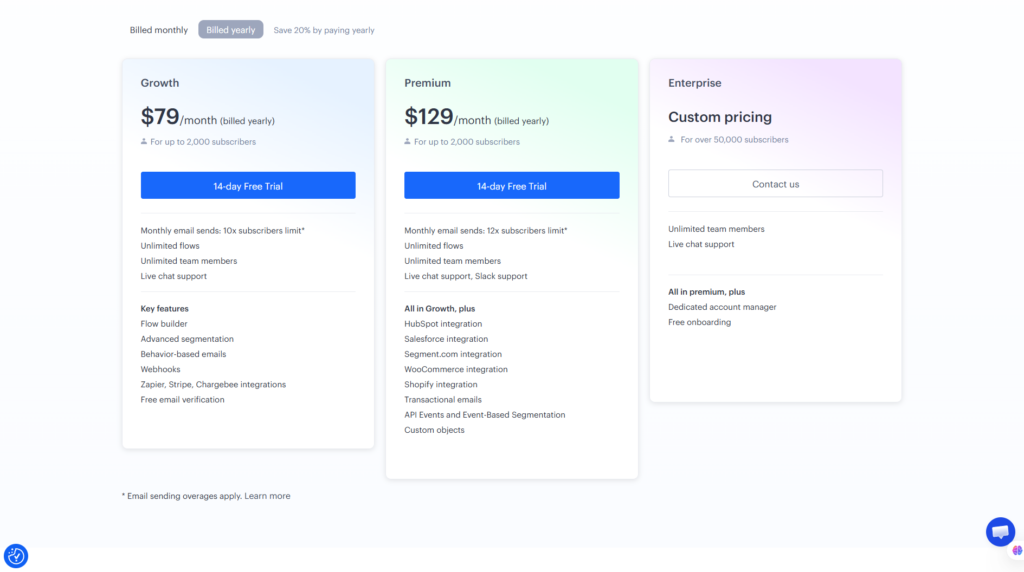
Encharge Pricing Table
| Plan | Monthly Billing | Annual Billing | Best For |
| Growth | From $99/month | From $79/month | Startups & growing businesses |
| Premium | From $159/month | From $129/month | SaaS & advanced automation |
| Enterprise | Custom | Custom | Larger organizations |
Pricing scales according to the number of people or subscribers managed in the account, so businesses with larger databases should calculate their expected cost rather than looking only at the advertised entry price.
Encharge Growth Plan
The Growth plan currently starts at $99 per month, or a lower equivalent monthly rate when billed annually.
It provides the core Encharge functionality needed by many growing businesses, including capabilities around:
- Flow Builder
- Advanced segmentation
- Behavior-based emails
- Broadcasts
- A/B testing
- Lead scoring
- Website tracking
- Forms
- Webhooks
- Zapier
- Stripe
- Chargebee
- Unlimited Flows
- Unlimited team members
- Free email verification
For many startups and smaller SaaS companies, Growth should be the logical starting point.
If your primary requirement is building behavioral customer journeys without requiring the most advanced integrations, this plan may provide the best balance between functionality and cost.
Encharge Premium Plan
The Premium plan currently starts at $159 per month, with a lower equivalent monthly starting price when billed annually.
Premium is designed for businesses that need deeper integration and automation capabilities.
Depending on the current plan configuration, Premium expands access to capabilities and integrations involving areas such as:
- HubSpot
- Salesforce
- Segment
- Shopify
- WooCommerce
- Transactional emails
- API Events
- Event-based segmentation
- Custom Objects
This makes Premium more relevant when Encharge needs to become deeply connected to a company’s product, CRM, ecommerce platform, or customer data infrastructure.
For a mature SaaS company, the additional cost may be justified if these integrations eliminate manual work or enable more sophisticated lifecycle automation.
Does Encharge Have a Free Plan?
No. Encharge does not currently advertise a permanent free plan.
However, it offers a 14-day free trial, allowing businesses to explore the platform before choosing a paid subscription.
That distinction matters when comparing Encharge with platforms offering free tiers.
If you’re a beginner building your first email list with almost no revenue, a free email marketing platform may make more financial sense.
If you’re evaluating Encharge for an existing SaaS or digital business, the trial gives you an opportunity to determine whether its automation capabilities justify the ongoing subscription cost.
Is Encharge Worth the Price?
The answer depends heavily on what you need.
For basic email marketing, $99 per month may be difficult to justify.
If your requirements are simply:
- Collect email addresses
- Send newsletters
- Create basic autoresponders
- Send occasional promotions
then lower-cost alternatives may provide better value.
The calculation changes when your requirements include:
- Product-behavior tracking
- Advanced segmentation
- SaaS onboarding
- Trial conversion workflows
- Lead scoring
- CRM integration
- Customer lifecycle automation
- Multi-step behavioral campaigns
In that scenario, Encharge should be evaluated based on the value of the automation system, not simply the cost of sending emails.
A useful way to think about it is:
Simple Email Marketing → Encharge may be expensive
Advanced SaaS Lifecycle Automation → Encharge can offer strong value
For businesses that fit the second category, the Growth plan is likely the best place to start before considering Premium.
Explore the automation features before committing to a paid plan.
Encharge Performance Evaluation
Flowcrai Score Table
| Category | Score |
| Ease of Use | 4.6/5 |
| Automation | 4.9/5 |
| Segmentation | 4.8/5 |
| Email Marketing | 4.6/5 |
| Integrations | 4.7/5 |
| SaaS Capabilities | 4.9/5 |
| Pricing & Value | 4.3/5 |
| Overall Rating | 4.7/5 |
Evaluation Methodology
Flowcrai’s Encharge rating is based on an analysis of the platform’s current capabilities rather than an unsupported claim of extensive hands-on testing.
The evaluation considers:
- Official Encharge product information
- Current feature documentation
- Current pricing and plan structure
- Integration ecosystem
- SaaS and lifecycle marketing use cases
- Market positioning
- Customer feedback patterns
- Functionality relative to competing marketing automation platforms
The strongest scores go to automation, segmentation, and SaaS capabilities because these areas align closely with Encharge’s core product positioning.
Pricing receives a lower score because the $99/month entry point makes Encharge less accessible to beginners, solo creators, and businesses with very simple email requirements.
Overall, 4.7/5 reflects a strong marketing automation platform with a clearly defined audience rather than a universal email solution.
Encharge makes the most sense when a company wants to move from:
“Send this email after three days”
to:
“Send the right message based on what this specific user has actually done.”
That distinction is central to understanding the value of Encharge.
For SaaS companies and digital businesses where onboarding, activation, conversion, and retention directly affect revenue, its behavioral automation capabilities can justify the additional complexity and higher starting price.
Encharge vs Competitors: How Does It Compare?
Encharge operates in a competitive marketing automation market. Platforms such as ActiveCampaign, Customer.io, Brevo, and HubSpot overlap with Encharge in areas including email automation, segmentation, customer journeys, and lead nurturing.
However, these tools are not designed for exactly the same audience.
Encharge’s strongest positioning is around behavior-based marketing automation for SaaS companies, startups, and digital businesses. This distinction is important when deciding whether Encharge or one of its competitors provides better value for your specific use case.
Encharge Alternatives Comparison
| Platform | Best For | Automation | Main Strength |
| Encharge | SaaS & startups | Excellent | Behavior-based lifecycle automation |
| ActiveCampaign | SMBs & marketing teams | Excellent | Broad marketing automation |
| Customer.io | Product-led businesses | Excellent | Event-driven customer messaging |
| Brevo | Small businesses | Good | Affordable multichannel marketing |
| HubSpot | Sales & marketing teams | Excellent | All-in-one CRM ecosystem |
Pricing and features can change frequently, so always compare current plans on each platform’s official website before making a final decision.
Encharge vs ActiveCampaign
ActiveCampaign is one of the most established alternatives to Encharge and offers extensive email marketing and automation capabilities.
Both platforms support advanced workflows, segmentation, and personalized communication, but their positioning is somewhat different.
Encharge is particularly attractive when:
- You run a SaaS business.
- Product behavior is central to your automation.
- You need trial onboarding workflows.
- You want to automate lifecycle communication.
- You want behavioral data to influence marketing actions.
ActiveCampaign may be better when:
- You run a conventional small or midsize business.
- You want broad email marketing functionality.
- CRM functionality is important.
- You need sales and marketing automation in one ecosystem.
- Your customer journey isn’t heavily dependent on SaaS product events.
For SaaS businesses specifically, Encharge’s emphasis on behavior-based communication can make it the more focused option.
For general SMB marketing automation, ActiveCampaign may offer a broader fit.
Encharge vs Customer.io
Customer.io is arguably one of the most relevant Encharge competitors for product-led and SaaS businesses.
Both platforms are designed to help companies send more relevant communication based on customer data and behavior.
Customer.io has a strong reputation for event-driven messaging and data-driven customer journeys, making it attractive to product teams and technically sophisticated organizations.
Encharge approaches a similar problem with a strong emphasis on visual marketing automation.
Choose Encharge if you prioritize:
- Visual workflow building
- SaaS lifecycle marketing
- Marketing-team accessibility
- Behavioral email automation
- Lead nurturing
- Visual segmentation and automation
Consider Customer.io if you prioritize:
- Highly event-driven messaging
- Product-centric communication
- Sophisticated customer data workflows
- A more technical implementation environment
- Messaging deeply connected to application events
The right choice therefore depends less on which platform has the longest feature list and more on who will actually manage the automation.
A marketing-led SaaS team may find Encharge’s visual approach attractive, while a highly technical product organization may prefer Customer.io.
Encharge vs Brevo
Brevo approaches the market differently.
While Encharge focuses heavily on behavioral and lifecycle automation, Brevo targets a broader range of small and midsize businesses with email marketing and additional communication tools.
This creates a relatively clear distinction.
Encharge is the stronger candidate when:
- You need advanced automation.
- You operate a SaaS product.
- Customer behavior should trigger campaigns.
- Lifecycle marketing is important.
- You need sophisticated segmentation.
Brevo may be more attractive when:
- Budget is a major consideration.
- Your automation requirements are relatively simple.
- You mainly need newsletters and promotional campaigns.
- You want a broader small-business communication platform.
For a small company sending conventional marketing emails, Encharge may be more automation than necessary.
For a SaaS company trying to turn behavioral signals into personalized customer journeys, Encharge has a much clearer advantage.
Encharge vs HubSpot
HubSpot is significantly broader than Encharge.
Its ecosystem includes CRM, marketing, sales, customer service, content, operations, and related business tools.
Encharge is much more specialized.
That specialization can be either an advantage or a disadvantage depending on your requirements.
Choose Encharge when:
- Email and marketing automation are your primary requirements.
- You want behavior-driven SaaS workflows.
- You already have other tools in your technology stack.
- You don’t need an enormous all-in-one business platform.
Consider HubSpot when:
- CRM is central to your business.
- Marketing and sales need one integrated platform.
- You need a broader suite of business tools.
- Your organization wants to consolidate multiple functions within one ecosystem.
HubSpot may therefore make more sense as a central business platform, whereas Encharge can work as a specialized automation layer connecting multiple tools and customer signals.
Which Encharge Alternative Should You Choose?
There is no universal winner.
Use your primary requirement as the deciding factor:
| Your Main Requirement | Consider |
| SaaS lifecycle automation | Encharge |
| General SMB marketing automation | ActiveCampaign |
| Product/event-driven messaging | Customer.io |
| Budget-friendly email marketing | Brevo |
| CRM + marketing + sales ecosystem | HubSpot |
If your priority is simply sending email newsletters, Encharge would not be our first recommendation.
If your priority is:
Lead → Trial → Activation → Conversion → Retention
then Encharge becomes significantly more compelling.
This is where its behavior-based approach makes the most strategic sense.
Frequently Asked Questions About Encharge
What Is Encharge Used For?
Encharge is a marketing automation platform used to create automated customer journeys based on user behavior, attributes, events, and lifecycle stages.
Common use cases include:
- Lead nurturing
- SaaS onboarding
- Trial conversion
- Behavior-based email
- Customer segmentation
- Product activation
- Lead scoring
- Re-engagement
- Customer retention
It is particularly relevant to SaaS companies, startups, and digital businesses with customer journeys that extend beyond simple newsletter subscriptions.
Is Encharge Free?
No. Encharge does not currently advertise a permanent free plan.
However, it offers a 14-day free trial, allowing businesses to evaluate the platform before subscribing to a paid plan.
The trial is particularly useful because Encharge’s value depends heavily on whether your business will actually use its automation, segmentation, and behavioral capabilities.
If you only need basic newsletters, a free or lower-cost platform may be more appropriate.
How Much Does Encharge Cost?
At the time of this Encharge review, the Growth plan starts at $99 per month, while the Premium plan starts at $159 per month.
Annual billing reduces the equivalent monthly starting prices to approximately:
- Growth: $79/month
- Premium: $129/month
Encharge pricing scales according to the number of people or subscribers managed in your account.
Enterprise requirements are handled through custom pricing.
Because SaaS pricing can change, always verify the latest prices and plan limits on the official Encharge website before purchasing.
Is Encharge Good for SaaS Companies?
Yes. SaaS is one of the strongest use cases for Encharge.
The platform’s combination of product events, behavior-based emails, segmentation, visual Flows, lead scoring, and integrations makes it particularly suitable for automating stages such as:
Signup → Trial → Activation → Upgrade → Retention
For example, a SaaS company could send different onboarding emails depending on whether a trial user has activated an important product feature.
That is significantly more targeted than sending every new user the same fixed onboarding sequence.
Does Encharge Support Behavior-Based Emails?
Yes.
Behavior-based emails are one of Encharge’s core capabilities.
Businesses can create automation around actions users perform — or fail to perform — and use those signals to determine which communication should happen next.
Potential triggers can include customer activity, website behavior, product events, or data coming from integrated applications.
This capability is particularly useful for SaaS and subscription businesses where user behavior changes throughout the customer lifecycle.
Does Encharge Integrate With HubSpot?
Yes. Encharge offers a HubSpot integration as part of its integration ecosystem.
Businesses considering Encharge specifically for HubSpot-related workflows should check the current plan requirements before subscribing, because some advanced integrations and capabilities may be restricted to higher-tier plans.
The integration can be useful for companies that want HubSpot to remain part of their CRM or sales stack while using Encharge for more specialized automation workflows.
What Are the Best Encharge Alternatives?
Some of the strongest Encharge alternatives include:
- ActiveCampaign for broad marketing automation
- Customer.io for event-driven product messaging
- Brevo for more budget-conscious email marketing
- HubSpot for an integrated CRM, marketing, and sales ecosystem
The best alternative depends on why you’re considering Encharge in the first place.
If behavior-driven SaaS automation is the main requirement, Encharge remains particularly competitive.
Is Encharge Safe to Use?
Encharge is a legitimate marketing automation platform used to manage customer information and email marketing workflows.
As with any SaaS platform handling customer data, businesses should review the provider’s current security, privacy, data-processing, and compliance documentation before implementation.
This is especially important for companies operating across multiple jurisdictions or handling sensitive customer information.
You should also configure account access, integrations, permissions, and customer consent practices according to your organization’s own security and privacy requirements.
Can Beginners Use Encharge?
Yes, but beginners should expect a learning curve.
Basic email automation can be relatively straightforward, especially when using visual workflows.
The challenge appears when businesses begin combining:
- Multiple conditions
- Product events
- Behavioral segmentation
- Lead scoring
- CRM data
- Branching logic
- API-based events
The platform can simplify implementation, but users still need to understand the customer journey they want to automate.
For a complete beginner who only wants to send a newsletter, Encharge may be unnecessarily advanced.
Is Encharge Worth It?
Encharge can be worth the price for SaaS companies and digital businesses that genuinely need behavioral marketing automation.
Its value becomes much harder to justify if you only use it to send basic newsletters.
Think about the buying decision this way:
If you need email sending → compare cheaper alternatives.
If you need customer lifecycle automation → seriously consider Encharge.
That distinction is essential.
Final Verdict: Is Encharge Worth It in 2026?
After evaluating its automation capabilities, segmentation, integrations, pricing, use cases, and competitive positioning, Encharge earns an overall Flowcrai rating of 4.7/5.
It is not the cheapest email marketing solution, nor is it designed to be.
Its strongest value lies elsewhere: turning customer behavior into automated marketing actions.
Encharge Is Best For
Encharge is particularly well suited to:
- SaaS companies
- Startups
- Product-led businesses
- SaaS marketing teams
- Digital businesses
- Subscription businesses
- Marketing agencies
- Teams running sophisticated customer journeys
- Businesses using behavior-based lifecycle marketing
It becomes especially valuable when improving metrics around:
- Onboarding
- Activation
- Trial conversion
- Lead qualification
- Product adoption
- Upgrades
- Re-engagement
- Retention
Encharge Is Not Recommended For
You may want to consider another platform if:
- You only send occasional newsletters.
- You need a permanent free plan.
- You have a very limited marketing budget.
- You don’t need behavioral automation.
- Your customer journey is extremely simple.
- You primarily want landing-page creation.
- Advanced segmentation and product events provide little value to your business.
In those situations, paying for Encharge’s more sophisticated automation capabilities could mean paying for functionality you rarely use.
Final Recommendation
The biggest strength of Encharge is not simply its ability to send emails.
It is the way the platform combines customer behavior, segmentation, product data, integrations, and visual automation to determine what communication should happen next.
For a SaaS business, that difference can be significant.
Instead of treating every trial user identically, Encharge can help create different journeys according to customer activity. Active users can receive more advanced product guidance, high-intent prospects can move toward conversion-focused communication, and inactive users can enter re-engagement workflows.
This makes Encharge particularly relevant across the SaaS customer lifecycle:
Lead → Trial → Activation → Conversion → Retention
The main trade-offs are equally clear.
With pricing starting at $99 per month, Encharge is not the obvious choice for a beginner who simply wants to build an email list and send newsletters. Advanced automation also requires more planning than a basic autoresponder.
But that comparison misses the point if you’re running a growing SaaS or digital business.
Encharge should be evaluated as a behavior-driven marketing automation platform, not simply as another email newsletter service.
For businesses that can take advantage of its behavioral automation, visual Flows, segmentation, lead scoring, product events, and integrations, Encharge offers a compelling combination of power and accessibility.
Flowcrai Rating: 4.7/5
Best for: SaaS companies, startups, and digital businesses that need behavior-based lifecycle automation.
Consider an alternative if: you primarily need inexpensive newsletter sending or basic email sequences.
Ready to Explore Encharge?
Start Your 14-Day Encharge Free Trial
See whether Encharge’s behavioral automation and visual workflows fit your customer journey before committing to a paid plan.
Explore More Marketing Automation Reviews on Flowcrai
References
Information for this Encharge review should be checked against current authoritative sources before publication, particularly because SaaS features, integrations, and pricing can change over time.
Recommended references:
- Encharge Official Website
- Encharge Pricing
- Encharge Features
- Encharge Integrations
- Encharge Knowledge Base
- Encharge API Documentation
- Encharge Product Updates
Third-party review platforms such as G2 and Capterra can also be used to identify broader customer feedback trends, but official Encharge documentation should remain the primary source for factual product specifications, pricing, and plan availability.
Final Review Summary
| Category | Flowcrai Assessment |
| Overall Rating | 4.7/5 |
| Best For | SaaS, startups & digital businesses |
| Biggest Strength | Behavior-based marketing automation |
| Automation | 4.9/5 |
| Segmentation | 4.8/5 |
| Ease of Use | 4.6/5 |
| Integrations | 4.7/5 |
| Pricing & Value | 4.3/5 |
| Starting Price | $99/month |
| Free Trial | 14 days |
| Permanent Free Plan | No |
| Final Recommendation | Highly recommended for SaaS lifecycle automation |
Bottom Line
Encharge is a strong choice for SaaS companies that want marketing automation to respond to what users actually do, rather than simply sending everyone the same predetermined email sequence.
For simple newsletters, there are cheaper options. For sophisticated SaaS lifecycle automation, Encharge deserves serious consideration.